HVAC / Air Conditioners
User Manual for ACiQ Remote Controller
Quick guide for the ACiQ remote controller. Learn how to operate your air conditioning unit, set modes, adjust temperature, use advanced features like ECO, Sleep, and Follow Me, and troubleshoot common issues.
Table of contents
Manual images
Click an image to enlargeQuick Guide from the Manual
To get started with your ACiQ remote controller, follow these six steps:
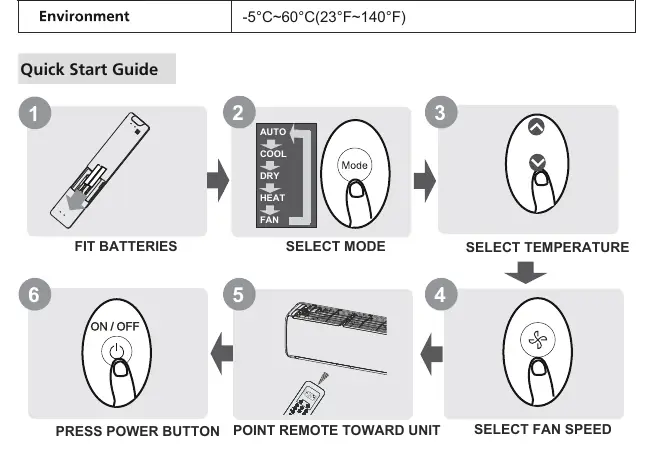
- Fit Batteries: Insert two R03/LR03 batteries into the compartment.
- Select Mode: Press the Mode button to cycle through Auto, Cool, Dry, Heat, and Fan modes.
- Select Temperature: Use the Temp up or down buttons to set your desired temperature.
- Select Fan Speed: Press the Fan Speed button to choose between Auto, Low, Med, or High.
- Point Remote: Aim the remote directly at the indoor unit.
- Power On: Press the Power button to start the unit.
Remote Controller Overview
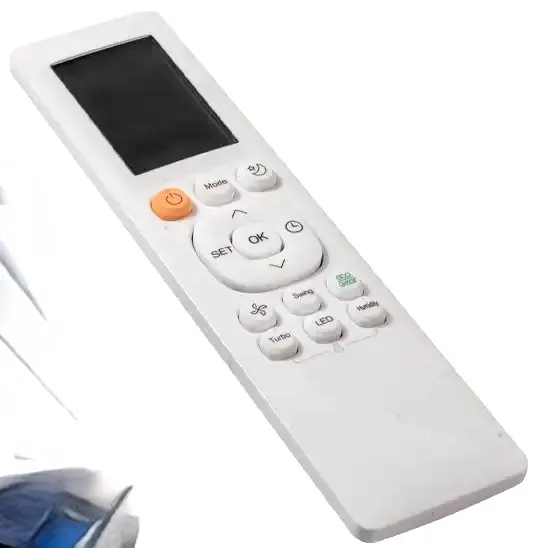
The remote controller features several buttons to manage your air conditioning system:
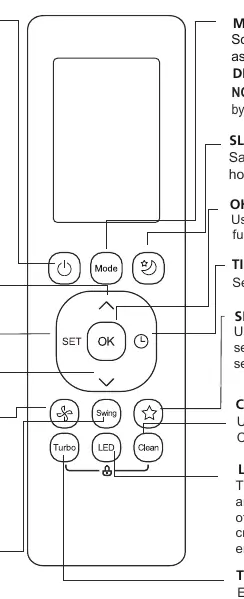
- ON/OFF: Turns the unit on or off.
- MODE: Cycles through operation modes (Auto, Cool, Dry, Heat, Fan).
- TEMP (Up/Down): Adjusts temperature in 1°C (1°F) increments.
- FAN SPEED: Adjusts fan speed. Holding for 2 seconds activates the Silence feature.
- SWING: Controls horizontal louver movement. Hold for 2 seconds for vertical auto swing.
- SET: Scrolls through advanced functions like Fresh/UV-C, Follow Me, and AP mode.
- OK: Confirms selected functions.
- TIMER: Sets the timer for automatic on/off.
- SLEEP: Saves energy during sleeping hours.
- TURBO: Enables the unit to reach the preset temperature quickly.
- CLEAN: Starts/stops the Self Clean function.
- LED: Turns the indoor unit's LED display and buzzer on or off.
Remote Screen Indicators
The LCD screen displays various icons to indicate the current status of your unit:
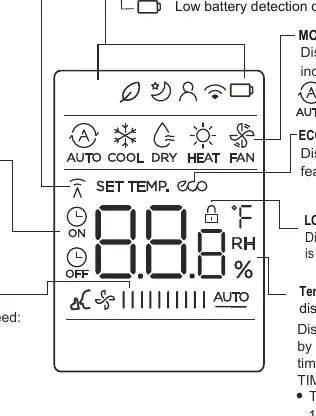
- Mode Display: Shows the active mode (Auto, Cool, Dry, Heat, Fan).
- Fan Speed: Indicates the selected fan speed (Low, Med, High, Auto).
- Transmission Indicator: Lights up when a signal is sent to the unit.
- Timer: Shows when Timer On or Timer Off is active.
- Features: Displays icons for Sleep, Follow Me, ECO, and Silence features.
- Temperature/Timer: Shows the set temperature or timer duration.
Advanced Functions
- Timer Setting: Use the Timer button to initiate the sequence, then use Temp buttons to set the time. The time increases in 30-minute increments up to 10 hours, then 1-hour increments.
- ECO Function: Adjusts the unit to an energy-efficient mode (only available in Cool mode).
- Follow Me: The remote measures the temperature at its current location instead of the indoor unit, optimizing comfort around you.
- FP Function: Sets the unit to 8°C/46°F (for heat pump models only).
- Lock Function: Press Clean and Turbo buttons simultaneously for 5 seconds to lock the remote.
- Shortcut: Restores previous settings or resumes current settings.
Maintenance and Troubleshooting
For optimal performance, do not mix old and new batteries. Remove batteries if the remote will not be used for more than 2 months. If the remote signal is not received, ensure you are within 8 meters of the unit and that there are no obstructions like curtains or direct sunlight interfering with the infrared receiver.
Manufacturer information
ACiQ
Practical help
Common problems
Remote not working
Check if batteries are inserted correctly. Ensure you are within 8 meters of the unit and there are no obstructions blocking the signal.
Display is blank
The display is intentionally blank when operating in FAN mode.
Function not working
Ensure the indoor unit supports the specific function. If the unit does not have a particular feature, pressing the button will have no effect.
Before use
- Insert 2x R03/LR03 batteries.
- Ensure the air conditioning unit is plugged in and powered.
- Point the remote directly at the indoor unit.
- Remove batteries if the remote will not be used for more than 2 months.
Specs in practice
- Signal Receiving Range
- 8 meters.
- Operating Temperature
- -5°C to 60°C (23°F to 140°F).
Images and diagrams
- The Quick Start Guide on page 3 illustrates the 6-step process for basic operation.
- The Timer setting section on page 11 provides a visual example of setting ON/OFF times.
Model compatibility
- HEAT mode is not supported by cooling-only models.
- Some features (Fresh, UV-C, ECO) are model-dependent.
- FP function is for heat pump air conditioners only.

Manual page author
Michael Turner
Technical manual editor
Reviews PDF manuals for structure, safety notes, and practical product details so readers can find the right information quickly.