Electronics / TV Accessories
Installation Manual for Matchmaster 04MM-TB02X Full-Motion TV Wall Mount
Quick installation guide for the Matchmaster 04MM-TB02X Full-Motion TV Wall Mount. Includes mounting steps, VESA compatibility, weight limits, and safety instructions.
Table of contents
Manual images
Click an image to enlargeQuick Guide from the Manual
The Matchmaster 04MM-TB02X is a full-motion TV wall mount designed to support televisions with VESA patterns ranging from 75x75 to 400x400. The maximum weight capacity is 30kg (66lbs). Ensure the wall structure is capable of supporting the combined weight of the mount and the TV before installation.
Safety Information
- Do not exceed the maximum weight capacity of 30kg (66lbs).
- Ensure the wall is solid (concrete, brick, or wood stud) and capable of supporting the equipment.
- Check all parts against the included list before starting installation.
- Regularly inspect the mount to ensure it is secure (at least every three months).
Parts List
Ensure all components are present before beginning:
- Wall plate assembly (A)
- Support arms (B, C)
- Hardware kit: M5x14 (M-A), M6x14 (M-B), M6x30 (M-C), M8x30 (M-D), M8x50 (M-E), D5 (M-F), D8 (M-G), M-H, M-I, W-A, W-B, W-C.
- Tools: Allen key (F), Wrench (G).
Installation Steps
Wall Mounting
Follow step 1a for concrete/brick walls or 1b for wood stud walls. Use a level to ensure the wall plate is straight. Drill holes according to the template provided in the manual and secure the wall plate using the appropriate wall anchors (W-A/W-B/W-C).
Arm Assembly
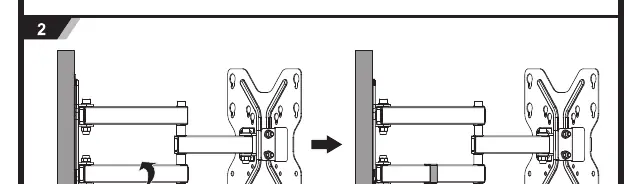
Attach the support arms to the wall plate assembly. Ensure the safety screw (E) is tightened to secure the arm assembly to the wall plate.
TV Bracket Attachment
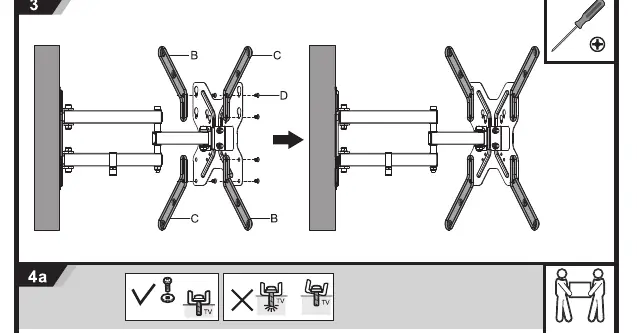
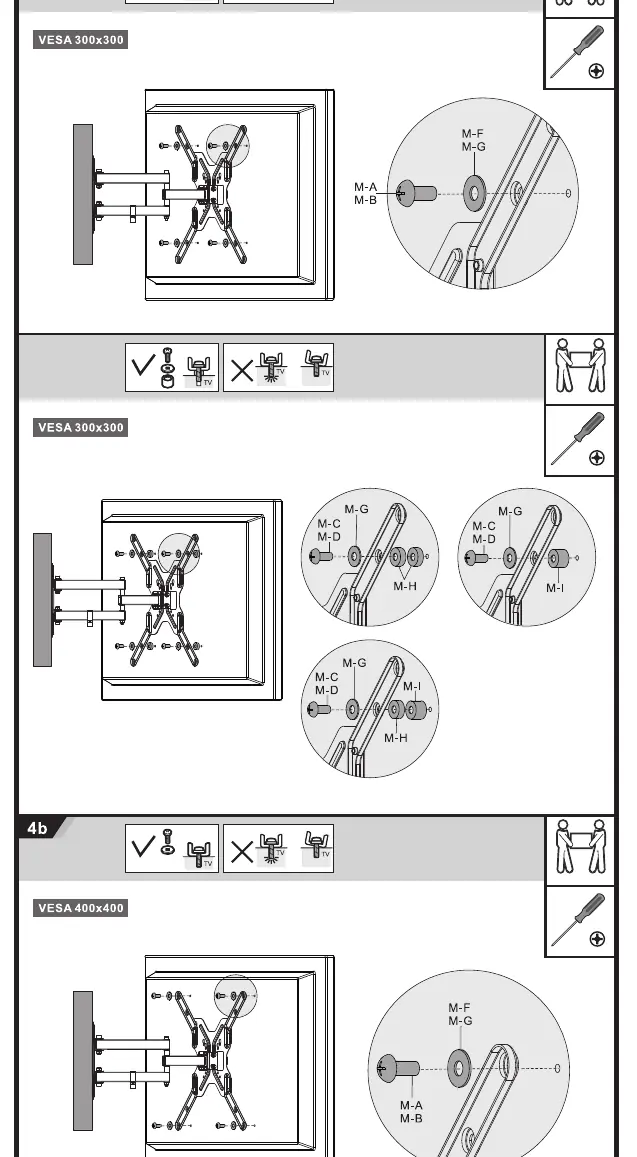
Attach the mounting brackets to the back of your TV using the appropriate screws (M-A to M-E) and spacers (M-H, M-I) based on your TV's VESA pattern and screw hole depth.
Mounting the TV
Once the brackets are attached to the TV, hook the TV onto the wall plate assembly. Ensure the TV is securely locked in place. Adjust the tilt angle as needed (up to +15° / -15°).
Manufacturer information
Matchmaster Communications Pty Ltd
Practical help
Common problems
TV does not fit the mount
Verify that your TV's VESA pattern matches one of the supported sizes: 75x75, 100x100, 200x100, 200x200, 300x300, or 400x400.
Wall mounting instability
Ensure you are using the correct wall anchors for your wall type (concrete/brick vs. wood stud) and that the wall is structurally sound.
Before use
- Verify the wall type is suitable (concrete, brick, or wood stud).
- Confirm the TV weight is 30kg (66lbs) or less.
- Check that the VESA pattern is compatible.
- Ensure all hardware (screws, spacers, anchors) is accounted for.
- Have a level and drill ready for installation.
Specs in practice
- Max Weight: 30kg (66lbs)
- The absolute maximum load the mount can safely support.
- VESA Compatibility
- The distance between mounting holes on the back of the TV (in mm).
Images and diagrams
- Step 1a/1b: Shows the drilling process and wall plate attachment for different wall types.
- Step 2: Illustrates attaching the arm assembly to the wall plate.
- Step 3: Details attaching the mounting brackets to the TV using spacers and screws.
- Step 4a/4b: Demonstrates hooking the TV onto the wall plate and securing it.
Model compatibility
- Compatible VESA patterns: 75x75, 100x100, 200x100, 200x200, 300x300, 400x400.

Manual page author
Michael Turner
Technical manual editor
Reviews PDF manuals for structure, safety notes, and practical product details so readers can find the right information quickly.