Plumbing / Sinks Faucets
Installation Guide for Matchmaster 04MM-TB04L Fixed Wall Mount
A comprehensive installation guide for the Matchmaster 04MM-TB04L fixed wall mount. Includes step-by-step instructions for wall plate mounting, TV bracket attachment, and safety specifications.
Table of contents
Manual images
Jump to the sectionQuick guide from the manual
The Matchmaster 04MM-TB04L is a fixed wall mount designed for flat-panel televisions. Before starting, ensure your TV is compatible with the VESA patterns (200x200, 300x300, 400x200, 400x400, 600x400) and does not exceed the maximum weight capacity of 40kg (88lbs). The installation requires basic tools including a drill, level, and screwdriver.
Safety and warnings
- Installation should be performed by qualified professionals.
- Ensure the wall structure is capable of supporting the combined weight of the equipment and the mount.
- Do not overtighten mounting screws.
- Keep small parts away from children to prevent choking hazards.
- Check the mount for safety at least every three months.
Specifications
The mount supports the following VESA mounting patterns:
- 200x200
- 300x300
- 400x200
- 400x400
- 600x400
Maximum load capacity: 40kg (88lbs).
Installation
The installation process is divided into mounting the wall plate and attaching the brackets to the TV.
Wall plate installation
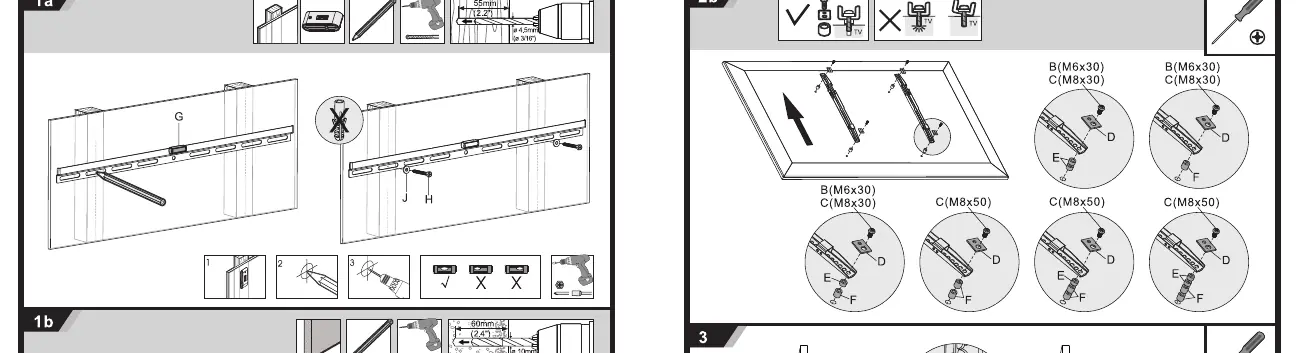
For wood studs: Use a stud finder to locate the center of the studs. Use the wall plate (G) as a template to mark the holes. Drill pilot holes and secure the plate using the provided hardware (H) and washers (J). Ensure the plate is level.
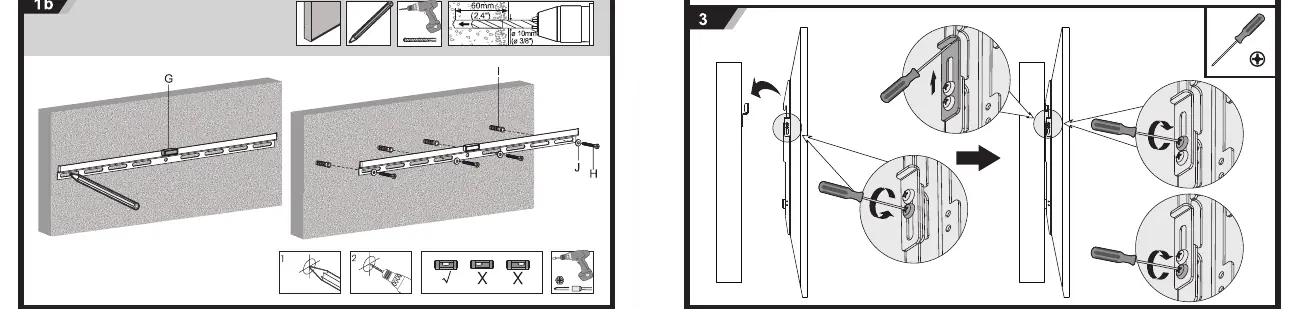
For concrete or brick walls: Use the wall plate (G) to mark the hole locations. Drill holes into the concrete, insert the wall anchors (I), and secure the plate using the screws (H) and washers (J).
TV bracket attachment
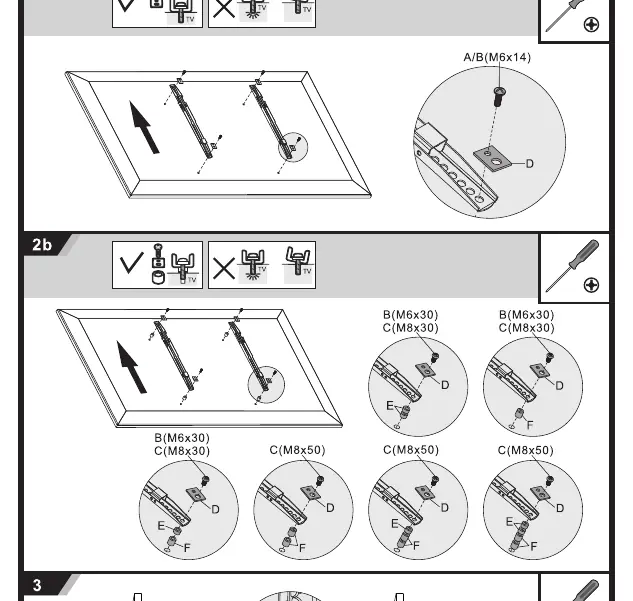
Identify the correct screw size (A, B, or C) for your TV's mounting holes. Use the appropriate spacers (D, E, or F) if necessary to ensure a secure fit. Attach the brackets to the back of the TV using the selected screws and washers.
Final assembly
Once the wall plate is secured and the brackets are attached to the TV, lift the TV and hook the brackets onto the wall plate. Ensure the TV is centered and secure. Tighten the safety screws on the brackets to lock the TV in place on the wall plate.
Manufacturer information
Matchmaster Communications Pty Ltd
Practical help
Common problems
TV is not level after installation
Ensure the wall plate is perfectly level during the initial drilling and mounting phase. Adjustments are difficult once the TV is mounted.
Mounting screws are too long or too short for the TV
Use the provided spacers (D, E, F) in combination with the screws (A, B, C) to adjust the depth and ensure a secure fit without damaging the TV's internal components.
Wall type uncertainty
Only install on solid wood studs or concrete/brick walls. Do not attempt to install on drywall alone, as it will not support the weight.
Before use
- Verify the TV weight is under 40kg (88lbs).
- Confirm the TV VESA pattern matches one of the supported sizes (200x200 to 600x400).
- Check that the wall surface is suitable (wood stud or concrete/brick).
- Ensure all parts (A-J) are present according to the parts list.
- Gather necessary tools: drill, drill bits, level, and screwdriver.
Specs in practice
- VESA Compatible
- The standard distance in millimeters between the four mounting holes on the back of your TV.
- Max Weight 40kg
- The maximum total weight the mount can safely support.
- Fixed Wall Mount
- A mount that holds the TV in a static, flat position against the wall without tilt or swivel capabilities.
Images and diagrams
- Step 1a: Shows the process for mounting the wall plate to wood studs using a level and drill.
- Step 1b: Shows the process for mounting the wall plate to concrete/brick walls using anchors.
- Step 2a/2b: Illustrates attaching the brackets to the back of the TV using various screw and spacer combinations.
- Step 3: Demonstrates the final step of hanging the TV brackets onto the wall plate and securing them.
Model compatibility
- Supports VESA patterns: 200x200, 300x300, 400x200, 400x400, 600x400.
- Maximum TV size: 70 inches.
- Maximum weight capacity: 40kg (88lbs).

Manual page author
David Miller
Documentation analyst
Organizes user manual content into clear summaries, with attention to model details, product context, and everyday usability.