Electronics / TV Accessories
Installation Guide for Matchmaster 04MM-TB17 TV Bracket
Quick installation guide for the Matchmaster 04MM-TB17 32-55 inch tilt and swivel TV bracket. Includes mounting steps for wood studs and concrete walls, VESA compatibility, and adjustment instructions.
Table of contents
Manual images
Click an image to enlargeQuick guide from the manual
This manual provides installation instructions for the Matchmaster 04MM-TB17 TV bracket. Ensure the wall structure is capable of supporting the combined weight of the equipment. Do not exceed the 50kg weight limit. Always verify the wall type before drilling.
Installation on wood studs
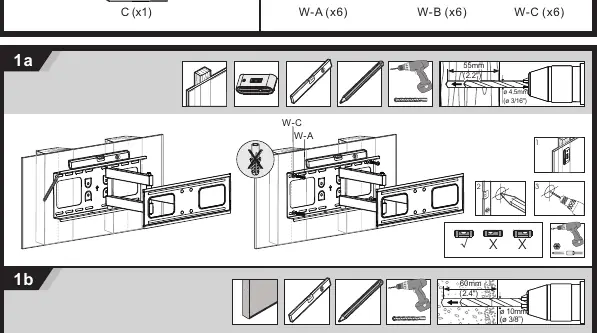
Use a 4.5mm drill bit to drill holes 55mm deep into the wood studs. Secure the wall plate using the provided W-A screws and W-C washers. Ensure the plate is level.
Installation on concrete or brick
Use a 10mm drill bit to drill holes 60mm deep. Insert wall anchors (W-B) and secure the wall plate using W-A screws and W-C washers. Ensure the plate is level.
Attaching the bracket to the TV
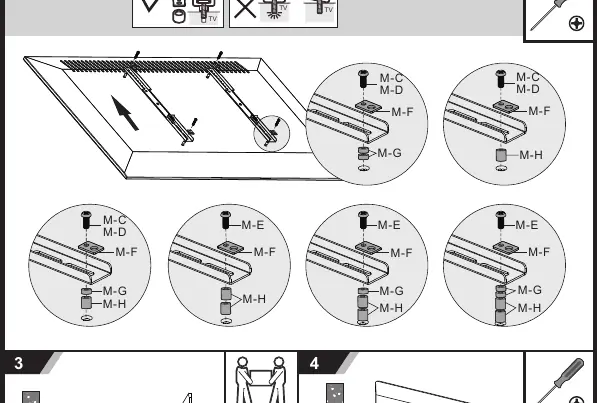
Select the appropriate screws (M5, M6, or M8) based on your TV's mounting holes. Attach the bracket arms to the back of the TV using the selected screws, M-F washers, and spacers (M-G/M-H) if necessary to ensure a secure fit.
Mounting and adjustments
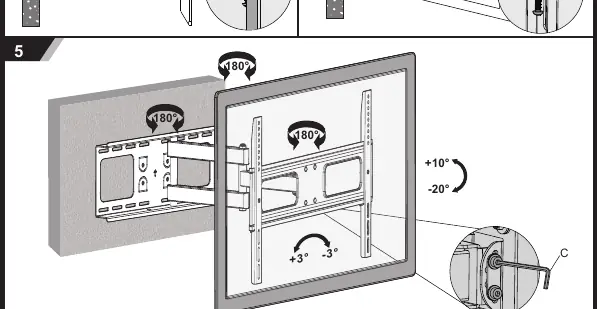
Hang the TV onto the wall plate. Secure the TV using the safety screws. Adjust the tilt (+10/-20 degrees) and swivel (180 degrees) as needed. Use the provided tool (C) for adjustments.
Manufacturer information
Matchmaster Communications Pty Ltd
Practical help
Common problems
TV does not fit the bracket
Check VESA compatibility (up to 400x400) and ensure the TV weight is under the 50kg limit.
Wall mounting issues
Ensure you are using the correct drill bit size: 4.5mm for wood studs, 10mm for concrete/brick.
Before use
- Verify wall type (wood stud or concrete/brick).
- Ensure TV weight is under 50kg.
- Check VESA pattern compatibility.
- Gather tools: drill, screwdriver, level.
- Verify all hardware (screws M5/M6/M8) is present.
Images and diagrams
- Step 1a/1b: Drilling instructions for different wall types.
- Step 2a/2b: Attaching the bracket arms to the TV using appropriate screws.
- Step 5: Adjusting the tilt and swivel tension.
Model compatibility
- Supports TV sizes 32-55 inches.
- Maximum weight capacity: 50kg.
- Compatible with VESA patterns up to 400x400.

Manual page author
David Miller
Documentation analyst
Organizes user manual content into clear summaries, with attention to model details, product context, and everyday usability.