Electronics / Televisions
Matchmaster 04MM-TB07 Tilt TV Wall Mount Installation Guide
Installation guide for the Matchmaster 04MM-TB07 Tilt TV Wall Mount. Includes mounting steps, VESA compatibility, and safety instructions for secure TV installation.
Table of contents
Manual images
Jump to the sectionQuick guide from the manual
The Matchmaster 04MM-TB07 is a tilt TV wall mount designed for screens up to 90 inches with a maximum weight capacity of 75kg (165lbs). Before installation, ensure your wall structure is capable of supporting the combined weight of the mount and the television. Always verify that your TV's VESA pattern matches the supported configurations listed in the specifications.
Safety and warnings
- Installation should be performed by professionals.
- Ensure the wall surface is solid and capable of supporting the equipment.
- Use appropriate tools for the wall type (e.g., masonry drill for concrete, stud finder for timber).
- Check all components against the parts list before starting.
- Perform maintenance checks every three months to ensure the mount remains secure.
Installation steps
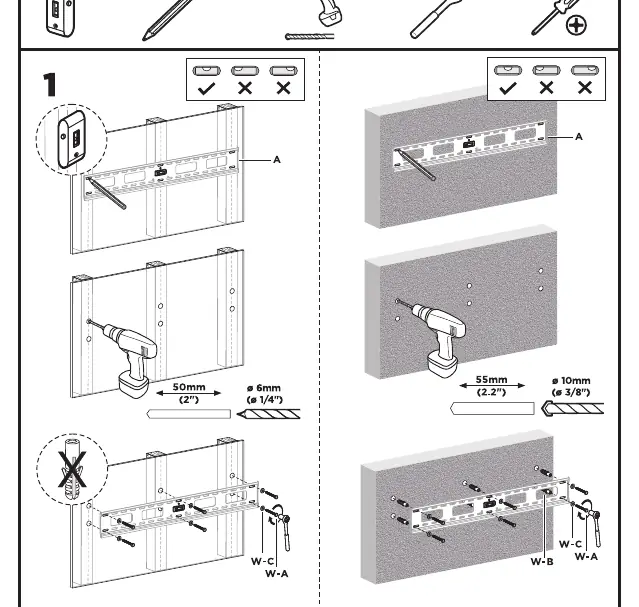
Step 1: Wall plate installation
Determine the mounting location. Use a level to ensure the wall plate is straight. Mark the holes on the wall. For concrete or brick walls, drill holes to the appropriate depth and insert wall anchors. Secure the wall plate using the provided wall screws (W-A) and washers (W-C). Ensure the plate is firmly attached to the wall.
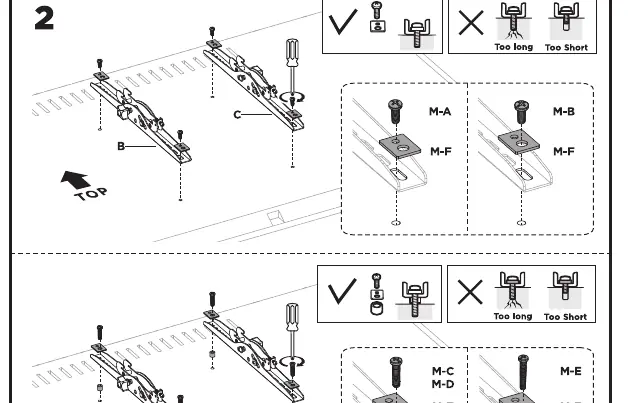
Step 2: Attaching brackets to the TV
Identify the correct mounting holes on the back of your TV. Select the appropriate screws (M-A to M-E) and spacers (M-G, M-H) based on your TV's requirements. Attach the mounting brackets to the back of the TV. Ensure the screws are not too long or too short; use spacers if necessary to achieve a secure fit without damaging the TV internals.
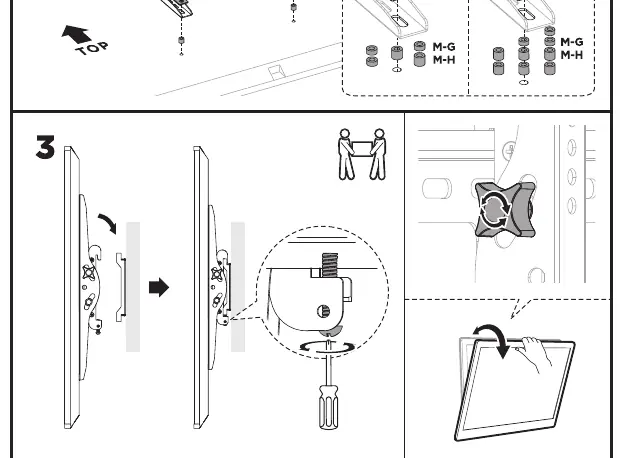
Step 3: Hanging and securing the TV
With the help of another person, lift the TV and hook the brackets onto the wall plate. Once the TV is positioned correctly, tighten the safety screws located on the bottom of the brackets to lock the TV onto the wall plate and prevent accidental dislodging.
Technical specifications
- Maximum TV Size: 90 inches
- Maximum Weight Capacity: 75kg (165lbs)
- VESA Compatibility: 200x200, 300x200, 300x300, 400x200, 400x300, 400x400, 600x400, 800x400
Manufacturer information
Matchmaster Communications Pty Ltd
Practical help
Common problems
Screws are too long or too short for the TV mounting holes.
Use the provided spacers (M-G, M-H) to adjust the depth of the screw engagement. Ensure the screw is fully seated without bottoming out inside the TV.
Unsure if the wall is suitable for mounting.
The wall must be a solid structure (concrete, brick, or timber stud). Do not install on hollow walls or surfaces that cannot support the combined weight of 75kg.
Before use
- Verify the TV weight is under 75kg.
- Confirm the TV VESA pattern matches one of the supported sizes.
- Ensure you have a drill, level, screwdriver, and pencil.
- Check that all parts (screws, spacers, wall plate) are present.
- Verify the wall material is suitable for heavy-duty mounting.
Specs in practice
- VESA Compatibility
- The distance in millimeters between the mounting holes on the back of your TV. This mount supports patterns from 200x200 up to 800x400.
- Max Weight 75kg
- The absolute maximum load the mount can safely support. Exceeding this may cause the mount to fail.
Images and diagrams
- Step 1 shows the wall plate being leveled and drilled into the wall.
- Step 2 illustrates the correct use of spacers and screws to attach brackets to the TV.
- Step 3 demonstrates the final hanging process and securing the safety screws.
Model compatibility
- Compatible with VESA patterns: 200x200, 300x200, 300x300, 400x200, 400x300, 400x400, 600x400, 800x400.
- Maximum screen size is 90 inches.

Manual page author
Emily Carter
User documentation editor
Prepares concise manual descriptions and highlights the most useful setup, operation, and maintenance information for readers.