Automotive / Tyre Inflators
User Manual for Michelin 12V Programmable Fast Flow Digital Tire Inflator 27266
Quick guide for the Michelin 12V Programmable Fast Flow Digital Tire Inflator (27266). Learn how to set pressure, inflate tires, use adapters, replace the fuse, and troubleshoot common issues.
Table of contents
Manual images
Click an image to enlargeQuick guide from the manual
The Michelin 12V Programmable Fast Flow Digital Tire Inflator is designed for inflating vehicle tires and smaller items like bicycle tires or sports balls. Always ensure the vehicle is parked in a safe location with the handbrake engaged before use. The device requires a 12V DC power source and is suitable only for vehicles with a negative ground.
Product overview
The unit features a digital display, programmable pressure settings, a built-in LED light, and a USB port for charging mobile devices. It includes a high-pressure hose with a quick-release connector and a storage compartment for adapters.
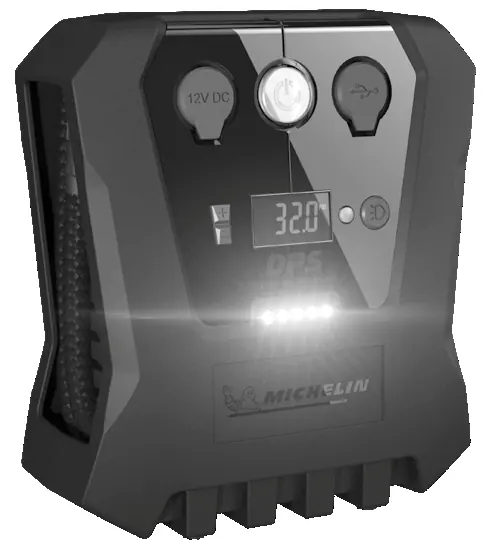
Inflation procedure
- Uncoil the power cord fully and plug it into the vehicle's 12V accessory socket.
- Ensure the unit is switched on.
- Uncoil the high-pressure hose and attach the quick-release connector to the tire valve.
- If the display reads 0.0 or Err, disconnect the hose, wait 5 seconds, and reconnect.
- Use the + and - buttons to set the desired pressure.
- Press the center button to start inflation. The unit will automatically stop once the pre-set pressure is reached.
- Disconnect the hose from the tire valve after inflation.
Using adapters
The unit includes adapters for various items:
- Presta Valve Adapter: For bicycle tires. Hold the quick-release connector, push onto the valve, and slide the collar forward to lock.
- Needle Adapter: For sports balls. Attach to the quick-release connector and insert into the ball.
- Small Toy Adapter: For inflatable toys. Attach to the quick-release connector and insert into the item.
Maintenance and fuse replacement
The inflator does not contain user-serviceable parts, except for the fuse. If the unit fails to power on, check the fuse in the 12V plug:
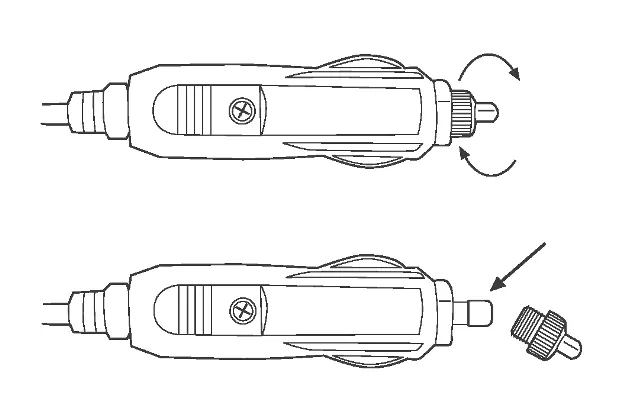
- Unscrew the knurled ring on the 12V plug counterclockwise.
- Remove the fuse and replace it if necessary (15A glass fuse).
- Reassemble by screwing the ring back on.
Troubleshooting
- Gauge does not illuminate: Check that the plug is fully inserted into the 12V socket and check the internal fuse.
- Unit fails to run: Ensure the switch is in the 'On' position and the vehicle ignition is on.
- Gauge reads 0.0 or Err: Disconnect from the tire, wait 5 seconds, and reconnect.
- Unit is running but not inflating: Ensure the quick-release connector is fully pushed onto the tire valve.
Technical specifications
- Max pressure: 40 PSI (vehicle), 100 PSI (bicycle).
- Max current: 11 Amps / 132 Watts.
- Fuse: 15 Amp glass fuse.
- Hose length: 23.5 inches (approx).
- Power cord: 9.1 feet (approx).
Manufacturer information
Michelin
Practical help
Common problems
Gauge does not illuminate
Check that the plug is fully inserted into the 12V socket and check the internal 15A glass fuse.
Unit fails to run
Ensure the switch is in the 'On' position and the vehicle ignition is turned to the accessory position.
Gauge reads 0.0 or Err
Disconnect the quick-release connector from the tire, wait at least 5 seconds, and reconnect.
Unit is running but not inflating
Check that the quick-release connector is correctly fitted to the tire valve.
Before use
- Ensure the vehicle is in a safe location with the handbrake engaged.
- Check the vehicle manual for recommended tire pressure.
- Ensure the 12V socket is clean and free of debris.
- Uncoil the power cord fully before use.
- Ensure the 12V plug is fully inserted into the socket.
Specs in practice
- Max Pressure
- 40 PSI for vehicle tires; up to 100 PSI for bicycle tires.
Images and diagrams
- Connecting the high-pressure hose: Shows how to hold the quick-release connector, push it onto the valve, and slide the collar forward to lock.
- Replacing the fuse: Shows unscrewing the knurled ring on the 12V plug counterclockwise to access the fuse.
Model compatibility
- Only suitable for vehicles with a negative ground.
- Not intended for use by children.
- Do not run continuously for more than 10 minutes; allow to cool.

Manual page author
Michael Turner
Technical manual editor
Reviews PDF manuals for structure, safety notes, and practical product details so readers can find the right information quickly.