Music / Instruments
Midiplus WAVE Wireless Audio System User Guide
Comprehensive user guide for the Midiplus WAVE 2.4GHz wireless audio system, covering setup, pairing, usage instructions, and technical specifications.
Table of contents
Manual images
Jump to the sectionIntroduction
The Midiplus WAVE is a compact 2.4GHz wireless audio system designed to provide electronic instrument performers with a low-latency, high-quality wireless stereo transmission solution. The system includes a transmitter (TX) and a receiver (RX), ensuring seamless audio connectivity without the clutter of cables. The transmitter features a 3.5mm headphone output for real-time monitoring, making it an ideal choice for musicians and performers who require reliable wireless audio.
Hardware Features
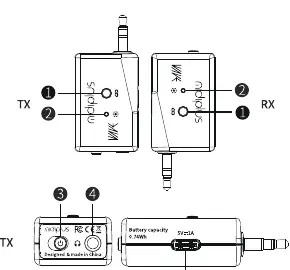
The WAVE system consists of two main units: the TX (transmitter) and the RX (receiver). Both units are equipped with a power switch, a pairing button, a status indicator LED, and a USB-C charging port. The TX unit also includes a 3.5mm headphone jack for monitoring. The devices are designed to be compact and portable, allowing for easy integration into any performance setup.
Pairing and Operation
The TX and RX units are factory-paired for immediate use. If re-pairing is required, turn on both units, long-press the pairing button on either unit until the blue LED blinks rapidly, then press the pairing button on the other unit within 10 seconds. Once successfully paired, the indicator LED will turn solid blue. To use the system, connect the TX to your instrument's output and the RX to your speaker or mixer's input. Always power on the TX and RX units before turning on your speakers to prevent audio pops.
Indicator Light Status
The status LED provides essential feedback on the system's state. A solid blue light indicates the units are paired and connected. A slowly blinking blue light means the units are disconnected, while a rapidly blinking blue light indicates pairing mode. A solid red light indicates the device is charging; note that the device enters standby mode and cannot be used while charging. A blinking red light warns of a low battery, and the light turning off indicates the device is powered off or fully charged.
Important Usage Notes
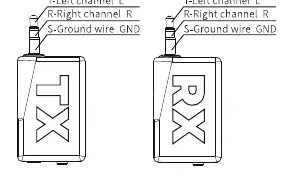
For optimal performance, ensure there are no physical obstructions or walls between the TX and RX units, and maintain a line-of-sight distance within the effective operating range. The 3.5mm TRS plugs are unbalanced stereo connectors. If your equipment uses balanced interfaces, you must use a TRS to 2 TS adapter to avoid phase cancellation or audio abnormalities. The system offers up to 7.5 hours of battery life and a low transmission latency of 9 milliseconds, ensuring a professional-grade experience for your musical performances.
Manufacturer information
Midiplus
Practical help
Common problems
Units are not connecting
Ensure both units are powered on and follow the manual pairing steps by long-pressing the pairing button until the blue LED blinks fast.
Audio abnormalities or phase issues
The 3.5mm plugs are unbalanced. If connecting to balanced equipment, use a TRS to 2 TS adapter.
Device not working during charging
The device automatically enters standby mode when charging; it cannot be used while connected to power.
Before use
- Ensure both TX and RX units are fully charged.
- Check that the TX is connected to the instrument output.
- Check that the RX is connected to the speaker or mixer input.
- Verify that the power switches on both units are turned on.
- Ensure no physical obstructions exist between the units.
- Confirm the distance is within the 10m range.
Specs in practice
- Operating Frequency
- 2.4GHz band used for wireless signal transmission.
- Sampling Frequency
- 16-bit/48kHz resolution for high-quality digital audio.
- Operating Range
- Maximum distance of 10 meters for stable connection.
- Input Impedance
- 1M Ohm, suitable for various electronic instruments.
Images and diagrams
- The hardware diagram identifies the pairing button, status LED, power switch, headphone jack, and charging port on both units.
- The connector diagram illustrates the 3.5mm TRS pinout: Tip (Left), Ring (Right), and Sleeve (Ground).
Model compatibility
- Compatible with electronic instruments featuring 3.5mm output ports.
- Compatible with active speakers or mixers with 3.5mm input ports.
- Requires TRS to 2 TS adapter for balanced interface connections.

Manual page author
David Miller
Documentation analyst
Organizes user manual content into clear summaries, with attention to model details, product context, and everyday usability.