General / Other Manuals
User Manual for Vevor 00-DM10-U01A Electronic Drink Mixer
Quick guide for the Vevor 00-DM10-U01A Electronic Drink Mixer, covering assembly, operation, cleaning, and troubleshooting to ensure safe and efficient use.
Table of contents
Manual images
Jump to the sectionQuick guide from the manual
This document provides essential instructions for the safe operation and maintenance of the Vevor 00-DM10-U01A Electronic Drink Mixer. Key safety measures include keeping children away, never immersing the motor housing in liquid, and ensuring the unit is unplugged before assembly, disassembly, or cleaning. Always operate on a stable surface and ensure all parts are securely fastened before use.
Product components
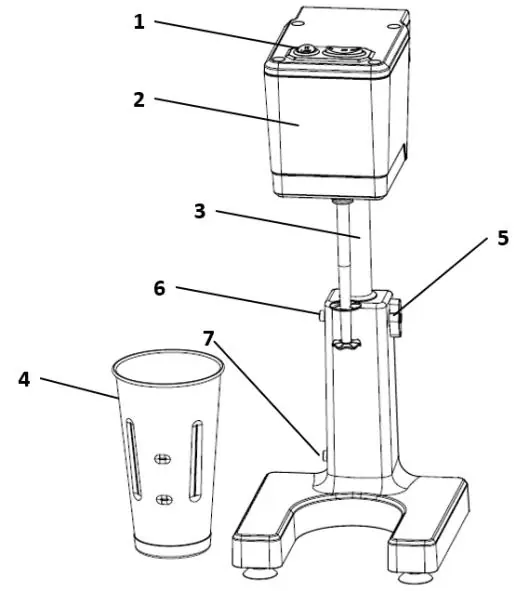
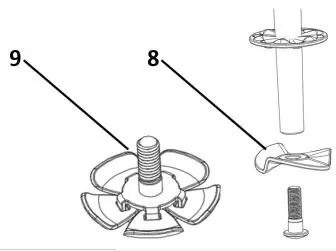
The mixer consists of the following parts: Control Switch, Motor Housing, Stand Post, Mixing Cup, Wing Knob, Upper Post Button, Lower Post Button, Solid Disk Agitator, and Moving-Wing Agitators.
Assembly and adjustment
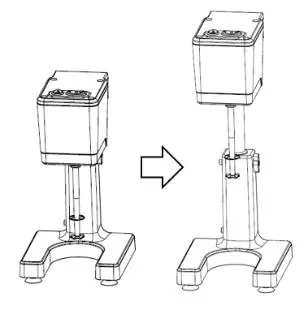
To move the stand post upward for operation: press the Lower Post Button, lift the Motor Housing until the Upper Post Button locks into the Stand Post, and tighten the Wing Knob. To move it downward for storage: loosen the Wing Knob, press the Upper Post Button, and lower the post until the Lower Post Button locks into place.
Operating the drink mixer
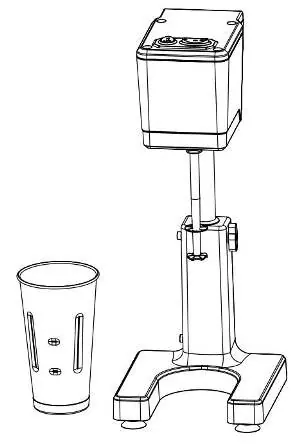
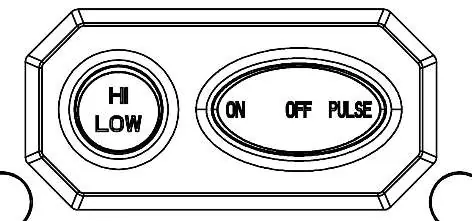
1. Lift the Motor Housing and lock it into position, then tighten the Wing lock. 2. Plug in the power cord. 3. Place ingredients into the Mixing Cup. 4. Select the desired speed (LO or HI) using the speed switch. 5. Grip the cup firmly and move it upward until the mixing shaft is immersed in the ingredients. 6. Turn the motor ON or use the Pulse function. 7. Once finished, turn the motor OFF and lower the cup.
Cleaning and maintenance
Unplug the unit before cleaning. Do not immerse the motor housing in water or use a dishwasher for the main unit. To clean the mixing shaft: fill the Mixing Cup with 200ml of warm, soapy water, place it in the operating position, and run on LO speed for 30 seconds. Repeat with warm water only to rinse. Wipe the shaft with a damp cloth. The Mixing Cup itself is dishwasher safe.
Troubleshooting
If ingredients are not mixing properly, try adjusting the speed or ingredient composition. If the motor does not turn on, the thermal overload protection may have triggered; turn the unit off, wait 30 minutes, and try again. For excessive splashing, ensure the cup is not overfilled, reduce the speed, or check that the agitator is properly fastened and not damaged.
Manufacturer information
VEVOR
Practical help
Common problems
Motor does not turn ON
The unit has thermal overload protection. Turn the unit OFF, wait 30 minutes, and try again.
Ingredients not mixing properly
Try selecting a different speed or adjust the composition of the ingredients.
Excessive splashing
Ensure the cup is not overfilled, reduce the speed setting, or check if the agitator is bent, worn, or loose.
Before use
- Clean the mixer thoroughly before initial use.
- Ensure all detachable parts are fastened tightly.
- Verify that the supply voltage matches the product specifications (AC 120V 60Hz).
- Ensure the unit is fully assembled before operation.
- Use only crushed ice if adding ice to the mixture.
Images and diagrams
- The control panel features a speed switch (HI/LOW) and an ON/OFF/PULSE switch.
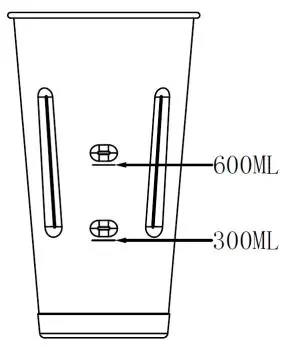
- The mixing cup has markings for 300ml and 600ml to indicate maximum fill levels.
- The stand post height is adjustable using the Upper and Lower Post Buttons and the Wing Knob.
Model compatibility
- Moving-Wing Agitators are intended only for soft ice cream.
- For heavy drinks, use HI speed; for light drinks with more liquid, use LO speed.

Manual page author
David Miller
Documentation analyst
Organizes user manual content into clear summaries, with attention to model details, product context, and everyday usability.