Music / Instruments
Elgato 10GBF9901 Stream Deck Pedal User Guide
Quick start guide for the Elgato Stream Deck Pedal, covering software installation, hardware connection, pedal pressure adjustment, and customization of actions.
Table of contents
Manual images
Jump to the sectionQuick guide from the manual
This document provides essential instructions for setting up and customizing the Elgato Stream Deck Pedal. Key steps include downloading the required software, connecting the device directly to your computer, and configuring actions via the Stream Deck app. Users can also customize the physical feel of the pedals by adjusting spring tension or converting the middle pedal into a footrest.
Installation
To begin using your Stream Deck Pedal, follow these steps:
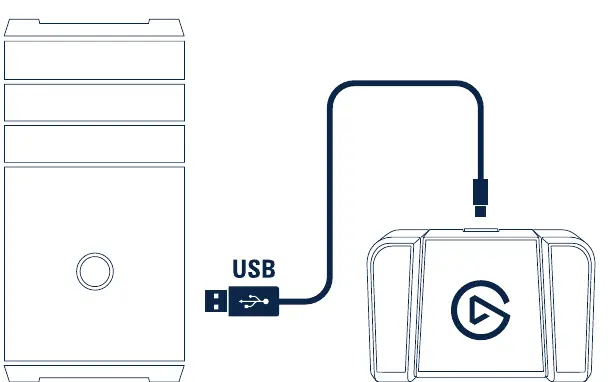
- Download and install the latest Stream Deck app from elgato.com/download.
- Connect the Stream Deck Pedal directly to a USB port on your PC or Mac. Do not use a USB hub, as it may cause connectivity issues.
Set Up Actions
Once connected, launch the Stream Deck app to configure your device:
- The app interface displays your pedal layout.
- Browse the right-hand panel for available actions (e.g., OBS Studio, Soundboard, System).
- Drag and drop your desired actions onto the specific pedals shown in the app.
- Right-click on any configured icon to copy, delete, or move the action to a different pedal.
Adjust Pedal Pressure
You can customize the resistance of each pedal using the included spring tension sets:
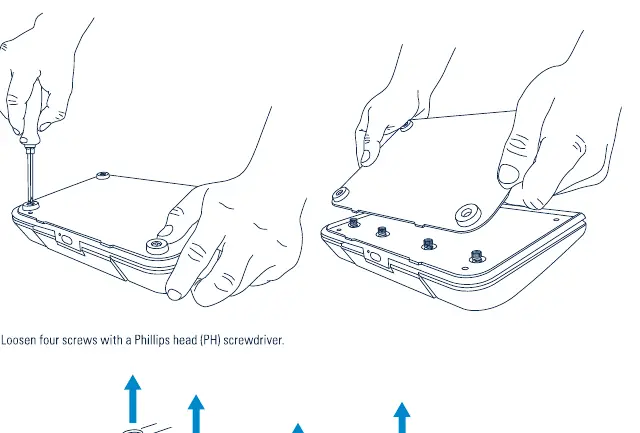
- Use a Phillips head (PH) screwdriver to loosen the four screws on the bottom of the unit.
- Remove the cover to access the internal springs.
- Replace the springs with the desired tension set (Soft, Medium, or Hard).
- Re-secure the cover with the four screws.
Use the Middle Pedal as a Footrest
If you prefer to use the middle pedal as a stationary footrest:
- Insert the two included stoppers into the designated slots on the middle pedal mechanism.
- This locks the pedal in place, providing a comfortable resting position.
Official resources from the manual
Manufacturer information
Elgato
Practical help
Common problems
Device not responding or intermittent connection
Ensure the device is connected directly to a USB port on your computer. Do not use a USB hub.
Before use
- Download the Stream Deck app from elgato.com/download
- Ensure you have a Phillips head (PH) screwdriver for hardware adjustments
- Verify your computer has an available USB port
Specs in practice
- Soft Tension
- Uses 1400/700/700/1400 spring configuration for lighter pedal resistance.
- Medium Tension
- Default configuration using 1600/800/800/1600 springs.
- Hard Tension
- Uses 2000/1000/1000/2000 spring configuration for heavier pedal resistance.
Images and diagrams
- The app interface allows drag-and-drop configuration of actions onto specific pedals.
- The bottom panel of the device must be opened to swap spring sets for pressure adjustment.
- Stoppers are inserted into the middle pedal to disable its switch function and turn it into a footrest.
Model compatibility
- Compatible with PC and Mac.
- Requires direct USB connection; USB hubs are not supported.

Manual page author
Emily Carter
User documentation editor
Prepares concise manual descriptions and highlights the most useful setup, operation, and maintenance information for readers.