Music / Instruments
Elgato Wave Shock Mount User Guide
Quick start guide for the Elgato Wave Shock Mount, covering installation on a boom arm and mounting the Wave microphone.
Table of contents
Manual images
Jump to the sectionProduct Overview
The Elgato Wave Shock Mount is designed to isolate your Wave microphone from handling noise, vibrations, and accidental bumps that can occur during recording. It provides a stable, professional mounting solution for your microphone on a boom arm.
Installation
The installation process is straightforward and requires no complex tools. Follow these steps to set up your equipment:
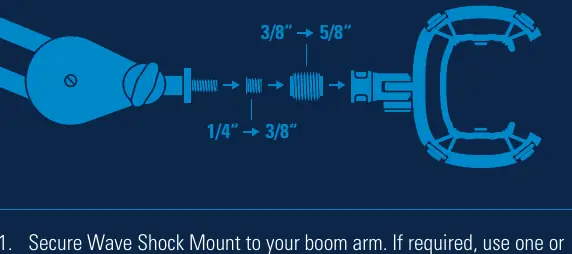
- Mounting to Boom Arm: Secure the Wave Shock Mount to your boom arm. The mount includes adapters to ensure compatibility with different thread sizes. If required, use one or both of the included adapters (1/4" to 3/8" or 3/8" to 5/8").
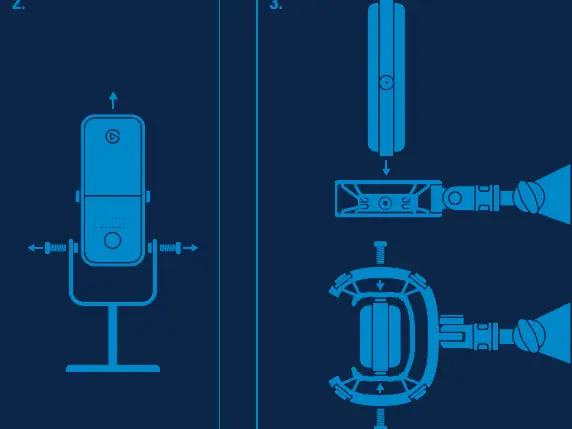
- Preparing the Microphone: Unscrew your Wave microphone from its original stand.
- Attaching to Shock Mount: Align the screw holes on the side of your Wave microphone with the eyelets on the Wave Shock Mount. Reinsert the screws to secure the microphone in place.
Important Safety and Handling
When attaching the microphone to the shock mount, ensure you do not overtighten the screws. Tighten them just enough to hold the microphone securely in place to avoid damaging the threads or the mount structure.
Support
For further assistance, you can reach out to the manufacturer through their official social media channels under the handle /elgatogaming. Elgato is a division of Corsair Memory Inc., located at 47100 Bayside Pkwy, Fremont, CA 94538, USA, and Corsair Memory BV, Wormerweg 8, 1311 XB, Almere, Netherlands.
Manufacturer information
Elgato
Practical help
Common problems
Microphone does not fit the boom arm thread.
Use the included 1/4" to 3/8" or 3/8" to 5/8" adapters to match your boom arm's thread size.
Difficulty aligning microphone with shock mount.
Ensure the microphone is completely removed from its original stand before attempting to align the screw holes with the shock mount eyelets.
Before use
- Verify you have the Wave Shock Mount and the two included thread adapters.
- Ensure your boom arm is stable and properly secured to your desk.
- Remove the Wave microphone from its original desktop stand.
- Check that you have the original screws from the microphone stand.
Specs in practice
- 1/4" to 3/8" Adapter
- Used to adapt the shock mount to standard microphone boom arm threads.
- 3/8" to 5/8" Adapter
- Used to adapt the shock mount to larger microphone stand threads.
Images and diagrams
- The diagram shows the sequence of adapters: 1/4" to 3/8" and 3/8" to 5/8" to be used depending on the boom arm thread.
- The assembly steps illustrate unscrewing the microphone from the stand and aligning it with the shock mount eyelets.
Model compatibility
- Designed specifically for Elgato Wave microphones.
- Compatible with standard boom arms using 1/4", 3/8", or 5/8" threads via included adapters.

Manual page author
David Miller
Documentation analyst
Organizes user manual content into clear summaries, with attention to model details, product context, and everyday usability.