Power / USB Chargers
User Manual for Minix NEO P3 100W GaN Charger
Quick guide for the Minix NEO P3 100W Turbo 4-Port GaN Charger. Learn how to assemble the interchangeable plugs, understand power distribution across ports, and troubleshoot common issues like sparking.
Table of contents
Manual images
Click an image to enlargeQuick guide from the manual
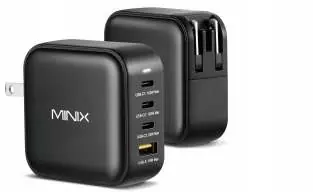
The Minix NEO P3 is a 100W GaN charger featuring three USB-C ports and one USB-A port. It supports global voltage (100-240V) and includes interchangeable plugs for US, EU, and UK sockets. When connecting or disconnecting devices, the charger may briefly pause charging to re-negotiate power distribution; this is normal operation.
Plug assembly
The charger comes with an integrated US plug. To use the EU or UK plug adapters:
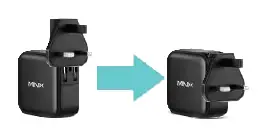
- Ensure the US plug is fully retracted into its housing.
- Align the EU or UK adapter with the US plug.
- Push the adapter firmly onto the US plug until it cannot go any further and is securely attached.
Power distribution
The charger uses Dynamic Smart Detection to adjust power output based on the connected devices. The total combined maximum output is 100W.
Single port usage
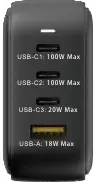
- USB-C1/C2: Max 100W (PD 5V/3A up to 20V/5A; PPS 3.3V-11V/4A).
- USB-C3: Max 20W (PD 5V/3A, 9V/2.22A, 12V/1.67A).
- USB-A: Max 18W (QC 5V/3A, 9V/2A, 12V/1.5A).
Multi-port usage
Power is shared dynamically. For example:
- Dual ports (C1 + C2): 65W + 30W.
- Dual ports (C1/C2 + C3): 65W + 20W.
- Dual ports (C1/C2 + A): 65W + 18W.
- Three ports (C1 + C2 + C3): 45W + 30W + 20W.
- Four ports (C1 + C2 + C3 + A): 45W + 30W + 7.5W + 7.5W.
Troubleshooting
If you notice sparking when plugging the charger into a wall socket, do not be alarmed. This is generally caused by a loose socket connection and is not dangerous. To avoid this, try using a different wall outlet or plug the charger into the socket before the socket is powered on.
Technical specifications
- Input: AC 100-240V, 50/60Hz, 2.5A.
- Total Output: 100W.
- Dimensions: 63.3 x 63.3 x 31.1 mm.
- Supported Protocols: PD 3.0/2.0, PPS, QC 3.0/2.0, AFC, FCP, SCP, BC1.2.
Contact information
For further support, you can contact Minix via email at [email protected] or visit their website at www.minix.com.hk. You can also join the community forum at www.theminixforum.com or follow them on Facebook at www.facebook.com/minixtech.
Official resources from the manual
Manufacturer information
Minix
Practical help
Common problems
Sparking when plugging into the wall
This is normal and not dangerous, often caused by a loose socket. Try a different outlet or plug the charger in before turning the socket on.
Charging pauses for a second
This is normal behavior when connecting or disconnecting devices, as the charger re-adjusts power distribution across ports.
Before use
- Verify the correct plug adapter (US, EU, or UK) is securely attached.
- Ensure the wall socket is functional.
- Use high-quality cables compatible with your devices.
- Check that the total power requirements of your devices do not exceed the charger's capabilities.
Specs in practice
- 100W Total Output
- The maximum combined power the charger can deliver across all ports simultaneously.
- GaN Technology
- Gallium Nitride technology allows for a smaller, lighter, and more efficient charger compared to traditional silicon chargers.
- PD (Power Delivery)
- A fast-charging protocol used by the USB-C ports for laptops, tablets, and smartphones.
- QC (Quick Charge)
- A fast-charging protocol used by the USB-A port for compatible devices.
Images and diagrams
- Plug Assembly: Shows how to retract the US plug and attach the EU/UK adapter.
- Port Layout: Identifies the three USB-C ports and one USB-A port.
Model compatibility
- Compatible with laptops, smartphones, and other USB devices.
- Supports global voltage (100-240V).

Manual page author
Michael Turner
Technical manual editor
Reviews PDF manuals for structure, safety notes, and practical product details so readers can find the right information quickly.