Power / USB Chargers
Satechi 100W Compact GaN Charger Instructional Guide
Quick guide for the Satechi 100W Compact GaN Charger. Learn how to connect your devices, understand power output distribution for multiple ports, and optimize charging for laptops and smartphones.
Table of contents
Manual images
Click an image to enlargeQuick guide from the manual
The Satechi 100W Compact GaN Charger is designed to power multiple devices simultaneously. It requires a standard wall outlet connection. For optimal performance, specifically for 100W laptop charging or iPhone fast charging, you must use the correct cables as specified in the instructions.
Getting started
To begin using the charger:
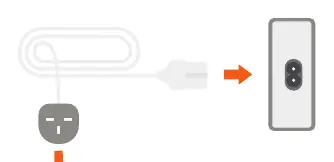
- Connect the power cord to the back side of the 100W Compact GaN Charger.
- Plug the power cord into a wall outlet.
Charging devices
The charger features multiple ports to accommodate different devices:
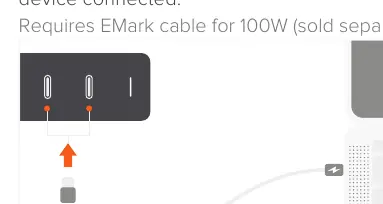
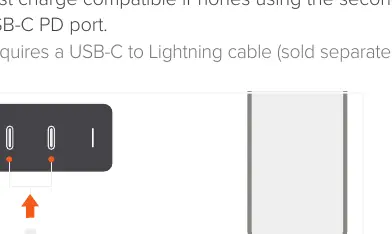
- Laptops: Connect to one of the USB-C PD ports. To achieve 100W output with a single device, you must use an EMark-rated cable (sold separately).
- iPhones: Use the second USB-C PD port for fast charging. This requires a USB-C to Lightning cable (sold separately).
- USB-A devices: Use the USB-A port to power smartphones or media devices.
Power output distribution
The charger automatically adjusts power output based on the number and type of devices connected:
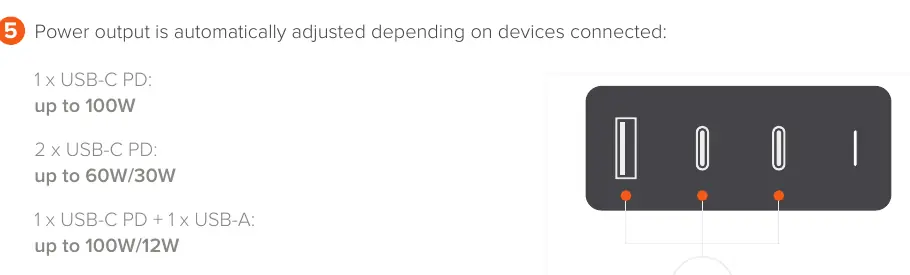
- 1 x USB-C PD: Up to 100W.
- 2 x USB-C PD: Up to 60W/30W.
- 1 x USB-C PD + 1 x USB-A: Up to 100W/12W.
- 2 x USB-C PD + 1 x USB-A: Up to 60W/30W/12W.
Manufacturer information
Satechi
Practical help
Common problems
Laptop not charging at 100W
Ensure you are using an EMark-rated cable, as standard cables may not support 100W power delivery.
iPhone not fast charging
Ensure you are connected to the second USB-C PD port and using a USB-C to Lightning cable.
Before use
- Connect the power cord to the back of the charger.
- Plug the power cord into a wall outlet.
- Verify you have the correct cables (EMark for 100W, USB-C to Lightning for iPhone).
Specs in practice
- 1 x USB-C PD
- Provides up to 100W of power for a single device.
- 2 x USB-C PD
- Splits power between two devices, providing up to 60W and 30W respectively.
Images and diagrams
- The charger features three ports: two USB-C PD ports and one USB-A port.
- Power distribution changes dynamically based on the number and type of devices connected.
Model compatibility
- Requires EMark cable for 100W laptop charging.
- Requires USB-C to Lightning cable for iPhone fast charging.

Manual page author
David Miller
Documentation analyst
Organizes user manual content into clear summaries, with attention to model details, product context, and everyday usability.