Power / USB Chargers
User Manual for Sitecom 100W GaN Power Delivery Wall Charger
Quick guide for the Sitecom 100W GaN Power Delivery Wall Charger. Includes port specifications, safety instructions, and usage guidelines for optimal charging.
Table of contents
Quick guide from the manual
The Sitecom 100W GaN Power Delivery Wall Charger is designed to charge USB-C and USB-A devices. It supports worldwide voltage (100-240V) and provides up to 100W of power. Ensure you use the correct country-specific adapter if traveling outside of Europe.
Device Overview
The charger features three output ports:
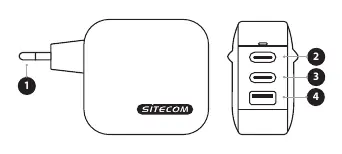
- 1: Euro mains plug.
- 2: USB-C 1 port (up to 100W).
- 3: USB-C 2 port (up to 100W).
- 4: USB-A port (up to 30W).
Technical Specifications
The charger intelligently adjusts output based on the connected device's demand. When using multiple ports simultaneously, the power distribution changes:
- USB-C1 or USB-C2: Up to 100W.
- USB-A: Up to 30W.
- USB-C1 + USB-C2: 65W + 35W.
- USB-C1 + USB-A: 65W + 18W.
- USB-C2 + USB-A: 15W shared.
- USB-C1 + USB-C2 + USB-A: 65W + 15W shared between USB-C2 and USB-A.
Safety Instructions
Please read and follow these safety guidelines to ensure proper operation and longevity of the device:
- Do not drop the device; frequent impacts may cause malfunctions.
- Do not disassemble the unit. Repairs must be performed by qualified service centers.
- Do not use the product if the AC adapter, adapter cable, or power cable is damaged.
- Do not extend the cable, as this may lead to poor performance. Always pull by the plug, not the cable.
- Unplug the device before cleaning. Use a dry cloth only; do not use liquid or spray cleaners.
- Do not use in damp places, near water, or in environments with steam, rain, or snow.
- Ensure the operating environment temperature is 25°C or less and the altitude is 5000m or less.
- For indoor use only.
Support and Warranty
The product comes with a 24-month warranty and lifetime technical support. If you encounter issues such as liquid ingress, damp environment exposure, or obvious physical defects, disconnect the device from the power supply and contact a service technician. For further assistance, visit www.sitecom.com or contact [email protected].
Official resources from the manual
Practical help
Common problems
Device not charging or charging slowly
Check if the cable is damaged or if the device requires more than 100W. Verify the port configuration if using multiple devices.
Liquid or moisture exposure
Immediately disconnect from the power supply and contact a service technician.
Device malfunction
Ensure the operating temperature is 25°C or less and that the device is not being used in a damp environment.
Before use
- Inspect the AC adapter and cables for any signs of damage.
- Ensure the wall outlet is compatible with the Euro plug or use a country-specific adapter.
- Verify that the device you intend to charge requires 100W or less.
- Ensure the environment is dry and indoors.
Specs in practice
- 100-240V Input
- The charger is suitable for worldwide use, though a physical plug adapter may be required.
- Smart Output
- The charger automatically detects the power requirements of the connected device.
Images and diagrams
- 1: Euro mains plug for connection to wall outlets.
- 2: USB-C 1 port for high-power devices (up to 100W).
- 3: USB-C 2 port for high-power devices (up to 100W).
- 4: USB-A port for standard devices (up to 30W).
Model compatibility
- Supports MacBook Pro with 96W power consumption on the USB-C1 port.
- Suitable for notebooks, smartphones, tablets, smartwatches, and powerbanks.
- Requires an adapter for use in the UK.

Manual page author
David Miller
Documentation analyst
Organizes user manual content into clear summaries, with attention to model details, product context, and everyday usability.