Power / USB Chargers
User Manual for MINIX P3 Pro 100W LED GaN Wall Charger
Quick guide for the MINIX P3 Pro 100W LED GaN Wall Charger. Learn how to use the LED screen, understand power distribution, and swap plug adapters.
Table of contents
Manual images
Click an image to enlargeQuick guide from the manual
The MINIX P3 Pro is a 100W GaN wall charger featuring three USB ports (2x USB-C, 1x USB-A) and an integrated LED display. It supports multiple charging protocols and includes interchangeable plugs for global use.
Plug assembly
The charger comes with a built-in US plug and includes EU and UK adapters. To attach an EU or UK plug:

- Ensure the US plug is retracted into its original position.
- Push the EU or UK plug onto the US plug until it is firmly seated.
Screen operation
The LED screen provides real-time information. Use the button to cycle through modes:
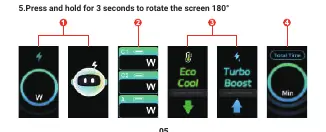
- Single press: Displays total output power (or standby smiley animation if no load).
- Press again: Displays power output for each individual port.
- Press a third time: Shows operating status ("Low-temperature operation" for <30W, "High-performance operation" for >30W).
- Press a fourth time: Displays the timing screen.
- Press and hold (3 seconds): Rotates the screen 180°.
Power distribution
The charger dynamically adjusts power based on connected devices. Maximum output is 100W.
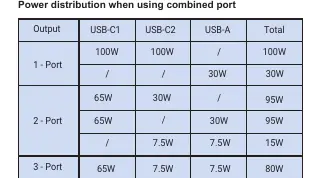
- Single Port (USB-C1/C2): Up to 100W (PD/PPS).
- Single Port (USB-A1): Up to 30W.
- Combined usage: Power is shared dynamically. For example, using 2 ports can provide 65W + 30W (95W total).
Safety and troubleshooting
If you notice sparking when plugging the charger into a socket, do not be alarmed. This is typically caused by a loose socket. To avoid this, try an alternative socket or plug the charger into the socket before turning on the power.
Manufacturer information
Minix
Practical help
Common problems
Sparking when plugging into a socket
This is normal and not dangerous; it is caused by a loose socket. Try an alternative socket or plug the charger in before the socket is powered.
Before use
- Ensure the correct plug adapter (US, EU, or UK) is securely attached.
- Check that your device is compatible with the charger's output protocols.
- Verify the wall socket is functional.
Specs in practice
- 100W Max Output
- The total power available across all ports combined.
- GaN Technology
- Gallium Nitride technology allows for high power output in a compact, lightweight design.
Images and diagrams
- Plug Assembly: Shows how to retract the US plug and attach the EU/UK adapter.
- Screen Modes: Illustrates the 4 display modes and the screen rotation function.
Model compatibility
- Supports protocols: PD2.0, PD3.0, QC2.0, QC3.0, AFC, FCP, SCP, Apple 2.4A, DCP 1.5A.

Manual page author
David Miller
Documentation analyst
Organizes user manual content into clear summaries, with attention to model details, product context, and everyday usability.