Automotive / Car Audio
User Manual for Morel HÖGTALARE BIGGIE Portable Bluetooth Speaker
Quick guide for the Morel HÖGTALARE BIGGIE portable Bluetooth speaker. Learn how to pair via Bluetooth, use TWS stereo mode, charge, check battery levels, and mount the speaker.
Quick answers from the manual
Quick answer
- To turn on the Morel HÖGTALARE BIGGIE, hold the power button for 2 seconds. To charge, use the provided USB-C cable. To pair via Bluetooth, use the Bluetooth button and select the speaker on your device. p. 7, 9, 11
Key actions
- Power On/Off p. 7
- Bluetooth Pairing p. 9
- TWS Stereo Pairing p. 13
First start
- Charge the device using the provided USB-C cable before first use. p. 11
Show 3 more answers Show less
Maintenance and reset
- Clean with a dry cloth; ensure power is off and disconnected. p. 18
Technical specifications
| Parameter | Value | Meaning | Pages |
|---|---|---|---|
| Battery | 11.1V/2500mAh | Internal lithium battery capacity. | p. 16 |
| Play time | 20 hours | At 50% volume. | p. 16 |
Where to find it in the PDF
- Overview p. 5
- Technical Specs p. 16
Table of contents
Manual images
Click an image to enlargeQuick Guide
The Morel HÖGTALARE BIGGIE is a portable Bluetooth speaker designed for high-quality audio. This guide provides essential instructions for setup, operation, and maintenance. Always use the provided charger for optimal performance and safety.
Overview
The speaker features a control panel with the following buttons:
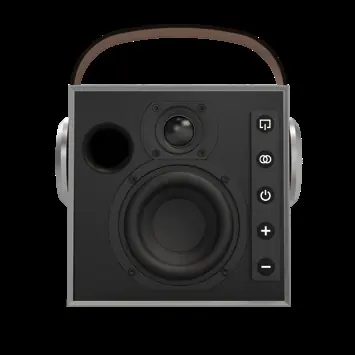
- Input/Mode: Switch between AUX and Bluetooth modes.
- TWS (Stereo Play): Pair two speakers for stereo sound.
- Power: Turn the device on or off.
- Volume + / -: Adjust the audio volume.
Getting Started
To turn the speaker on or off, press and hold the power button for 2 seconds. To pair with a device, ensure the speaker is in Bluetooth mode and select 'HOGTALARE BIGGIE' in your device's Bluetooth settings.
Audio Modes
The speaker supports both Bluetooth and 3.5mm AUX input. Use the Input/Mode button to toggle between sources. For a wider soundstage, you can use the Stereo Play (TWS) function to pair two speakers together. Follow the specific TWS pairing steps outlined in the manual to link them.
Battery and Charging
The speaker features a built-in lithium battery. To charge, connect the provided USB-C cable to the charging port on the rear of the unit. To check the battery level, press and hold the '+' and '-' buttons simultaneously for 2 seconds; the LED indicators will display the current charge percentage (from <10% to 81-100%).
Installation
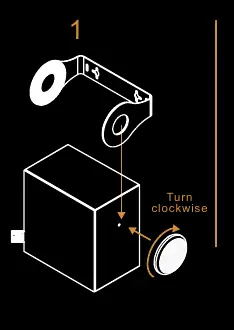
The speaker includes a handle that can be removed or attached by turning the side knob counterclockwise or clockwise. An optional wall mount accessory is also available for permanent installation.
Technical Specifications
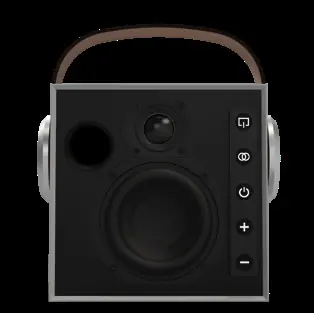
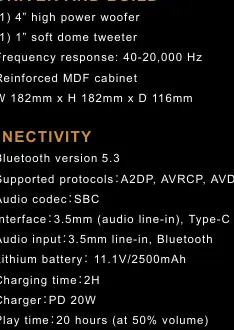
The Morel HÖGTALARE BIGGIE is equipped with a 4" high-power woofer and a 1" soft dome tweeter. It supports Bluetooth 5.3 with SBC codec and offers up to 20 hours of playtime at 50% volume. The operating range is approximately 20 meters.
Safety and Maintenance
To ensure longevity, keep the speaker away from heat sources, liquids, and extreme cold. Do not disassemble the device. When cleaning, use a dry cloth and ensure the power is switched off and the device is disconnected from any power source. Do not use concentrated chemicals or detergents.
Practical help
Common problems
Speaker will not turn on
Ensure the battery is charged using the provided USB-C cable.
Bluetooth pairing fails
Ensure the speaker is in pairing mode and your source device has Bluetooth enabled.
TWS pairing issues
Ensure both speakers are within range and follow the TWS pairing sequence carefully.
Before use
- Charge the speaker fully using the provided USB-C cable.
- Ensure the speaker is placed on a stable surface.
- Check that the power switch is accessible.
Show more Show less
Specs in practice
- Bluetooth 5.3
- Provides a stable and efficient wireless connection.
- Play time: 20 hours
- Battery life duration when playing at 50% volume.
- Charging time: 2H
- Time required to fully charge the battery.
Images and diagrams
- The control panel is located on the side of the speaker.
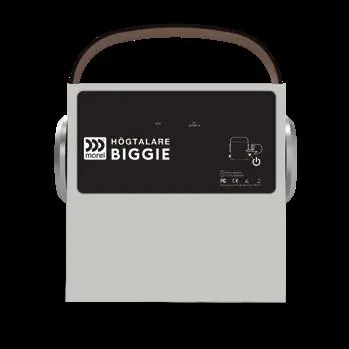
- The rear panel contains the 3.5mm AUX input and USB-C charging port.
Model compatibility
- Supports 3.5mm audio line-in.
- Supports Bluetooth audio input.

Manual page author
Emily Carter
User documentation editor