Electronics / Speakers & Soundbars
User Manual for Motorola 200W 5.1 Soundbar MT200-SB51
Quick guide for the Motorola 200W 5.1 Soundbar MT200-SB51. Includes setup, wireless pairing, remote control functions, troubleshooting, and technical specifications.
Quick answers from the manual
Quick answer
- The Motorola MT200-SB51 is a 200W 5.1 soundbar system. This manual covers setup, wireless pairing of the subwoofer and satellite speakers, remote control operation, and troubleshooting. p. 1, 4
Key actions
- Wireless Pairing Reset p. 4
- Bluetooth Pairing p. 6
First start
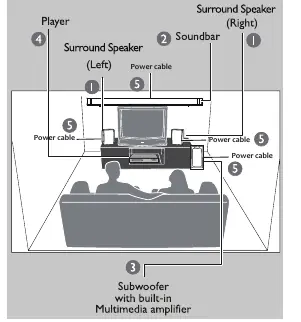
- Connect the system to a power outlet, position the subwoofer on the floor, and place satellite speakers at 45-degree angles from the listening position. p. 2, 7
Show 4 more answers Show less
Problems and fixes
No power
Check if the AC power cord is properly inserted into the AC main socket.
p. 8Maintenance and reset
- Manual reset for wireless pairing: press the reset key for 5 seconds, power cycle the unit. p. 4
Technical specifications
| Parameter | Value | Meaning | Pages |
|---|---|---|---|
| Total system power | 200 W | Total output power | p. 11 |
Where to find it in the PDF
- Front panel operation p. 4
- Remote controls p. 5
Table of contents
Manual images
Click an image to enlargeQuick guide from the manual
This document provides essential instructions for setting up and operating the Motorola 200W 5.1 Soundbar (MT200-SB51). Key procedures include wireless pairing of the subwoofer and satellite speakers, remote control operation, and system positioning for optimal acoustics.
What's in the box
- 1x Subwoofer
- 2x Satellite speakers
- 1x Soundbar
- 1x RCA cable
- 1x Remote control
- 1x HDMI cable
- 1x Power cable
- 4x Wall mount kit (screws)
Connections and wall mounting
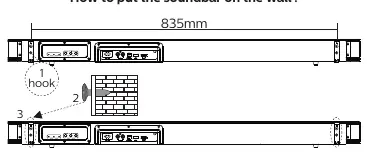
The soundbar can be wall-mounted. Ensure the wall is suitable for the weight. Use the provided hooks and screws. The back panel of the soundbar contains inputs for the subwoofer and satellite speakers.
Front panel operation
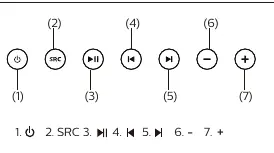
The front panel features touch-sensitive buttons for power, source selection, playback control, and volume adjustment. The LED display turns off after 90 seconds of inactivity to prevent disturbance.
Manual reset for wireless pairing
If the subwoofer or satellite speakers fail to connect automatically:
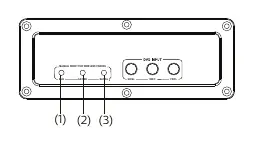
- Press the reset key on the back panel for 5 seconds.
- Switch off the specific unit (subwoofer or satellite) using the power switch on its back plate.
- Switch the unit back on; it should connect automatically.
- The blue light on the unit will indicate a successful connection.
Remote control
The remote allows full control over the system, including:
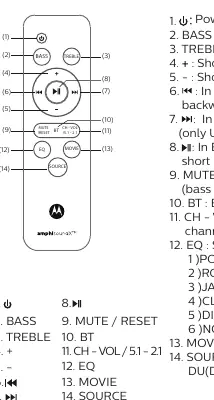
- BASS/TREBLE: Adjust levels using the + or - buttons.
- CH-VOL / 5.1-2.1: Adjust individual channel volumes or toggle between 5.1 and 2.1 modes.
- EQ: Cycle through preset modes (POP, ROC, JAZ, CLA, DIR, NOR).
- SOURCE: Switch between BT, OP, HD (HDMI ARC), AU (AUX), DU (DVD), and USB modes.
Bluetooth operation
To pair a device, select Bluetooth mode using the SOURCE button. The display dot will blink fast. Search for 'Motorola 200w SB' on your mobile device. Once paired, the dot will blink slowly.
System positioning
For the best acoustic effect, place the subwoofer on the floor. Position the front left and right speakers at equal distances from the TV at approximately 45-degree angles from the listening position. Place the soundbar above the TV to localize the center channel.
Troubleshooting
If you encounter issues, check the following:
- No power: Ensure the AC power cord is properly inserted.
- No sound: Adjust volume or select the correct source.
- Remote not working: Check batteries and ensure the remote is pointed at the IR sensor on the subwoofer.
- USB issues: Ensure the drive is not formatted as NTFS and is not too large/slow.
- Wireless connection: Perform the manual reset procedure described above.
Safety and maintenance
Avoid high temperatures, moisture, and dust. Do not block ventilation openings. Clean the cabinet with a soft, slightly moistened cloth; do not use alcohol or abrasives.
Manufacturer information
Motorola
Practical help
Common problems
No sound or distorted sound
Adjust the volume or select the correct input source.
Remote control does not work
Replace batteries, point directly at the IR sensor on the subwoofer, or restart the system.
USB flash drive not read
Ensure the drive is not formatted as NTFS and that the file size is not too large.
Wireless speakers/subwoofer not connecting
Perform the manual reset: hold the reset key for 5 seconds, power cycle the unit, and wait for automatic reconnection.
Before use
- Verify all items are present in the box
- Ensure the system is connected to the correct voltage
- Place subwoofer on the floor
- Position satellite speakers at 45-degree angles
- Ensure adequate ventilation (at least 10cm space)
Show more Show less
Specs in practice
- Total system power
- 200 W
- USB capacity
- Up to 32GB (MP3 tracks)
- HDMI version
- V 1.4
Images and diagrams
- Wall mounting hook installation
- Front panel button layout
- Remote control button functions
- Wireless pairing reset button location
Model compatibility
- USB flash drive must not be NTFS formatted
- HDMI ARC feature must be available on the TV

Manual page author
Emily Carter
User documentation editor