Electronics / Two-Way Radios
User Guide for Motorola 2-Wire xL Clear Tube Earpiece PMLN8083
Quick guide for the Motorola 2-Wire xL Clear Tube Earpiece (PMLN8083). Includes setup, wearing instructions, cable management, and maintenance tips.
Quick answers from the manual
Quick answer
- The PMLN8083 is a 2-wire surveillance earpiece. Always turn off the radio before connecting or disconnecting it to ensure safety and proper operation. p. 1
Key actions
- Turn off radio before attaching/detaching p. 1
- Clean with soft damp cloth p. 1
First start
- Connect the earpiece to the radio while the device is powered off. p. 1
Problems and fixes
Hearing discomfort
Stop listening and consult a doctor.
p. 1Where to find it in the PDF
- Overview and Safety p. 1
- Parts and Warranty p. 2
Table of contents
Manual images
Click an image to enlargeQuick guide from the manual
This document provides essential instructions for the Motorola 2-Wire xL Clear Tube Earpiece (PMLN8083). Before using the device, ensure you have read the RF Energy Exposure and Product Safety Guide provided with your radio. Always turn off the radio before attaching or detaching the earpiece to prevent damage or improper connection.
Earpiece Overview
The earpiece consists of three main components:
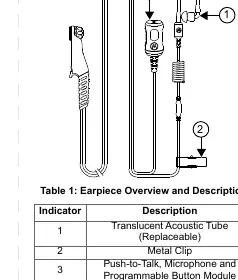
- Translucent Acoustic Tube: The replaceable part that delivers audio to the ear.
- Metal Clip: Used to secure the earpiece cable to clothing.
- Push-to-Talk, Microphone and Programmable Button Module: The main control unit for communication.
Wearing and Cable Management
Proper wearing and cable routing are essential for optimal performance and comfort:
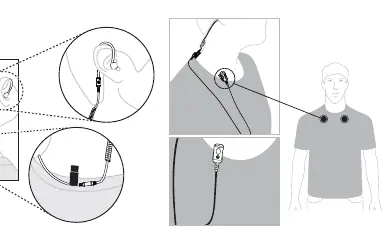
- Wearing Position: Ensure the earpiece is positioned comfortably in the ear.
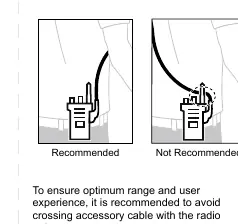
- Cable Management: To ensure optimum range and user experience, avoid crossing the accessory cable with the radio antenna.
Recommended Practice
Follow these guidelines to maintain the earpiece:
- Do not cover the microphone port, as this will degrade performance.
- Do not fill the earpiece with water.
- Clean the earpiece using a soft, damp cloth.
- Do not use the earpiece until it is completely dry.
- If you experience hearing discomfort, ringing in your ears, or muffled speech, stop using the earpiece and consult a doctor.
Replaceable Parts
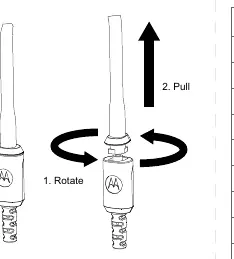
The acoustic tube is replaceable. To replace it, rotate the tube to unlock it, then pull it off the module. Various sizes of earpieces and ultra earplugs are available as spare parts, including Right and Left Earpieces in sizes S, M, and L.
Warranty Information
Motorola Solutions offers a warranty for this accessory. Please contact your Motorola Solutions dealer or point-of-purchase for detailed information. Note that the warranty is void if the customer replaces any parts other than those listed in the replaceable parts section.
Manufacturer information
Motorola
Practical help
Common problems
Hearing discomfort or muffled speech
Stop listening to the radio through the earpiece immediately and have your hearing checked by a doctor.
Poor microphone performance
Ensure the microphone port is not covered by clothing or other objects.
Cable interference
Avoid crossing the accessory cable with the radio antenna to ensure optimum range.
Before use
- Read the RF Energy Exposure and Product Safety Guide.
- Turn off the radio before attaching or detaching the earpiece.
- Check that the earpiece is clean and dry.
- Ensure the cable is routed away from the radio antenna.
Images and diagrams
- Earpiece Overview: Identifies the acoustic tube, metal clip, and PTT/Mic module.
- Cable Management: Shows the recommended routing to avoid the antenna.
- Acoustic Tube Replacement: Illustrates the rotate-and-pull method for removing the tube.
Model compatibility
- Compatible with radios supporting this surveillance kit configuration.

Manual page author
Emily Carter
User documentation editor
Prepares concise manual descriptions and highlights the most useful setup, operation, and maintenance information for readers.