Electronics / Two-Way Radios
User Guide for Motorola MU Series Talkabout 2-Way Radio
Comprehensive user guide for the Motorola MU Series Talkabout 2-Way Radio. Learn how to set up channels, use Bluetooth, configure VOX, access weather channels, and operate emergency features.
Quick answers from the manual
Quick answer
- The Motorola MU Series Talkabout is a 2-way radio supporting 22 GMRS/FRS channels, Bluetooth connectivity, NOAA weather alerts, and emergency signaling. p. 1, 2
Key actions
- Pairing Bluetooth p. 2
- Activating Emergency Alert p. 2
- Using Weather Receiver p. 2
First start
- Charge the NiMH battery pack for 14 hours before first use. p. 1
Problems and fixes
Radio chirps periodically
This indicates a low battery; recharge the battery pack.
p. 1Maintenance and reset
- Remove batteries before storing the radio for extended periods to prevent corrosion. p. 1
Technical specifications
| Parameter | Value | Meaning | Pages |
|---|---|---|---|
| Channels | 22 | Total available channels for communication. | p. 1 |
| Weather Channels | 11 | Number of NOAA weather frequencies available. | p. 2 |
| IP Rating | IP-54 | Dust and splash-proof rating. | p. 1 |
Where to find it in the PDF
- Control Buttons and Display p. 1
- Menu Options and Weather p. 2
Table of contents
Manual images
Click an image to enlargeQuick Guide from the Manual
The Motorola MU Series Talkabout is a 2-way radio designed for recreational use. It supports 22 channels, GMRS/FRS frequencies, and includes features like Bluetooth connectivity, NOAA weather alerts, and an emergency alert mode. Before first use, ensure the battery is fully charged for 14 hours.
Battery Installation
The radio can be powered by either the included NiMH battery pack or 3 AA alkaline batteries.
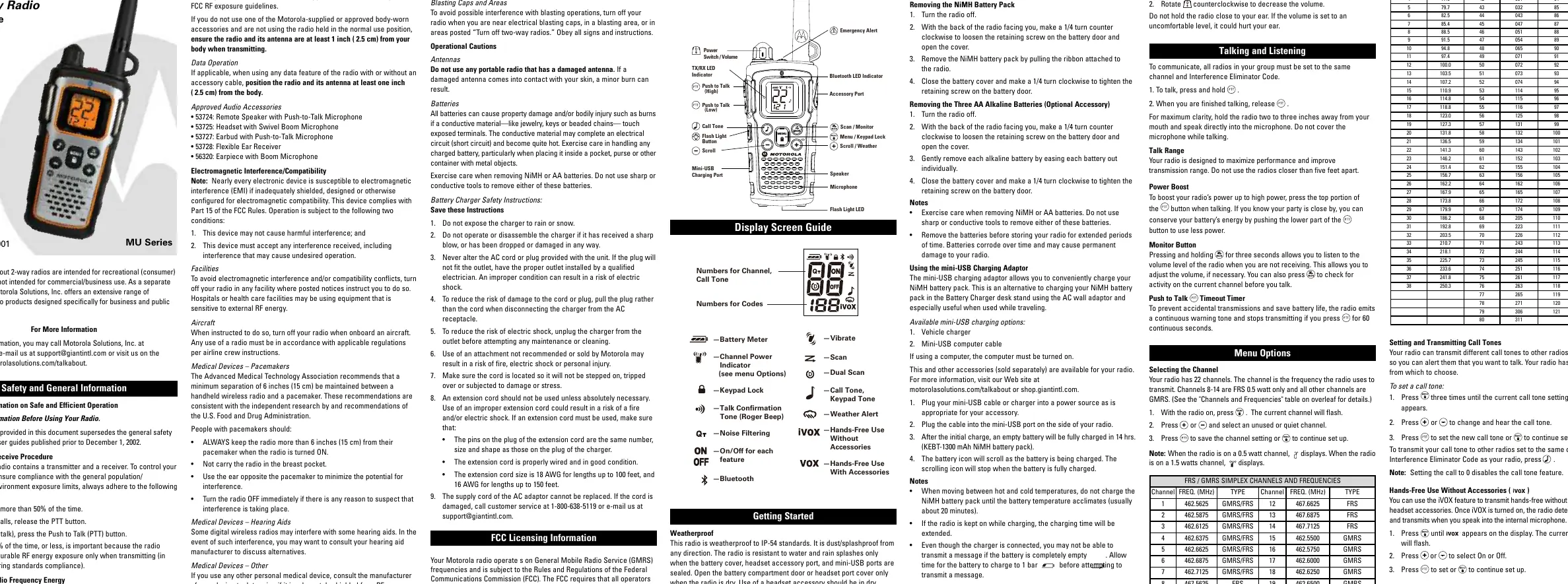
- Turn the radio off.
- Loosen the retaining screw on the battery door by turning it 1/4 turn counter-clockwise.
- For NiMH Pack: Insert the pack with the diagram facing you. Ensure the ribbon is underneath the pack for easy removal.
- For AA Batteries: Insert 3 AA batteries according to the polarity (+/-) shown inside.
- Close the battery cover and tighten the retaining screw.
Basic Operation
Volume and Power: Rotate the power switch/volume knob to turn the radio on or off and adjust the volume level.
Talking and Listening: To communicate, all radios in your group must be set to the same channel and Interference Eliminator Code.
- To talk, press and hold the Push to Talk (PTT) button.
- Release the PTT button to listen.
- Hold the radio 2-3 inches away from your mouth for best clarity.
Bluetooth Pairing
The MU Series radio works with qualified Bluetooth headsets and the Talkabout Wireless PTT POD 1693.
- With the radio on, briefly press the Bluetooth button until the icon appears.
- To pair a headset: Press and hold the '-' button for about 3 seconds until a tone sounds and the blue LED flashes. Follow the headset manufacturer's instructions to enter pairing mode.
- To pair the PTT Pod: Ensure the Pod is off. Press and hold the power button until the LED flashes blue and red. On the radio, press and hold the Bluetooth button for 3 seconds to enter pairing mode.
Emergency Alert
The Emergency Alert feature signals members in your group if you need urgent help.
- Press and hold the Emergency Alert button for 3 seconds.
- The radio will sound a warbling alert tone for 8 seconds and automatically advance the speaker volume to maximum.
- After the alert, any spoken words or incidental sounds will be transmitted to the group for 22 seconds.
Weather Receiver
Your radio can tune into NOAA Weather Radio broadcasts.
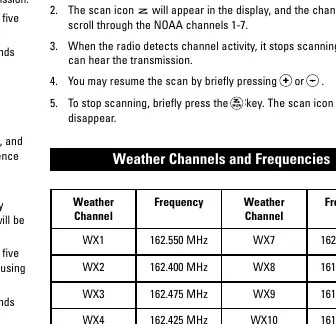
- To turn weather reception on, press and hold the Scan/Monitor button for 3 seconds.
- Press the Menu button to select the weather channel.
- Use the Scroll buttons to select the appropriate channel for your area.
- Press the Menu button to save the setting.
Scanning
Use the scan feature to search for transmissions on all 22 channels.
- Briefly press the Scan button to start scanning.
- The radio will scroll through channel and code combinations.
- When activity is detected, the radio stops scrolling.
- To stop scanning, briefly press the Scan button again.
Safety and Maintenance
The radio is weatherproof to IP-54 standards, meaning it is dust and splash-proof from any direction, provided the battery cover, headset port, and mini-USB port are sealed. Do not use the radio in potentially explosive atmospheres. Remove batteries before storing the radio for extended periods to prevent corrosion.
Manufacturer information
Motorola
Practical help
Common problems
Radio does not transmit
Check if the PTT button is held for more than 60 seconds (timeout). Ensure the battery is charged and the channel/code matches the receiving radio.
Interference from other radios
Use Interference Eliminator Codes (1-121) to filter out unwanted transmissions.
Bluetooth pairing fails
Ensure all other Bluetooth devices are switched off before pairing. Verify the radio is in pairing mode (blue LED flashing).
Before use
- Charge the NiMH battery pack for 14 hours before first use.
- Ensure the battery door is tightly screwed to maintain the IP-54 weatherproof seal.
- Verify all radios in your group are set to the same channel and Interference Eliminator Code.
- Remove batteries if storing the radio for an extended period.
Specs in practice
- Interference Eliminator Code
- Sub-codes (1-121) that allow you to block transmissions from unknown sources.
Images and diagrams
- Control Buttons: Includes PTT, Menu, Flashlight, and Volume/Power knob.
- Display Screen: Shows channel, battery meter, and active features like Bluetooth or Scan.
Model compatibility
- Compatible with Motorola Talkabout EM, MJ, MR, MT, and MU series for Emergency Alert.
- Bluetooth works with qualified Bluetooth SIG headsets and Talkabout Wireless PTT POD 1693.

Manual page author
Michael Turner
Technical manual editor
Reviews PDF manuals for structure, safety notes, and practical product details so readers can find the right information quickly.