HVAC / Towel Warmers
User Manual for Namron GULVOVN WiFi 2200W Heater
Quick guide for the Namron GULVOVN WiFi 2200W heater. Learn how to set up WiFi, adjust heating modes, use the timer, and operate safety features.
PDF source: NO · summary: English
Quick answers from the manual
Quick answer
- The Namron GULVOVN WiFi 2200W is an electric heater with WiFi control, multiple heating modes (High, Medium, Low, ECO), timer functionality, and child lock. It is intended for indoor use in well-insulated spaces. p. 2, 3
Key actions
- Set up WiFi p. 2
- Activate Child Lock p. 3
First start
- Plug in the device and turn on the power switch. The device will beep and enter standby mode. p. 2
Show 3 more answers Show less
Maintenance and reset
- The device has a memory function for settings, but these are lost if the power is disconnected. p. 3
Technical specifications
| Parameter | Value | Meaning | Pages |
|---|---|---|---|
| Power | 2200W | Maximum heating output | p. 2 |
| Voltage | 220-240V~ 50Hz | Operating voltage | p. 2 |
| IP Rating | IP22 | Ingress protection rating | p. 2 |
Where to find it in the PDF
- Operation and WiFi Setup p. 2
- Settings and Functions p. 3
- Safety and Icons p. 4
Table of contents
Manual images
Click an image to enlargeQuick guide from the manual
The Namron GULVOVN WiFi 2200W is an electric heater designed for indoor use. It features WiFi connectivity for remote control via the Smart-Life app, multiple heating modes, a timer, and a child lock function. The device is equipped with an automatic shutoff feature after 300 days of continuous operation for safety.
WiFi Setup
To connect the heater to your network:
- Ensure Bluetooth and WiFi are enabled on your mobile device.
- Download the Smart-Life app and create an account.
- Plug in the device and turn on the power switch.
- In standby mode, press and hold the On/Off button for approximately 3 seconds until the WiFi icon flashes rapidly.
- Follow the instructions in the app to add the device.
- When connected, the WiFi icon will remain lit.
Operation
Switching On/Off: Plug in the device and turn on the power switch. The device will beep and enter standby mode. Touch the On/Off button to switch the device on or off. Note that the air outlet closes slowly when switching off; do not place hands inside during this process.

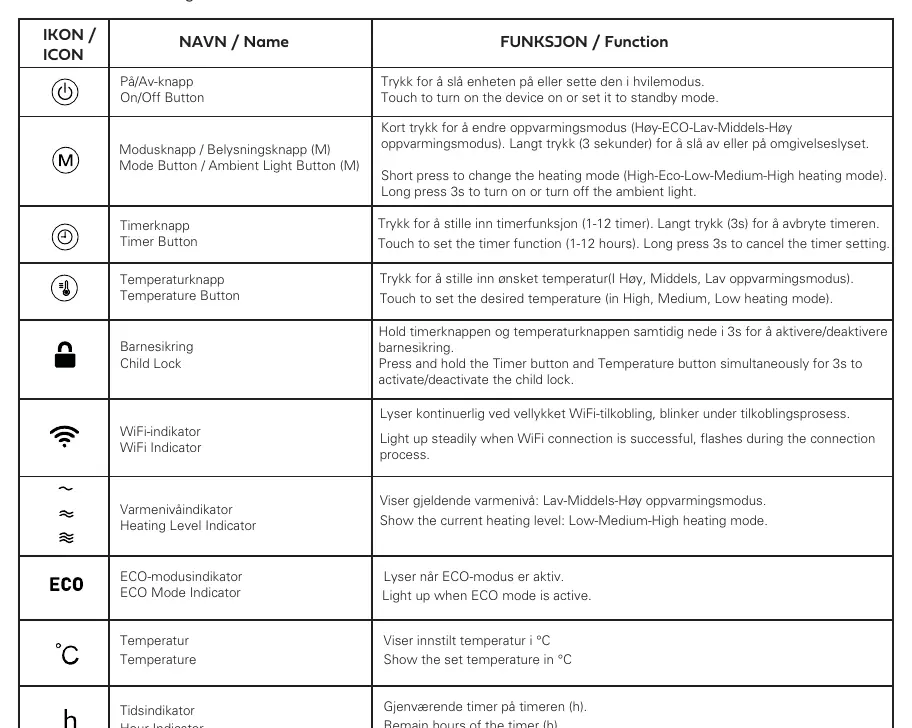
Heating Modes: Press the Mode button to cycle through:
- High: Strongest output, adjustable temperature (17°C-35°C).
- Medium: Medium output, adjustable temperature (17°C-35°C).
- Low: Lowest output, adjustable temperature (17°C-35°C).
- ECO: Optimizes energy consumption with a fixed target temperature of 20°C.
Temperature Adjustment: In High, Medium, or Low modes, use the Temperature button to set the desired temperature between 17°C and 35°C in 1°C increments.
Timer:
- Switch-off timer: In operating mode, touch the Timer button to set the automatic switch-off time (1-12 hours).
- Switch-on timer: In standby mode, touch the Timer button to set the automatic switch-on time (1-12 hours).
- To cancel, press and hold the Timer button for 3 seconds.
Safety and Maintenance
Child Lock: Press and hold the Timer and Temperature buttons simultaneously for 3 seconds to activate or deactivate the lock.
Safety Notices:
- Do not cover the heater surface.
- Place at a safe distance from flammable materials.
- Disconnect power during maintenance.
- For indoor use only.
- The light source must only be replaced by the manufacturer or a qualified service agent.
Manufacturer information
Namron AS
Practical help
Common problems
WiFi connection fails
Ensure Bluetooth and WiFi are enabled on your phone. Hold the On/Off button for 3 seconds in standby mode until the WiFi icon flashes.
Settings are lost
If the power cord is unplugged or there is a power outage, the device reverts to factory default settings (High mode, 21°C).
Heater does not heat in ECO mode
In ECO mode, the device only heats if the ambient temperature is below 20°C. If the room is already warm, it may enter standby.
Before use
- Ensure the heater is placed on a flat, stable surface.
- Check that the power cord is fully unrolled.
- Verify the device is not covered by any material.
- Download the Smart-Life app if you intend to use WiFi features.
Show more Show less
Images and diagrams
- Fig 1: Shows the air outlet rising to the highest position upon startup.
- Fig 2: Shows the air outlet closing sequence when the device is switched off.
Model compatibility
- Requires 220-240V~ 50Hz power supply.
- WiFi functionality requires 2.4GHz network compatibility (implied by standard Smart-Life requirements).

Manual page author
Michael Turner
Technical manual editor