Toys / RC Models & Drones
New Bright 1688U R/C Vehicle
Quick guide for the New Bright 1688U R/C vehicle. Learn how to charge the internal battery, install transmitter batteries, operate the vehicle, and troubleshoot common issues.
Table of contents
Manual images
Click an image to enlargeQuick guide from the manual
This guide provides essential instructions for operating your New Bright 1688U R/C vehicle. Key procedures include charging the internal battery via USB, installing transmitter batteries, and performing basic maintenance. Always ensure the vehicle is switched to the OFF position before charging.
Component Checklist
- 1 R/C Vehicle with USB cord
- 1 Transmitter
- 2 AA Batteries (for transmitter)
Vehicle Features and Functions
The vehicle is equipped with several key components:
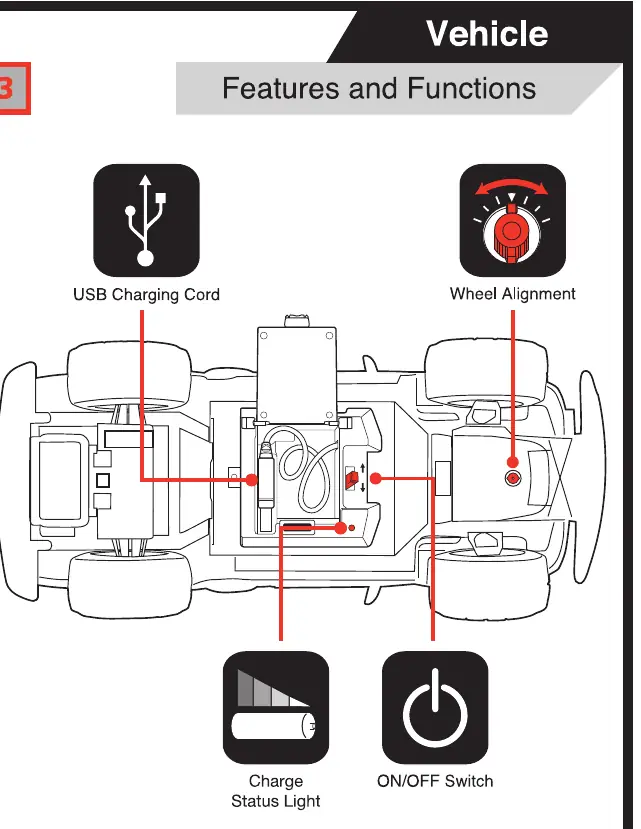
- USB Charging Cord: Located on the underside of the vehicle.
- Wheel Alignment Dial: Located on the bottom of the chassis; use this if the vehicle pulls to the left or right while driving forward.
- Charge Status Light: Indicates charging status.
- ON/OFF Switch: Located on the underside of the vehicle.
Charging the Battery
The vehicle features an internal Lithium-ion battery.
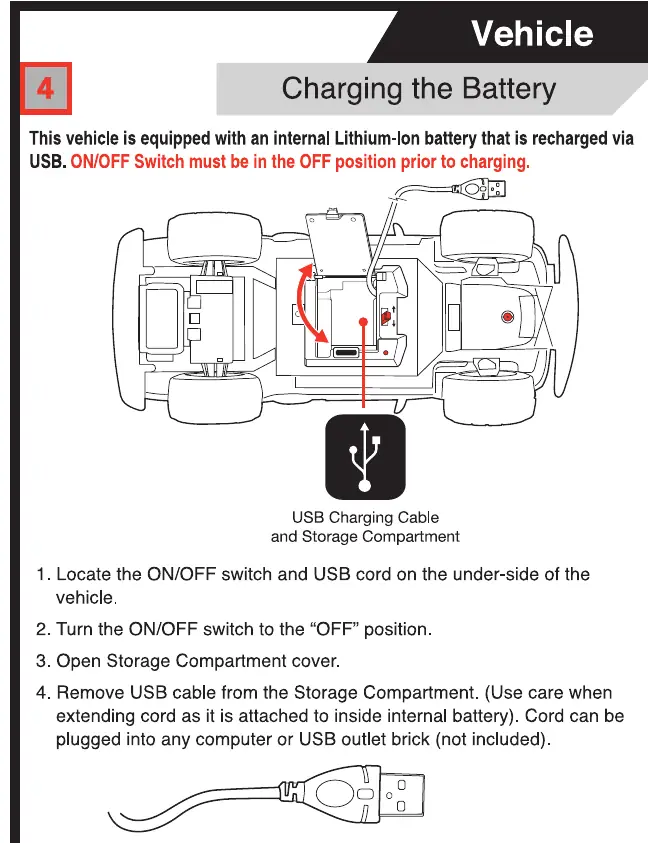
- Locate the ON/OFF switch and USB cord on the underside of the vehicle.
- Turn the ON/OFF switch to the OFF position.
- Open the storage compartment cover.
- Remove the USB cable from the storage compartment.
- Plug the cable into any computer or USB outlet brick (not included).
- The LED under the vehicle will turn on while charging.
- Charging is completed in approximately 1 hour. The LED will turn off when fully charged.
- Return the cord and secure the storage lid before operating.
Transmitter Battery Installation
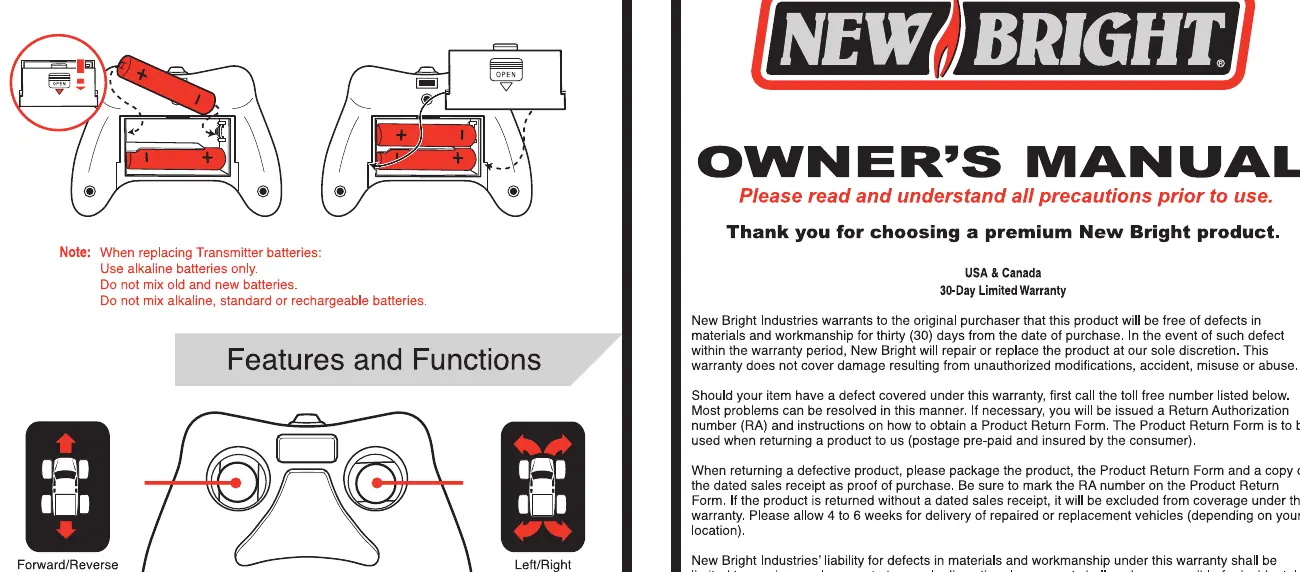
- Open the battery compartment cover on the transmitter.
- Insert 2 "AA" batteries, ensuring the (+) and (-) markings match the compartment.
- Replace the cover.
- Use alkaline batteries only. Do not mix old and new batteries or different types of batteries.
Proper Use and Care
- Switch OFF: Always turn the vehicle OFF when not in use.
- Cleaning: Wipe the body with a soft rag or tack cloth. Do not use chemicals or water to clean.
- Environment: Avoid driving in dirt, sand, or water. Brush away any dirt that gets trapped in the wheels.
- Storage: Remove batteries from the transmitter when not in use.
Troubleshooting
- Vehicle does not move or moves slowly: Ensure fresh alkaline batteries are installed in the transmitter with correct polarity. Check if the vehicle is switched ON and fully charged.
- Reduced range or interference: Ensure there is no radio interference. Keep the vehicle away from radio towers, electrical lines, or tall buildings.
Manufacturer information
New Bright Industrial Co., Ltd.
Practical help
Common problems
Vehicle does not move or moves slowly
Check that transmitter batteries are fresh and installed correctly. Ensure the vehicle is switched ON and the internal battery is fully charged.
Vehicle moves by itself or has reduced range
Avoid radio interference. Operate the vehicle away from radio towers, electrical lines, or tall buildings.
Before use
- Ensure transmitter has 2 fresh AA batteries installed.
- Ensure the vehicle is switched to the OFF position before charging.
- Charge the internal battery via USB for approximately 1 hour.
- Check wheel alignment if the vehicle pulls to one side during operation.
Specs in practice
- Charging Time
- Approximately 1 hour for a full charge.
- Transmitter Frequency
- 2.4GHz technology, allowing up to 6 vehicles to be raced simultaneously.
- Battery Type
- Internal Li-ion battery (vehicle); 2x AA batteries (transmitter).
Images and diagrams
- The USB charging cable is stored in a compartment on the underside of the vehicle.
- The wheel alignment dial is located on the bottom of the chassis between the front wheels.
Model compatibility
- The transmitter uses 2.4GHz technology, which allows up to 6 vehicles to be raced at the same time without interference.

Manual page author
David Miller
Documentation analyst
Organizes user manual content into clear summaries, with attention to model details, product context, and everyday usability.