Power / Power Banks
User Manual for Newell Powerbank Vayu 27000 mAh PD 140W
Quick guide for the Newell Powerbank Vayu 27000 mAh PD 140W. Learn about safety, charging specifications, display features, and maintenance to ensure optimal performance.
Table of contents
Manual images
Click an image to enlargeQuick guide from the manual
The Newell Powerbank Vayu 27000 mAh PD 140W is a high-capacity portable charger designed for fast charging of various devices. Before first use, ensure the power bank is fully charged. For long-term storage, keep the device at approximately 50% charge and recharge it every 3-4 months to maintain battery health. Do not use the device in temperatures below 0°C or above 40°C.
Product Description
The power bank features a power switch on the side, an LED indicator, and multiple ports for versatile charging:
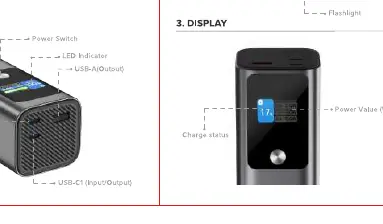
- USB-C1/C2 (Input/Output): Supports high-speed PD 3.1 charging.
- USB-A (Output): Standard USB output for compatible devices.
- LED Indicator: Provides visual feedback on the power bank's status.
Display
The integrated display provides real-time information about the power bank's operation:
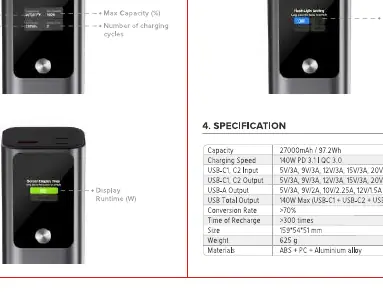
- Temperature: Monitors the internal temperature.
- Value total output: Shows the current power output in Watts (W).
- Max Capacity (%): Indicates the remaining battery percentage.
- Number of charging cycles: Tracks the usage of the battery.
- Display Runtime (W): Shows the current power consumption or runtime.
Specifications
The device offers the following technical capabilities:
- Capacity: 27000mAh / 97.2Wh
- USB-C1/C2 Input/Output: 5V/3A, 9V/3A, 12V/3A, 15V/3A, 20V/5A, 28V/5A (140W)
- USB-A Output: 5V/3A, 9V/2A, 12V/1.5A, 10V/2.25A (22.5W)
- Total Output: 140W Max
- Weight: 625g
- Dimensions: 159 x 54 x 51 mm
Safety and Maintenance
To ensure safety and longevity of the device, follow these guidelines:
- Do not expose the device to water or other sources of moisture.
- Do not drop, hit, or shake the device to avoid internal damage.
- Keep the device away from fire and other heat sources.
- Do not leave metal objects near the charging/discharging ports to prevent short circuits.
- Use original cables for optimal performance and safety.
Practical help
Common problems
Device not charging
Check if the cable is securely connected and ensure the power bank has sufficient charge.
Battery performance degradation
Ensure the device is not stored for long periods without charging; charge every 3-4 months.
Device overheating or not working
Do not use the power bank in temperatures below 0°C or above 40°C.
Before use
- Charge the power bank fully before the first use.
- Check that the charging cable is compatible and in good condition.
- Ensure the environment temperature is within the safe operating range (0°C - 40°C).
Specs in practice
- Total Output
- 140W Max, the maximum power the device can deliver simultaneously.
Images and diagrams
- The power switch is located on the side of the unit.
- USB-C ports are bidirectional, supporting both input and output.
- The display provides real-time metrics including temperature, output power, and battery percentage.
Model compatibility
- Supports PD 3.1 140W charging standard.
- USB-A port supports up to 22.5W output.

Manual page author
David Miller
Documentation analyst
Organizes user manual content into clear summaries, with attention to model details, product context, and everyday usability.