Power / Power Banks
User Manual for Powerology 15000mAh Mini Power Bank
Quick guide for the Powerology 15000mAh Mini Power Bank (PPBCHA60). Learn how to charge your devices, understand the TFT display, and follow safety precautions.
Table of contents
Manual images
Click an image to enlargeQuick guide from the manual
The Powerology 15000mAh Mini Power Bank is a high-capacity, compact charging solution featuring a smart TFT display and built-in USB-C cable. It supports fast charging via PD 45W and QC 22.5W standards, making it suitable for smartphones, tablets, and laptops.
Product Overview
This device is designed for portability and convenience. It includes a smart TFT display that provides real-time monitoring of battery levels, power output, and temperature. The unit features multiple charging ports and a built-in USB-C cable to simplify your charging experience.
Specifications
- Model: PPBCHA60
- Battery Capacity: 15000mAh
- USB-C In/Out: 5V/3A, 9V/2A, 12V/1.5A, 15V/3A, 20V/2.25A (PD 45W Max)
- USB-A Output: 5V/3A, 9V/2.22A, 12V/1.67A (QC 22.5W Max)
- Total Output: 5V/3A, 15W Max
- Dimensions: 38 x 71 x 71mm
- Weight: 280g
Charging Instructions
Charging other devices
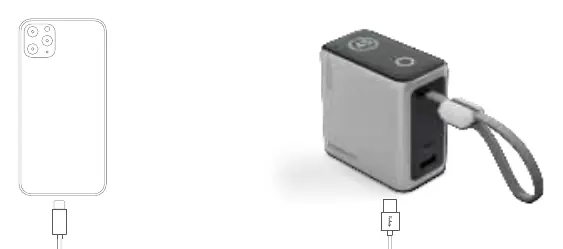
Connect your device to the power bank using the built-in USB-C cable or the available USB ports. The power bank will automatically begin charging your device.
Charging the Power Bank
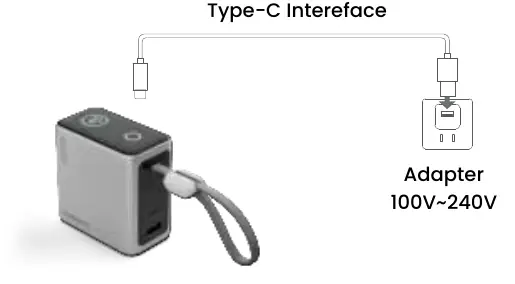
Connect the power bank to a power source using a wall adapter (100V-240V) via the Type-C interface. The LED display will flash while charging and show 100% when fully charged.
Status Display
The TFT display provides essential feedback during operation:
- Charging other devices: The residual power percentage shown on the display will decrease gradually.
- Charging the power bank: The display will flash, and the residual power percentage will increase. It will show 100% when the charging process is complete.
Safety Precautions
- Do not use the product in damp environments to prevent electrical short circuits.
- Keep the device away from high temperatures, high pressure, and fire sources.
- Do not disassemble or modify the product.
- Ensure the device is not dropped into water or exposed to moisture.
- Use only the correct battery pack model for any necessary replacements.
Warranty and Contact
Products purchased directly from the Powerology website or store come with a 24-month warranty. Products bought from verified retailers are eligible for a 12-month warranty. You can extend your warranty by visiting powerology.me/warranty and submitting the required details within 48 hours of purchase.
For support, contact: [email protected]. Website: powerology.me. Instagram: powerology_official. Facebook: powerology.ME.
Official resources from the manual
Manufacturer information
Powerology
Practical help
Common problems
Power bank not charging
Ensure the wall adapter is functional and supports 100V-240V input. Check the connection to the Type-C interface.
Device not charging
Verify that the cable is securely connected to both the power bank and your device. Check the power bank's battery level on the TFT display.
Before use
- Check the battery level on the TFT display.
- Ensure you are using a compatible cable for your device if not using the built-in cable.
- Verify the power source is between 100V-240V when recharging the power bank.
- Inspect the device for any physical damage before use.
Images and diagrams
- Charging other devices: Connect your device to the power bank using the built-in cable or USB ports.
- Charging the power bank: Connect the power bank to a wall adapter (100V-240V) using the Type-C interface.
Model compatibility
- Compatible with smartphones, tablets, and laptops.
- Supports fast charging for devices compatible with PD 45W and QC 22.5W.

Manual page author
Michael Turner
Technical manual editor
Reviews PDF manuals for structure, safety notes, and practical product details so readers can find the right information quickly.