Electronics / Speakers & Soundbars
User Manual for Niceboy ION Cruncher C4 2-Slice Toaster
Quick guide for the Niceboy ION Cruncher C4 2-Slice Toaster. Learn how to operate, clean, and maintain your toaster, including browning settings and safety precautions.
Quick answers from the manual
Quick answer
- The Niceboy ION Cruncher C4 is a 2-slice toaster. Before first use, run it empty 3 times to eliminate any manufacturing odors. p. 8
Key actions
- Run empty 3 times p. 8
- Clean crumb tray p. 8
First start
- Run the toaster empty 3 times and ventilate the room. p. 8
Show 3 more answers Show less
Maintenance and reset
- Pull out the crumb tray and pour the crumbs into the bin. p. 8
Technical specifications
| Parameter | Value | Meaning | Pages |
|---|---|---|---|
| Power | 700-850 W | Power consumption | p. 9 |
| Browning levels | 7 | Number of browning levels | p. 9 |
Where to find it in the PDF
- English User Manual p. 8, 9, 10
Table of contents
Quick guide from the manual
Before using your Niceboy ION Cruncher C4 toaster for the first time, it is essential to run the device empty at least 3 times. This process may produce a slight smell or smoke, so ensure the room is well-ventilated during this initial setup.
Device Overview
The toaster features the following controls:
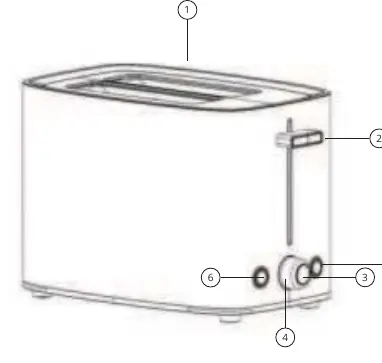
- Slot for inserting pastry
- Device switch
- Cancel button
- Browning level knob
- Defrost button
- Reheat button
Operation
Before inserting bread, set the desired browning level using the knob. Levels range from 1 (light browning) to 6 (heavy browning). If you operate the toaster in short intervals, the residual heat may cause subsequent batches of bread to brown more quickly at the same setting.
- Cancel: Interrupts the roasting process.
- Reheat: Heats already toasted pastries or finishes the baking process.
- Defrost: Toasts frozen pastries.
Cleaning and Maintenance
Always unplug the device and allow it to cool down completely before cleaning. Use only a slightly damp cloth for cleaning; do not use abrasive or aggressive cleaning agents. Pull out the crumb tray and empty the crumbs into a bin. Any other maintenance should be performed by a professional.
Safety Instructions
- The appliance should be operated by an adult.
- Keep the device away from children under 8 years of age.
- Do not use the product if it has been damaged by dropping, outdoor use, or water ingress.
- Do not touch the appliance with wet hands.
- Do not use the product in extreme heat (above 40 °C) or extreme cold (below 4 °C).
- Keep hair, clothing, and fingers away from operating parts.
- Do not use the power cord to pull or carry the device.
Technical Specifications
The toaster operates on 220-240 V ~ 50/60 Hz with a power consumption of 700-850 W. It features 2 slots and 7 browning levels.
Practical help
Common problems
First use smell or smoke
Run the toaster empty at least 3 times and ensure the room is well-ventilated.
Bread browning too much in subsequent batches
Residual heat from previous use can increase browning; consider lowering the setting for subsequent batches.
Before use
- Unpack the toaster
- Place on a stable surface
- Run the toaster empty 3 times
- Ventilate the room during the first run
- Set the browning level before inserting bread
Show more Show less
Specs in practice
- Browning levels
- Adjustable from 1 (light) to 6 (heavy)
Images and diagrams
- 1. Slot for inserting pastry
- 2. Device switch
- 3. Cancel button
- 4. Browning level knob
- 5. Defrost button
Model compatibility
- Suitable for 2 slices of bread or pastry
- Not intended for use by children under 8 years without supervision

Manual page author
David Miller
Documentation analyst