Electronics / Speakers & Soundbars
User Manual for Niceboy PARTY BOSS 200W Party Speaker
Comprehensive user guide for the Niceboy PARTY BOSS 200W party speaker. Includes setup, Bluetooth pairing, TWS mode, recording, equalizer settings, and technical specifications.
Quick answers from the manual
Quick answer
- The Niceboy PARTY BOSS 200W is a portable party speaker. To turn it on, use the power switch on the rear panel. It defaults to Bluetooth mode; use the MODE button to switch between Bluetooth, USB, SD, AUX, and FM radio. p. 14
Key actions
- Pairing Bluetooth p. 16
- Recording p. 18
- TWS Pairing p. 15
First start
- Charge the speaker using the supplied cable. p. 14
Show 2 more answers Show less
Technical specifications
| Parameter | Value | Meaning | Pages |
|---|---|---|---|
| RMS performance | 200W | Power output | p. 18 |
| Battery life | 8 hours | Playback time | p. 18 |
| Charging time | 4 hours | Time to full charge | p. 18 |
Where to find it in the PDF
- Upper Panel Controls p. 14, 15
- Remote Controller p. 16
- Technical Parameters p. 18
Table of contents
Manual images
Click an image to enlargeQuick Guide
The Niceboy PARTY BOSS 200W is a powerful party speaker. To begin, connect the supplied cable to the socket on the rear panel to charge the integrated battery. The charging LED on the top panel will turn red while charging and green when fully charged. To turn on the speaker, use the power switch on the rear panel. The speaker defaults to Bluetooth mode upon startup.
Product Description
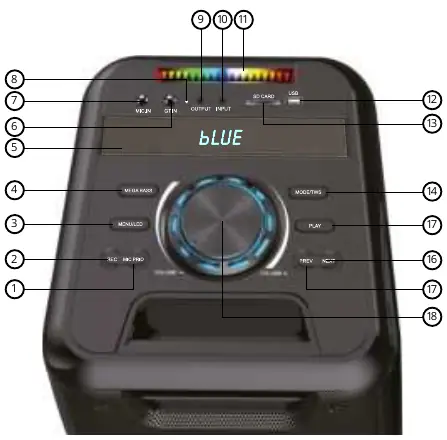
Upper Panel
The upper panel contains the main controls and inputs:
- MIC PRIO: Prioritizes the microphone by muting music when speaking.
- REC: Activates recording for wired or wireless microphones.
- MENU/LED: Adjusts bass, treble, microphone volume, and echo. Long press to toggle LED effects.
- MEGABASS: Toggles the mega bass effect.
- Inputs: Includes GT.IN (guitar), MIC.IN (microphone), AUX (3.5mm), USB, and SD card slot.
- MODE/TWS: Short press to select source (Bluetooth, USB, SD, AUX, FM). Long press for TWS pairing of two speakers.
- Playback Controls: PLAY (start/pause/scan), NEXT, and PREV buttons.
- VOLUME: Main knob for adjusting speaker volume.
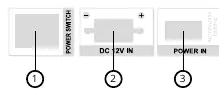
Rear Panel
- POWER SWITCH: Turns the speaker on and off.
- DC 12V IN: For connecting an external 12V battery.
- POWER IN: Connection for the AC power cord.
Operation Modes
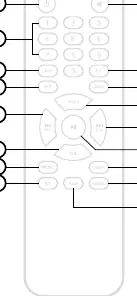
Bluetooth Mode
The speaker enters Bluetooth mode automatically. If in another mode, press the MODE button briefly. Search for "Niceboy PARTY Boss 200W" on your device to pair. A successful connection is confirmed by an acoustic prompt and the word "BLUE" appearing on the display.
AUX Mode
Ensure the speaker is off. Connect a 3.5mm jack cable to the INPUT. Turn on the speaker and press the MODE button to switch to AUX mode. The display will show "LINE".
USB and SD Card Modes
Insert a USB drive or SD card into the respective slots. The speaker will automatically switch to the appropriate mode. Use the PLAY button to start/pause playback and the NEXT/PREV buttons to navigate tracks. The device supports up to 32GB capacity and MP3/WAV formats.
FM Radio Mode
Use the MODE button to select FM radio. Press the PLAY button to scan for available stations, which will be automatically stored as presets. Use the NEXT/PREV buttons or the remote control number buttons to switch between stations.
Advanced Features
Equalizer
Toggle between basic equalizer settings using the MEGABASS button. For custom settings, press the MENU/LED button to select L (bass) or H (treble) and use the NEXT/PREV buttons to adjust values from -8 to 8.
Wireless Microphone
Insert AA batteries into the microphone and turn it on using the switch on top. It connects automatically. Adjust volume and echo by pressing the MENU/LED button on the speaker to find N (volume) and E (echo), then use the NEXT/PREV buttons to adjust.
Recording
Connect a microphone or instrument. Insert a USB drive or SD card. Press the REC button to start recording. Press REC again to stop. The speaker will automatically play the recorded track.
Official resources from the manual
Practical help
Common problems
Speaker not in Bluetooth mode
Briefly press the MODE button to switch to Bluetooth mode.
Microphone volume/echo not adjustable
Press the MENU/LED button to find N (volume) and E (echo) on the display, then use NEXT/PREV buttons to adjust.
Recording not working
Ensure a USB drive or SD card is inserted and contains at least one MP3 or WAV file.
Before use
- Charge the speaker fully (red LED turns green)
- Insert AAA batteries into the remote control
- Insert AA batteries into the wireless microphone
- Ensure the speaker is switched off before connecting instruments
Show more Show less
Specs in practice
- RMS performance
- 200W, the continuous power output of the speaker.
- Battery life
- Up to 8 hours of playback on a full charge.
Images and diagrams
- Upper panel shows controls for volume, modes, playback, and inputs.
- Rear panel shows power switch, DC 12V input, and AC power input.
Model compatibility
- Supports USB and SD cards up to 32GB.
- Supports MP3 and WAV audio formats.
- TWS mode only works between two Niceboy PARTY Boss 200W speakers.

Manual page author
David Miller
Documentation analyst