Electronics / Speakers & Soundbars
Niceboy PARTY BOY 2 100W Party Speaker User Manual
Quick start guide and user manual for the Niceboy PARTY BOY 2 100W party speaker. Learn how to pair via Bluetooth, use TWS mode, connect instruments, charge devices, and adjust sound and lighting settings.
Table of contents
Manual images
Click an image to enlargeQuick Start Guide
Before using your Niceboy PARTY BOY 2 100W for the first time, it is recommended to fully charge the battery. Charging takes approximately 6 hours using a 5V/2A adapter. To turn the speaker on or off, press and hold the power button (1) for approximately 3 seconds. Upon powering on, the speaker defaults to Bluetooth mode.
Product Description
The speaker features a control panel on the top and an input panel on the front/side:
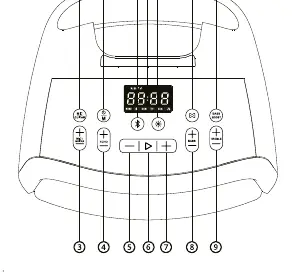
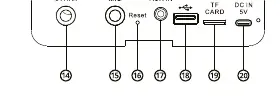
- 1. Power / Mode change
- 2. Microphone/Guitar control switch
- 3. Microphone/Guitar volume control
- 4. Microphone ECHO effect control
- 5. Decrease volume / Previous song
- 6. Play / Pause
- 7. Increase volume / Next song
- 8. Equalizer for microphone bass
- 9. Equalizer for microphone treble
- 10. Bass boost button
- 11. Multisession button
- 12. Lighting control
- 13. Bluetooth button
- 14. 6.3mm input for guitar/instrument
- 15. 6.3mm input for microphone
- 16. Speaker reset
- 17. 3.5mm AUX input
- 18. USB input / Powerbank output
- 19. Micro SD card slot
- 20. USB-C charging input
Bluetooth Mode
The speaker automatically enters Bluetooth mode when turned on. If in another mode, press button (1) to switch. Activate Bluetooth on your device and select "Niceboy PARTY Boy 2 100W" from the list. An acoustic prompt confirms successful pairing, and the Bluetooth symbol will remain lit on the display.
Playback Modes
The speaker supports multiple playback sources:
- AUX Mode: Insert a 3.5mm jack cable into the input (17). The speaker switches automatically.
- USB Mode: Insert a USB flash drive into the slot (18).
- Micro SD Card Mode: Insert a card into the slot (19).
In all modes, use button (6) to play/pause, and buttons (5) and (7) to adjust volume (short press) or skip tracks (long press).
Advanced Features
TWS Function
To connect two speakers in stereo:
- Turn off Bluetooth on your mobile device.
- Turn on both speakers and press and hold the Bluetooth button (13) on both.
- The primary speaker will display 'A' and the secondary 'B'.
- Activate Bluetooth on your device and select "Niceboy PARTY Boy 2 100W".
Niceboy Multisession
You can connect up to 98 additional speakers:
- Connect your device to the first speaker via Bluetooth.
- Press and hold the Multisession button (11) until 'A' appears.
- Turn on the next speaker and press and hold the Multisession button (11) until 'B' appears. Repeat for additional speakers.
Bass Boost and Lighting
Press the Bass Boost button (10) to toggle between standard and boosted sound. Use the Lighting button (12) to cycle through 4 rotating light modes or turn them off. Long press (12) to activate monochrome mode.
Microphone and Instruments
Ensure the speaker is off before connecting. Connect your microphone to input (15) or instrument to input (14). Use button (3) to control volume and button (2) to switch between microphone and instrument controls.
Powerbank Function
You can charge external devices by connecting a USB-A cable to the USB port (18). The output is 5V/2A.
Factory Reset
If technical issues occur, insert a narrow object (needle/pin) into the reset opening (16) while the speaker is on. The speaker will turn off automatically.
Technical Specifications
- BT Version: 5.1 + EDR
- System Power: 100W
- Battery: 5200 mAh
- Charging Time: 6 hours
- Playback Time: 20 hours at 50% volume
- Protection: IPX4
Practical help
Common problems
Speaker will not pair via Bluetooth
Ensure Bluetooth is active on your device and select 'Niceboy PARTY Boy 2 100W' from the list of available devices.
Speaker is inactive during phone calls
The speaker is inactive during calls. Use the connected phone directly to make or receive the call.
TWS connection fails
Turn off Bluetooth on your device, turn on both speakers, and press and hold the Bluetooth button (13) on both speakers simultaneously.
Before use
- Charge the speaker fully (approx. 6 hours) before first use.
- Use a quality 5V/2A adapter for charging.
- Turn off the speaker before connecting a microphone or musical instrument.
- Ensure the microphone is switched to the ON position.
Show more Show less
Specs in practice
- System Power
- 100W total output power.
- Battery Life
- Up to 20 hours of playback at 50% volume.
- Degree of Protection
- IPX4 rating, meaning the device is splash-proof.
Images and diagrams
- Buttons (5) and (7): Short press for volume, long press for track navigation.
- Button (1): Power on/off and mode change.
- Button (11): Multisession mode activation.
- Button (12): Lighting mode control.
Model compatibility
- Supports MP3, WAV, WMA, and FLAC file formats.
- USB flash drive maximum capacity: 256GB.
- Micro SD card maximum capacity: 64GB.

Manual page author
David Miller
Documentation analyst