Electronics / Televisions
User Manual for Philips 19HFL3007D Professional LED TV
Comprehensive user guide for the Philips 19HFL3007D Professional LED TV. Includes specifications, connectivity details, and key features for hospitality use.
Quick answers from the manual
Quick answer
- The Philips 19HFL3007D is a 19-inch professional LED TV designed for hospitality environments, featuring SmartInstall, MyChoice, and energy-saving technologies. p. 1, 2, 3
Key actions
- Remotely configure and install TVs using the SmartInstall web tool. p. 2
Technical specifications
| Parameter | Value | Meaning | Pages |
|---|---|---|---|
| Screen Size | 19 inch | Diagonal screen size | p. 3 |
| Resolution | 1366 x 768p | Panel resolution | p. 3 |
| Power | 220-240 V, 50/60 Hz | Mains power requirement | p. 3 |
Show 1 more answers Show less
Where to find it in the PDF
- Product Highlights p. 2
- Specifications p. 3
Table of contents
Manual images
Click an image to enlargeQuick guide from the manual
The Philips 19HFL3007D is a 19-inch professional LED TV designed specifically for hospitality environments such as hotels, hospitals, and prisons. This guide provides an overview of its key features, connectivity options, and technical specifications to assist with installation and daily operation.
Product Overview
The TV is equipped with several professional-grade features to enhance guest experience and reduce operational costs:
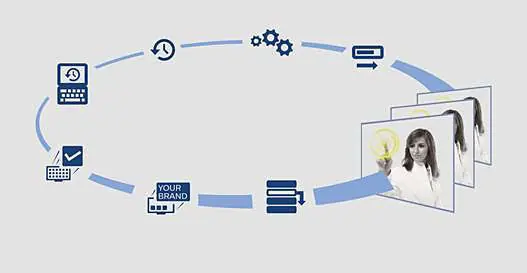
- SmartInstall: Allows for remote configuration and installation of TVs without needing to visit individual rooms.
- MyChoice: A system to offer premium TV channels to guests, creating an additional revenue stream.
- SmartInfo: Provides hotel or city information to guests through a dedicated Hotel Info page.
- Green Button: Enables guests to save energy by dimming the backlight or switching off the screen while listening to the radio.
- ThemeTV Lite: An easy-to-use interface for navigating channels, news, and hotel information.
Connectivity
The TV features both rear and side connector panels to accommodate various devices:
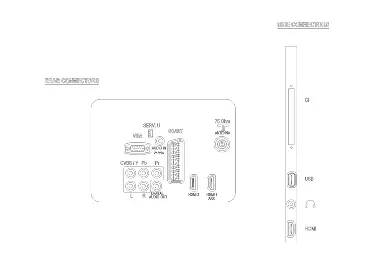
- Rear Connectors: Includes inputs for VGA, Scart (RGB/CVBS), Antenna (75 ohm), YPbPr (Component), and HDMI.
- Side Connectors: Provides easy access to CI+ (Common Interface), USB, Headphone output, and additional HDMI ports.
Technical Specifications
Key technical details for the 19HFL3007D model:
- Display: 19-inch LED HD TV, 1366 x 768p resolution, 16:9 aspect ratio.
- Power: 220-240 V, 50/60 Hz. Standby power consumption is less than 0.3 W.
- Sound: 6 W (2 x 3 W) output power with Auto Volume Leveller and Incredible Surround.
- Wall-mount: Compatible with 75 x 75 mm VESA mounts.
- Weight: 2.75 kg (without stand), 2.98 kg (with stand).
Installation and Safety
The TV is designed with safety in mind, featuring a flame-retardant housing. It supports Plug and Play installation and includes advanced hotel mode settings such as volume limitation, keyboard lock-out, and security menu access. Firmware can be upgraded via USB or RF.
Manufacturer information
Philips
Practical help
Common problems
High power consumption
Use the Green Button to enable higher backlight dimming or switch off the screen when listening to the radio.
Need to update hotel info or channels
Use the SmartInstall web tool to remotely configure and install TVs without visiting rooms.
Guests want to use personal devices
Use the Integrated Connectivity Panel to connect personal devices directly to the TV.
Before use
- Ensure the TV is placed on a stable surface or wall-mounted using a 75x75 mm mount.
- Connect the antenna to the 75 ohm coaxial input.
- Connect the power cord to a 220-240 V, 50/60 Hz outlet.
- Check that the remote control has batteries installed.
- Verify the TV is in the correct mode (Hotel, Hospital, or Prison) for your environment.
Show more Show less
Specs in practice
- Panel resolution
- 1366 x 768p (HD Ready).
- Aspect ratio
- 16:9 widescreen format.
- Power consumption
- 20 W (EU Energy Label).
Images and diagrams
- The rear connector panel includes inputs for VGA, Scart, Antenna, YPbPr, and HDMI.
- The side connector panel provides easy access to CI+, USB, Headphone out, and HDMI.
Model compatibility
- Compatible with DVB-T and DVB-C MPEG 2/4 signals.
- Supports firmware upgrades via USB or RF.

Manual page author
David Miller
Documentation analyst