Electronics / Monitors
User Manual for Philips 22BDL7439L Professional LED Display
Comprehensive user guide for the Philips 22BDL7439L Professional LED Display. Includes installation instructions, safety guidelines, dehumidification function setup, troubleshooting, and technical specifications.
Quick answers from the manual
Quick answer
- The 22BDL7439L is a professional LED display. This manual covers installation, safety, dehumidification settings, and troubleshooting. p. 1, 14, 23, 34
Key actions
- Install the display using the provided wall mount kit and follow the daisy-chaining instructions for power and data. p. 14, 20
- Configure the dehumidification function using Nova LCT V5.4.2 Plus software to prevent moisture damage. p. 23, 30
First start
- Power on the product, press the CHECK button on the back of each cabinet to verify normal operation, and check that colors are displayed correctly. p. 13
Show 4 more answers Show less
Problems and fixes
No picture is displayed
Check power/signal cables, power distribution box, and LED display controller status.
p. 34Maintenance and reset
- Clean with a slightly damp cloth when power is off. Do not use organic solvents. p. 3, 11
Technical specifications
| Parameter | Value | Meaning | Pages |
|---|---|---|---|
| Peak brightness | 4500 nits | Maximum brightness output | p. 39 |
| Operating Temperature | -20°C to 45°C | Allowed operating environment temperature | p. 39 |
Where to find it in the PDF
- Safety Instructions p. 3
- Installation p. 14
- Dehumidification Function p. 23
- Technical Specifications p. 39
Table of contents
Manual images
Click an image to enlargeQuick guide from the manual
This manual provides essential instructions for the Philips 22BDL7439L Professional LED Display. Key procedures include safe handling, proper installation, and configuring the dehumidification function to protect the display from moisture damage.
Safety Precautions
- Handling: Always wear anti-static gloves when touching the display. Grasp the frame to lift; do not lift by placing hands on the LED modules.
- Environment: Keep away from direct sunlight, heat sources, and oil. Ensure the display is in a well-ventilated area.
- Power: Use only approved power cords. If the power cord is missing, contact your local service center.
- Maintenance: Do not use organic solvents (alcohol, ammonia) to clean. Use a dry cloth when the power is off.
Installation
Installation should only be performed by qualified service personnel.
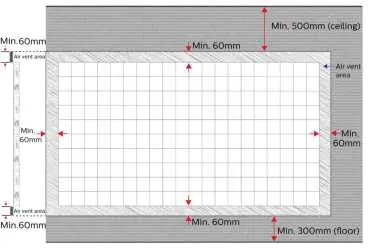
- Mounting: Ensure the wall mount bracket is strong enough to bear the weight of the display.
- Daisy Chain: Connect power and signal cables between cabinets. Connection is allowed up to 8 cabinets (110 VAC) or 16 cabinets (220 VAC).
- Gap Adjustment: Use feeler gauges (0.5mm) to ensure accurate gaps between cascaded cabinets.
Dehumidification Function
This function prevents corrosion by using heat to remove moisture from the LED display.
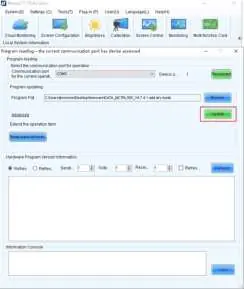
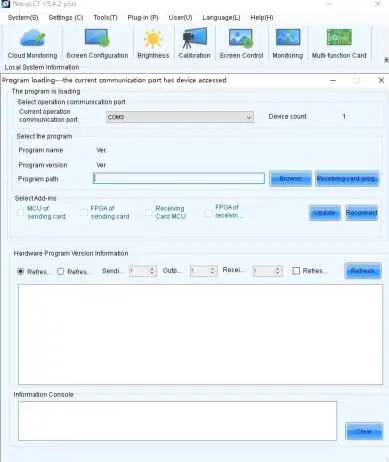
- Install the "Nova LCT V5.4.2 Plus" program on your PC.
- Connect the USB cable to your PC and run the program.
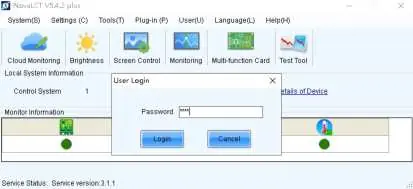
- Log in to the Advanced Synchronous System (default password: admin or 666).
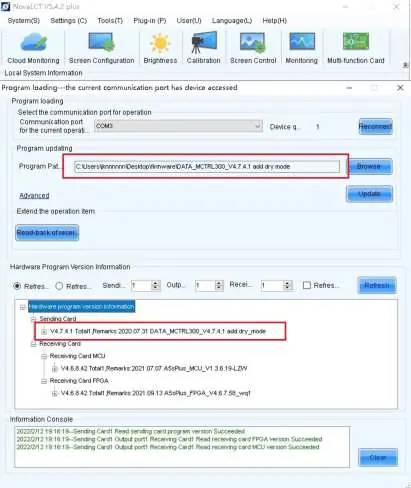
- Perform firmware upgrade and verification as instructed.
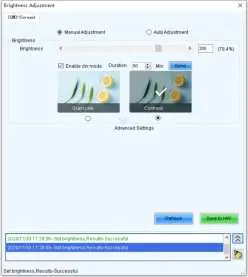
- Configure settings in the Brightness menu by enabling "Enable Dry mode" and setting the duration.
- Click "Send" and "Save to HW".
Troubleshooting
- No picture: Check power/signal cable connections, ensure the power distribution box is on, and verify the LED display controller is active.
- Module blinking/not lighting up: Check the cable connection between the cabinet and the power distribution box.
Technical Specifications
Key parameters for the 22BDL7439L include:
- Peak brightness: 4500 nits
- Operating Temperature: -20°C to 45°C
- Input Voltage: AC100-240V (50 & 60Hz)
- IP rating: IP30 (panel side)
- Pixel Pitch: 3.9 mm
Manufacturer information
Philips
Practical help
Common problems
No picture is displayed
Check if power/signal cables are disconnected, ensure the power distribution box is switched on, and verify the LED display controller is powered and configured correctly.
Module is blinking or cannot light up
Check the cable connection between the cabinet and the power distribution box to ensure it is secure.
Before use
- Wear anti-static gloves when handling the display.
- Ensure the wall mount bracket is strong enough to bear the weight.
- Verify the power supply voltage (110V/220V) and daisy chain limits.
- Install in a well-ventilated area.
- Ensure the power plug and outlet are easily accessible.
Show more Show less
Specs in practice
- Peak brightness
- 4500 nits (according to IDMS standard).
- Operating Temperature
- -20°C to 45°C.
- Input Voltage
- AC100-240V (50 & 60Hz).
Images and diagrams
- Mounting steps show the sequence of installing connecting plates and cabinets.
- Cable diagrams illustrate daisy-chaining power and data cables.
Model compatibility
- Compatible with specific LED display controller programs.
- Daisy chain limit: 8 cabinets (110V) or 16 cabinets (220V).

Manual page author
Michael Turner
Technical manual editor