Electronics / Monitors
User Manual for Philips 24E1N5500E/24E1N5500B Monitor
Quick guide and user manual for the Philips 24E1N5500E and 24E1N5500B monitors. Includes setup instructions, OSD menu navigation, technical specifications, and troubleshooting tips.
PDF source: ZH · summary: English
Quick answers from the manual
Quick answer
- The Philips 24E1N5500E/24E1N5500B is a 23.8-inch IPS monitor. Setup involves attaching the base to the stand and connecting via HDMI or DisplayPort. Use the rear joystick for OSD menu navigation. p. 6, 7
Key actions
- Install the base p. 6
- Connect to PC p. 7
- Adjust OSD settings p. 7, 8
First start
- Connect power and signal cables, turn on the PC, and power on the monitor using the rear joystick. p. 7
Show 4 more answers Show less
Problems and fixes
No image
Check power and signal cable connections.
p. 21Maintenance and reset
- Use the OSD menu to select 'Reset' to restore factory settings. p. 22
Technical specifications
| Parameter | Value | Meaning | Pages |
|---|---|---|---|
| Resolution | 2560 x 1440 | Native resolution for best performance. | p. 14 |
| Refresh Rate | 75Hz (E) / 100Hz (B) | Maximum vertical refresh rate. | p. 14 |
Where to find it in the PDF
- Safety and Maintenance p. 3, 4
- Installation p. 6
- OSD Operation p. 7, 8
- Technical Specifications p. 14, 15
Table of contents
Manual images
Click an image to enlargeQuick Guide from the Manual
This guide provides essential information for setting up and operating your Philips 24E1N5500E/24E1N5500B monitor. Always ensure the monitor is placed on a stable surface and connected to a reliable power source.
Installation
To install the base:
- Place the monitor face down on a smooth surface, taking care not to scratch the screen.
- Attach the base to the stand arm.
- Secure the base to the arm using the screw at the bottom.
- Attach the stand arm to the VESA mounting area on the monitor until it locks into place.
Connections
The monitor features the following ports:
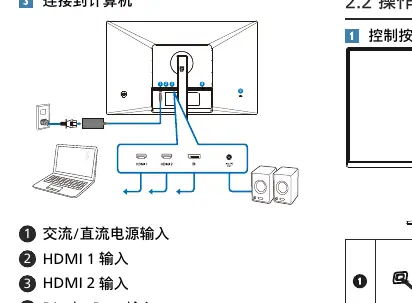
- Power Input: AC/DC power input.
- HDMI 1 & 2: For connecting to computers or media devices.
- DisplayPort: For high-speed video connection.
- Audio Out: For connecting headphones or external speakers.
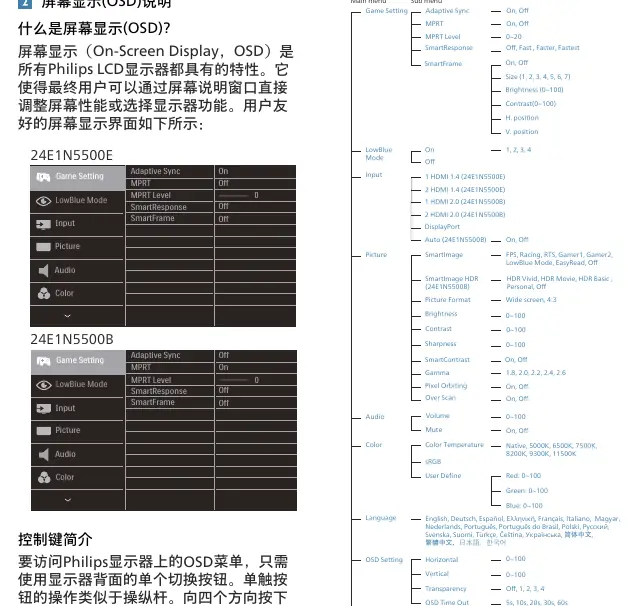
OSD Menu Operation
The monitor uses a single joystick button on the back for OSD navigation:
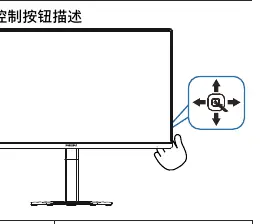
- Press: Power on/off (hold 3s to power off).
- Up/Down/Left/Right: Navigate the OSD menu.
- SmartImage: Access game modes (FPS, Racing, RTS, etc.) or HDR settings.
Technical Specifications
- Resolution: 2560 x 1440 (Native).
- Refresh Rate: Up to 75Hz (24E1N5500E) or 100Hz (24E1N5500B).
- Panel: 23.8" IPS.
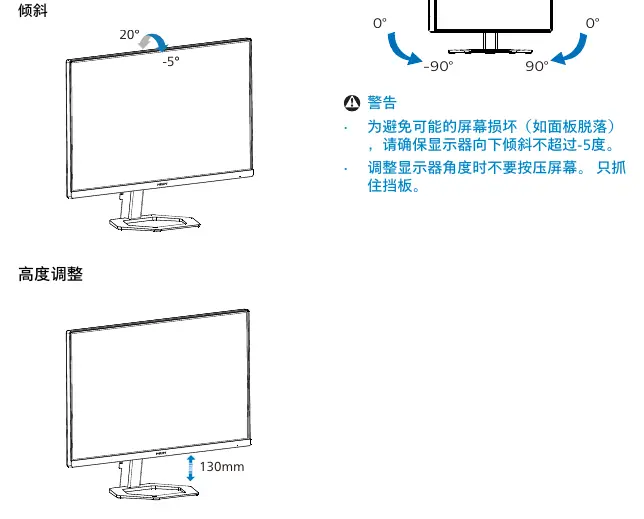
- Adjustments: Tilt (-5/+20 degrees), Height (130mm), Swivel (-90/+90 degrees).
Troubleshooting
If you encounter issues:
- No Image/LED Off: Check power cable connections.
- No Image/LED On: Check PC status and signal cable connections.
- Image Shaking: Ensure the signal cable is securely connected.
- Blurry Text: Set the PC resolution to the native 2560 x 1440.
Manufacturer information
Philips
Practical help
Common problems
No image (Power LED off)
Ensure the power cable is securely connected to both the wall outlet and the monitor.
No image (Power LED on)
Check if the PC is turned on and the signal cable is correctly connected. Inspect the cable for bent pins.
Image shaking
Verify that the signal cable is firmly connected to the graphics card or PC.
Blurry text or image
Adjust the PC display resolution to the monitor's native resolution of 2560 x 1440.
Before use
- Ensure the monitor is placed on a flat, stable surface.
- Check that the power cable is the one provided by Philips.
- Verify the PC is turned off before connecting the signal cable.
- Ensure the monitor is set to its native resolution (2560 x 1440) for best performance.
Show more Show less
Specs in practice
- Native Resolution
- 2560 x 1440 at 60Hz (optimal performance).
- Refresh Rate
- Up to 75Hz (24E1N5500E) or 100Hz (24E1N5500B).
- Operating Temperature
- 0°C to 40°C.
Images and diagrams
- Base installation: Attach base to arm, then arm to monitor.
- OSD Joystick: Use the rear button to navigate menus and power the unit.
- Tilt/Height: Adjust the monitor position carefully by holding the bezel.
Model compatibility
- Compatible with Windows 10/8.1/8/7 (24E1N5500E) and Windows 11/10 (24E1N5500B).
- Mac OS X is supported.
- Adaptive Sync is compatible with specific AMD Radeon graphics cards.

Manual page author
Emily Carter
User documentation editor