Electronics / Monitors
Owner's Manual for Philips 242E1GAJ-75 Gaming Monitor
Quick guide for the Philips 242E1GAJ-75 gaming monitor. Learn about key features, technical specifications, display settings, and connectivity options.
Quick answers from the manual
Quick answer
- The Philips 242E1GAJ-75 is a 23.8-inch Full HD gaming monitor featuring a 144Hz refresh rate, 1ms MPRT response time, and AMD FreeSync Premium technology. p. 1
Key actions
- Adjusting OSD settings p. 2
Technical specifications
| Parameter | Value | Meaning | Pages |
|---|---|---|---|
| Panel Size | 23.8 inch / 60.5 cm | Physical screen size | p. 3 |
| Resolution | 1920 x 1080 @ 144 Hz | Maximum display resolution and refresh rate | p. 3 |
| Response Time | 1 ms (MPRT) | Motion Picture Response Time | p. 3 |
| Contrast Ratio | 3500:1 | Typical contrast ratio | p. 3 |
| Power Consumption | 14.83 W (typ.) | Power usage in On mode | p. 3 |
Show 1 more answers Show less
Where to find it in the PDF
- Overview p. 1
- Highlights p. 2
- Specifications p. 3
Table of contents
Manual images
Click an image to enlargeQuick guide from the manual
The Philips 242E1GAJ-75 is a 23.8-inch Full HD gaming monitor designed for high-performance gaming and multimedia. This guide provides an overview of the monitor's key features, technical specifications, and operating conditions to help you get the most out of your display.
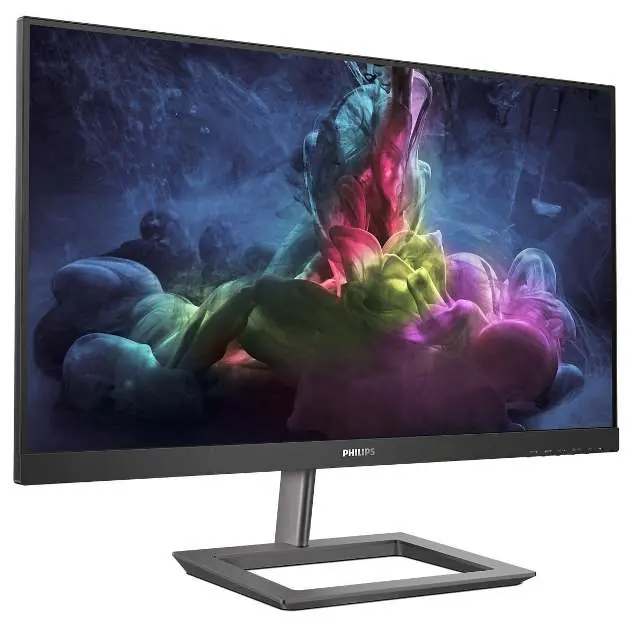
Display Features
The monitor is equipped with several technologies to enhance your visual experience:
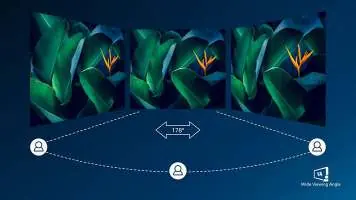
- VA Display: Uses advanced multi-domain vertical alignment technology for high static contrast ratios and a 178/178-degree extra-wide viewing angle.
- AMD FreeSync Premium: Provides a fluid, tear-free gaming experience with high refresh rates and low latency.
- 144Hz Refresh Rate: Redraws the screen up to 144 times per second for ultra-smooth motion, essential for competitive gaming.
- 1ms MPRT: Motion Picture Response Time technology eliminates smearing and motion blur for crisp visuals.
- Ultra Wide-Color Technology: Delivers a wider spectrum of colors for more natural-looking greens, vivid reds, and deeper blues.
- Flicker-free Technology: Regulates brightness to reduce screen flicker and eye fatigue.
SmartImage Game Mode
The monitor features a quick-access OSD (On-Screen Display) tuned for gamers with several presets:
- FPS (First Person Shooting): Improves dark themes to help you see hidden objects in dark areas.
- Racing: Adapts the display for the fastest response time and high color adjustments.
- RTS (Real Time Strategy): Includes a special SmartFrame mode that enables highlighting of specific areas for size and image adjustments.
- Gamer 1 & Gamer 2: Allows you to save personal customized settings for different games.
Connectivity and Convenience
- Inputs: HDMI (digital, HDCP) and DisplayPort x 1.
- Audio: Built-in 3W x 2 stereo speakers and an audio-out port.
- Mounting: Supports VESA mount (100x100mm) and includes a Kensington lock slot.
- OSD Languages: Supports multiple languages including English, French, German, Spanish, Italian, and more.
Technical Specifications
- Panel Size: 23.8 inch (60.5 cm).
- Resolution: 1920 x 1080 @ 144 Hz.
- Contrast Ratio: 3500:1 (typical).
- Power Supply: External, 100-240VAC, 50-60Hz.
- Power Consumption: 14.83 W (typ.) in On mode.
- Tilt: -5/20 degrees.
- Weight: 3.07 kg (with stand), 2.49 kg (without stand).
Operating Conditions
- Temperature: 0 to 40°C (operation), -20 to 60°C (storage).
- Altitude: Up to 12,000ft (3,658m) in operation.
- Humidity: 20%-80% relative humidity.
Manufacturer information
Philips
Practical help
Common problems
Screen flickering
Ensure the monitor is set to a stable refresh rate and check cable connections. The monitor includes Flicker-free technology to mitigate this.
Blurry motion in games
Enable the 1ms MPRT mode or ensure the refresh rate is set to 144Hz in your graphics card settings.
Before use
- Ensure your graphics card supports 144Hz output.
- Use a high-quality HDMI or DisplayPort cable.
- Check that the power supply is 100-240VAC.
- Verify the monitor is placed on a stable surface or mounted using a 100x100mm VESA mount.
Show more Show less
Specs in practice
- 144Hz Refresh Rate
- Redraws the screen 144 times per second for smoother motion.
- SmartContrast
- Mega Infinity DCR for rich black details.
Model compatibility
- VESA mount compatible (100x100mm).
- Compatible with Windows 10/8.1/8/7, Mac OS X.

Manual page author
Michael Turner
Technical manual editor