Power / Batteries & Chargers
User Manual for Porodo 10000mAh Power Bank with Integrated Cables
Quick guide for the Porodo 10000mAh Power Bank with Integrated Cables. Learn how to charge the power bank, use the integrated cables, understand the digital display, and check technical specifications.
Table of contents
Manual images
Click an image to enlargeQuick Guide from the manual
This power bank is designed for portable charging with integrated cables and a digital display. To use the device, press the button once to check the battery level. To turn off the power output, double-click the button. Always disconnect the power bank from your device or power source if it begins to overheat.
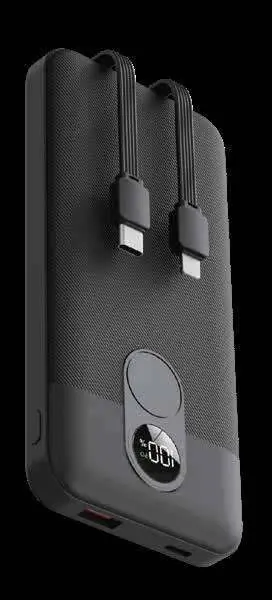
Features
- Digital Display: Shows real-time charging status and remaining battery levels.
- Fast Charging: Capable of charging batteries from 0% to 60% in approximately 35 minutes.
- Dual Charging: Supports charging two devices simultaneously.
- High Output: Delivers up to 22.5 watts of power.
Technical Specifications
Battery Capacity: 10000mAh, 37Wh, 3.7V
Inputs:
- USB-C Input: 5V/2.6A, 9V/2A, 12V/1.5A (18W)
Outputs:
- USB-C Output: 5V/3A, 9V/2.22A, 12V/1.67A (20W)
- USB-A Output: 5V/3A, 9V/2A, 12V/1.5A, 10V/2.25A (22.5W)
- Built-In Cable Output (USB-C): 5V/3A, 9V/2A, 12V/1.5A, 10V/2.25A (22.5W)
- Built-In Cable Output (Lightning): 5V/2.4A
- Multi-Port Output: 5V/3A (Max)
Operating Environment: -10°C to 60°C
Dimensions
The device measures 18mm x 69mm x 147.5mm.
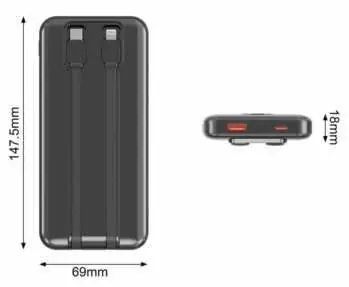
Instructions for Use
Button Function
- Short Press: Activates the digital display to show remaining power.
- Double-Click: Turns off the power output.
Charging the Power Bank
Connect the power bank to a power source using the USB-C input and the included USB-A to USB-C cable. The digital display will show the charging progress. A full charge is indicated when the display reaches 100%. Disconnect the power bank once fully charged.
Charging Your Mobile Devices
Connect your mobile device to the power bank using the available USB ports or the built-in cables. Note that different devices may require specific cables not provided. Charging two devices simultaneously may result in slower charging speeds.
Safety Warning
If the power bank overheats during use, immediately disconnect it from the power source or your device. Allow the unit to cool down completely before attempting to use it again.
Warranty and Contact
Products purchased directly from the Porodo website or shop include a 24-month warranty. Products purchased from approved sellers include a 12-month warranty. Warranty extensions may be requested via the website. For support, contact [email protected] or [email protected].
Practical help
Common problems
Device overheating
Immediately disconnect the power bank from the power source or your device and allow it to cool down before further use.
Slow charging speed
Charging two devices simultaneously may result in slower charging speeds.
Incompatible cable
Different brands or devices may require different cables than those provided with the power bank.
Before use
- Check the digital display to ensure the power bank has sufficient charge.
- Verify that the device you intend to charge is compatible with the provided built-in cables or your own cable.
- Ensure the power source used to charge the power bank is compatible with the USB-C input specifications.
Specs in practice
- Operating Temperature
- -10°C to 60°C - the safe temperature range for operating the device.
Images and diagrams
- The digital display provides real-time feedback on battery percentage.
- Integrated cables are located at the top of the unit for direct device connection.
- The USB-C port is dedicated to recharging the power bank itself.
Model compatibility
- Supports simultaneous charging of two devices.
- Built-in cables include USB-C and Lightning connectors.
- USB-A output port is available for additional device connectivity.

Manual page author
Emily Carter
User documentation editor
Prepares concise manual descriptions and highlights the most useful setup, operation, and maintenance information for readers.