Power / Batteries & Chargers
User Manual for Porodo Pocket VOLT 10000mAh Power Bank
Quick guide for the Porodo Pocket VOLT 10000mAh Power Bank (PB090). Includes charging instructions, safety warnings, specifications, and troubleshooting steps.
Table of contents
Manual images
Click an image to enlargeQuick guide from the manual
The Porodo Pocket VOLT 10000mAh Power Bank (Model PB090) is a portable charging device featuring a digital display for power status. Key usage points include using the correct Type-C or Lightning cables for charging, ensuring the power bank is not left unattended during use, and avoiding contact with the human body for more than 10 seconds. If the device shows signs of malfunction, such as odors or deformation, stop using it immediately.
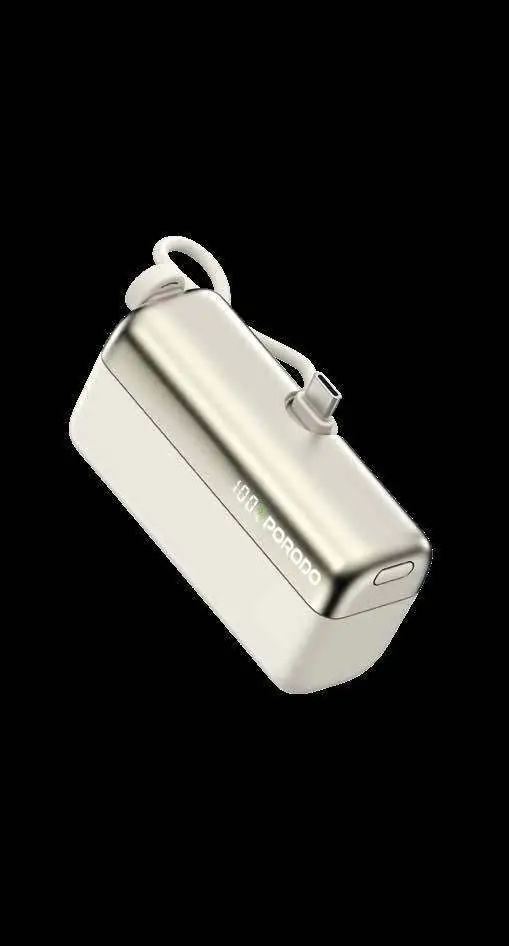
Product Overview
The device features a digital display tube that indicates the current power level. The schematic identifies the following ports and controls:
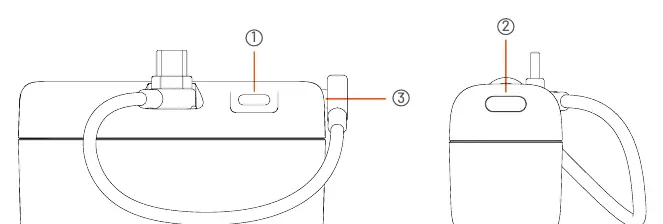
- 1: Type-C Input/Output
- 2: Switch Button
- 3: Lightning Input/Output
Specifications
Battery Capacity: 10000mAh
Type-C Input: 5V/3A, 9V/2A, 12V/1.5A (18W Max)
Type-C Output: 5V/3A, 9V/2A, 10V/2.25A, 12V/1.5A (22.5W Max)
Lightning Input: 5V/3A, 9V/2A, 12V/1.5A (18W Max)
Lightning Output: 5V/3A, 9V/2.22A, 12V/1.67A (20W Max)
Total Output: 5V/3A, 15W Max
Dimensions: 84 x 45 x 31mm
Weight: 170g
Instructions for Use
To charge your digital devices, connect them to the power bank using a compatible Type-C or Lightning cable. When the power bank's battery is low, recharge it using a USB port on a computer, AC adapter, or car charger. Important Note: Due to the weight of the power bank, do not hang it from the charging cable while charging your phone to prevent damage.
Recharging Instructions
While charging the power bank (input), the digital display will flash to show the current power status. Once fully charged, it will display 100 and remain on. When discharging (output), the display shows the current battery percentage. If the power drops below 0%, the display will show 0% and flash at a rate of 1Hz to indicate low battery. The power bank will automatically turn off if the battery voltage falls below 3V.
Safety Warnings
- Recommended operating temperature is between 0°C and 35°C.
- Do not immerse in water or expose to fire.
- Do not cover the product during use to allow for heat dissipation.
- Do not disassemble the device; it contains no user-serviceable parts.
- Keep out of reach of children.
- Ensure the output voltage of the charger matches the product specifications before use.
- Always unplug the charger once the product is fully charged.
Troubleshooting
If you encounter issues, check the following:
- Indicators do not display full charge: Charge the product for 12 hours or contact a service center.
- Product cannot charge other devices: Ensure the USB cable or adapter is functional and the correct connector is used.
- Sudden shutdown: This may be due to an external short circuit or overload triggering the automatic shutdown for self-protection. Charge to reactivate.
Disposal and Warranty
Do not dispose of this product with general household waste; take it to a government-designated recycling center. Products purchased directly from the Porodo website come with a 24-month warranty, while those from approved sellers have a 12-month warranty. You can extend the warranty by visiting porodo.net/warranty. For support, contact [email protected] or visit porodo.net.
Official resources from the manual
Practical help
Common problems
Indicators do not display full charge status after extended charging.
Charge the product for 12 hours or contact a service center.
The product cannot charge other devices.
Change the USB cable or adapter, ensure the correct connector is used, or check if the device is incompatible.
Product suddenly stops working or fails to display power.
External short circuit or overload may have triggered automatic shutdown. Charge the product to reactivate.
Before use
- Ensure the external power adapter meets standard requirements (e.g., CCC certification).
- Verify that the charger output voltage matches the product specifications.
- Check for any unusual signs like odors, heat, or deformation before use.
- Ensure the environment is between 0°C and 35°C.
Specs in practice
- Battery Capacity
- 10000mAh total energy storage.
- Type-C Output
- Supports up to 22.5W fast charging for compatible devices.
- Lightning Output
- Supports up to 20W fast charging for compatible devices.
Images and diagrams
- 1: Type-C Input/Output port.
- 2: Switch button to activate/check power.
- 3: Lightning Input/Output port.
Model compatibility
- Compatible with devices requiring Type-C or Lightning charging interfaces.
- Ensure external power adapters are certified and meet standard requirements.

Manual page author
David Miller
Documentation analyst
Organizes user manual content into clear summaries, with attention to model details, product context, and everyday usability.