Power / Batteries & Chargers
Porodo Blue 10000mAh Power Bank PB-BPWBNK
Quick guide for the Porodo Blue 10000mAh Power Bank (PB-BPWBNK). Learn how to charge the power bank, charge your devices, and understand safety precautions.
Table of contents
Quick guide from the manual
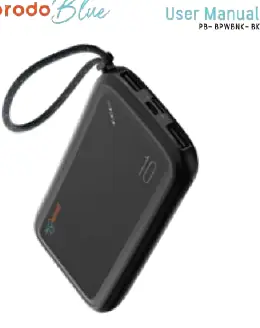
The Porodo Blue 10000mAh Power Bank is a portable charging solution equipped with a lanyard for easy carrying. It features dual USB-A outputs and supports both Micro and Type-C inputs. Before using the device for the first time, it is recommended to fully charge the power bank.
Charging the power bank
To charge the power bank, use a compatible USB-A to Micro or USB-A to Type-C cable:
- Connect the USB-A end of the cable to an AC adapter (5V/2A).
- Connect the other end (Micro or Type-C) to the corresponding input port on the power bank.
- The LED lights will illuminate to indicate that the power bank is charging successfully.
Charging your devices
To charge your mobile devices using the power bank:
- Connect your device's charging cable to one of the USB-A output ports on the power bank.
- Connect the other end of the cable to your mobile device.
- Charging should start automatically.
Safety instructions
To ensure safe operation and longevity of the device, please observe the following:
- Do not use the power bank with electronic products that exceed its specifications, as this may lead to malfunction or damage.
- Keep the power bank dry; do not place it in water or wet environments to avoid electric shock.
- Do not attempt to disassemble the power bank or allow non-professional technicians to perform repairs.
Technical specifications
Model: PB-BPWBNKCapacity: 10000mAh Li-PolymerInput 1 (Type-C): 5V/2AInput 2 (Micro USB): 5V/2AOutput 1 (USB-A): 5V/2AOutput 2 (USB-A): 5V/2ATotal Output: 10W 5V/2ADimensions: 143 x 70 x 16 mmWeight: 225g ± 2g
Practical help
Common problems
Power bank not charging
Ensure you are using a 5V/2A AC adapter and a compatible USB-A to Micro or USB-A to Type-C cable.
Device not charging
Ensure the cable is securely connected to the USB-A output port on the power bank and your device.
Before use
- Charge the power bank fully before first use.
- Check that your charging cable is compatible (USB-A to Micro or USB-A to Type-C).
- Ensure your power adapter provides 5V/2A output.
Model compatibility
- Compatible with devices requiring 5V/2A charging.
- Do not use with electronics exceeding the power bank's specifications.

Manual page author
Emily Carter
User documentation editor
Prepares concise manual descriptions and highlights the most useful setup, operation, and maintenance information for readers.