Garden / Brushcutters & Trimmers
User Manual for Princess Auto 9296625 20V 1/2 Inch Cordless Brushless Impact Wrench
Quick guide for the Princess Auto 9296625 20V Cordless Brushless Impact Wrench. Includes safety instructions, operation steps, drive control settings, maintenance, and troubleshooting.
Quick answers from the manual
Quick answer
- The Princess Auto 9296625 is a 20V cordless brushless impact wrench designed for tightening or loosening heavy-duty nuts and bolts. It features variable speed/impact modes and an anvil function for controlled fastener removal. p. 1, 3, 8
Key actions
- Socket Installation p. 7
- Adjusting Drive Control p. 8
First start
- Ensure the battery is charged (sold separately), attach an appropriate impact socket, and verify the rotation direction before squeezing the trigger. p. 3, 7, 8
Problems and fixes
The impact wrench will not start
Check power supply, replace trigger, or have a qualified technician service the tool.
p. 10Maintenance and reset
- Clean air vents regularly with a cloth, brush, or vacuum. Do not use compressed air. p. 9
Technical specifications
| Parameter | Value | Meaning | Pages |
|---|---|---|---|
| Max. Torque | 516 ft-lb | Maximum torque output | p. 11 |
Where to find it in the PDF
- Operations p. 7, 8
- Specifications p. 11
Table of contents
Manual images
Click an image to enlargeQuick guide from the manual
This impact wrench is designed for tightening or loosening heavy-duty nuts and bolts. Before using the tool, ensure you have read and understood all safety instructions. The operator must wear appropriate personal protective equipment (PPE), including impact safety goggles (CSA Z94.3-07 or ANSI Z87.1 compliant), ear protection, and a dust mask or respirator if working with hazardous materials. Always hold the tool firmly with both hands and be aware of potential kickback if the socket becomes pinched or snagged.
Device Overview
The impact wrench consists of the following components:
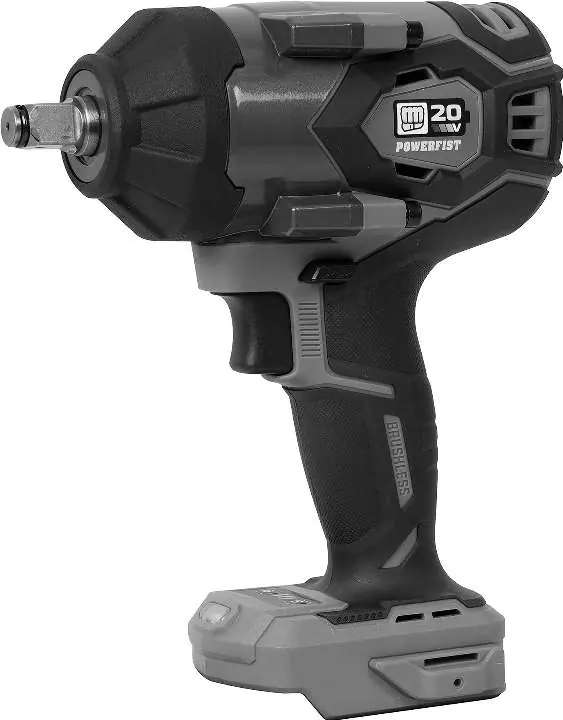
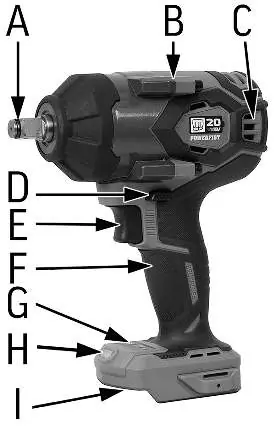
- A: Anvil
- B: Housing
- C: Air vent
- D: Forward/reverse switch
- E: Trigger
- F: Handle
- G: Control panel
- H: LED work light
- I: Battery receiver
Operation
Socket Installation
- Select an appropriately sized drive impact socket designed for impact wrenches. Do not use worn or damaged sockets.
- Push and snap the socket onto the anvil.
- For recessed nuts or bolts, use an extension bar. Push the extension bar onto the anvil, then insert the socket into the other end.
Drive Control
The tool features adjustable speed and impact modes:
- Right-hand button: Increases the range of rotations and impacts per minute. An LED bar indicates the level.
- Left-hand button: Controls the anvil function in reverse. When activated (red LED on), the anvil automatically stops when a fastener is 'broken' loose. When deactivated (red LED off), the anvil continues to turn until the trigger is released.
Operating the Impact Wrench
- Tighten the fastener by hand as much as possible before using the tool.
- Place the impact socket onto the bolt head or nut.
- Squeeze the trigger to start. Rotational and impact speed increase as the trigger is squeezed deeper.
- Apply power in short bursts to avoid stripping the nut or bolt.
- Release the trigger to stop the tool.
Care and Maintenance
Maintain the tool in good condition to ensure efficiency and safety:
- Cleaning: Remove dust and debris from motor vents using a cloth, brush, or vacuum. Do not use compressed air. Clean plastic parts with a damp cloth; avoid solvents.
- Storage: Keep components dry. Apply a thin coat of lubricant to steel parts if storing for an extended period. Remove the impact socket and store in a safe place.
Troubleshooting
If the tool does not function properly:
- Tool will not start: Check power supply, replace the trigger, or have a qualified technician service the tool.
- Motor starts slow/doesn't reach speed: Have a qualified technician service the tool.
- Unusual sounds: Check for obstructions or misaligned components. Lubricate, repair, or replace worn parts.
- Overheating: Allow the machine to work at its own rate and ensure motor vents are not blocked.
Specifications
- Drive Size: 1/2 in.
- Blows Per Minute: 1,850 to 3,200 BPM
- No Load Speed: 1,200 to 2,100 RPM
- Max. Torque: 516 ft-lb
- Voltage Rating: 20V DC
- Weight: 4.4 lb
Practical help
Common problems
The impact wrench will not start
Check that the power supply is available, replace the trigger, or have a qualified technician service the tool.
Motor starts slow and doesn't reach operation speed
Have a qualified technician service the tool.
Tool is making unusual sounds
Check for obstructions or misaligned tool components. Lubricate, repair, or replace worn components.
Overheating
Allow the machine to work at its own rate and clear blocked motor housing vents.
Before use
- Ensure the work area is clean, well-lit, and free of distractions.
- Wear appropriate PPE: impact safety goggles, ear protection, and a dust mask.
- Check that the tool's moving parts are not misaligned or binding.
- Ensure the impact socket is designed for impact use and is not cracked or worn.
- Tighten the fastener by hand before using the impact wrench.
Specs in practice
- No Load Speed
- 1,200 to 2,100 RPM
- Voltage Rating
- 20V DC
Images and diagrams
- D: Forward/reverse switch
- G: Control panel
- H: LED work light
- I: Battery receiver
Model compatibility
- Battery pack and charger are sold separately.
- Only use impact sockets designed for impact wrenches.

Manual page author
Michael Turner
Technical manual editor
Reviews PDF manuals for structure, safety notes, and practical product details so readers can find the right information quickly.