Garden / Water Pumps
User Manual for Extol Premium Cordless Impact Wrench Share 20V
Quick guide for the Extol Premium Cordless Impact Wrench Share 20V. Includes setup, battery charging, operation, safety instructions, and technical specifications.
Quick answers from the manual
Quick answer
- The Extol Premium Cordless Impact Wrench Share 20V is designed for tightening and loosening bolts and screws in wood, steel, and concrete. p. 29
Key actions
- Charging the battery p. 30
- Setting rotation direction p. 30
- Inserting a tool p. 30
First start
- Charge the battery, insert it into the tool, set the rotation direction, and pull the trigger switch. p. 30
Problems and fixes
Tool stops suddenly
Battery protection against full discharge triggered. Release and press trigger again.
p. 31Technical specifications
| Parameter | Value | Meaning | Pages |
|---|---|---|---|
| Max. tightening torque | 180 Nm | Maximum force for tightening | p. 29 |
Where to find it in the PDF
- Technical Specifications p. 29
- Safety Instructions p. 31, 32, 33
Table of contents
Manual images
Click an image to enlargeQuick guide from the manual
The Extol Premium Cordless Impact Wrench Share 20V is a powerful tool designed for tightening and loosening bolts and screws in wood, steel, and concrete. It features a 1/4" hex tool tang and is part of the SHARE 20V battery program. Before first use, ensure the battery is fully charged and you are familiar with the safety instructions.
Product description and parts
The tool consists of the following main components:
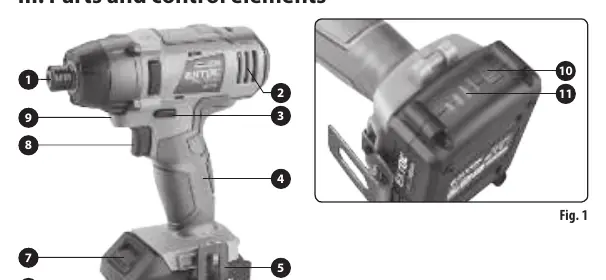
- Tool tang (1/4" hex)
- Rotation direction toggle switch
- Trigger switch
- LED work light
- Battery release button
- Battery pack
Battery charging
Important: Only use the original charger from the manufacturer. Charging should be done in an ambient temperature range of 10°C to 40°C.
- Insert the battery into the charger grooves.
- Connect the charger to a power source (220-240V ~ 50Hz).
- Charging indication: For most models, a flashing green LED with a red LED indicates charging; a solid green LED indicates a full charge. For the 4A charger, a red LED indicates charging, and a green LED indicates a full charge.
- Warning: Do not use the 4A charger (Extol 8891892) with the 1.5Ah battery (Extol 8891880) due to the high charging current.
Preparation and operation
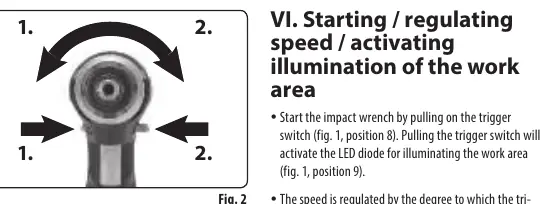
Setting rotation direction
Use the rotation toggle switch to set the direction. Position "1" is for one direction, and position "2" is for the opposite direction.
Inserting/exchanging tools
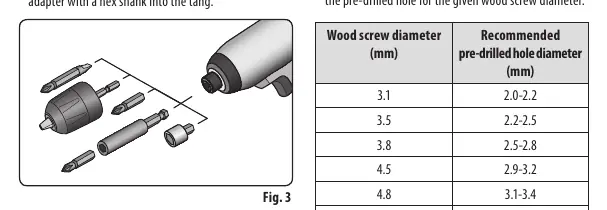
Before changing tools, set the rotation switch to the middle (neutral) position to prevent accidental activation. Insert the driver bit or adapter into the tool tang until it clicks into place. For drilling, use a chuck adapter.
Operation
Pull the trigger switch to start the tool. The speed is regulated by how far the trigger is pulled. The LED work light activates automatically when the trigger is pulled.
Safety instructions
- Always wear certified eye and hearing protection.
- Wear suitable work gloves.
- Hold the tool firmly by the handle to manage reaction torques.
- If the tool stops suddenly, it may be due to the battery protection against full discharge. Release and press the trigger again.
- If the tool produces unusual noise or vibrations, stop immediately, remove the battery, and check for faults.
Storage and maintenance
Store the tool in a dry, safe place out of reach of children. Remove the battery before storage. Protect the battery from frost, high heat, and moisture. For long-term storage, keep the battery fully charged and recharge it every 6 months.
Manufacturer information
Extol
Practical help
Common problems
Tool stops suddenly during operation
The battery protection against full discharge has been triggered. Release and press the trigger again.
Unusual noise or vibrations
Stop immediately, remove the battery, and identify the cause. If the fault is internal, contact an authorized service center.
Charger not charging
Check if the charger or battery is damaged. Ensure you are using the correct charger for the battery capacity.
Before use
- Check battery charge level.
- Ensure rotation switch is in the neutral position before changing tools.
- Check charger cable and housing for damage.
- Ensure the workpiece is secured.
- Wear appropriate protective gear (eye/ear protection, gloves).
Specs in practice
- Max. tightening torque
- 180 Nm
- Speed without load
- 0-2800 min-1
- Number of percussions
- 0-3600 min-1
Images and diagrams
- Fig 1: Overview of parts including trigger, rotation switch, and battery.
- Fig 2: Rotation direction setting.
- Fig 3: Tool insertion and removal from the tang.
Model compatibility
- Compatible with SHARE 20 V battery program.
- Do not use 4A charger (8891892) with 1.5Ah battery (8891880).

Manual page author
Michael Turner
Technical manual editor
Reviews PDF manuals for structure, safety notes, and practical product details so readers can find the right information quickly.