Home Appliances / Small Kitchen Appliances
User Manual for PureMate 1400ML Mini Dehumidifier PM400
Quick guide for the PureMate 1400ML Mini Dehumidifier (PM400). Learn how to operate, clean, maintain, and troubleshoot your device with this essential user manual summary.
Table of contents
Manual images
Click an image to enlargeQuick guide from the manual
The PureMate 1400ML Mini Dehumidifier (PM400) is designed for indoor use to reduce humidity. Before using the device, ensure the ambient temperature is above 15°C, as the unit may freeze or frost in colder environments. Always keep the unit in an upright position and ensure the inlet and outlet grills remain unobstructed to maintain proper airflow.
Components and Control Panel
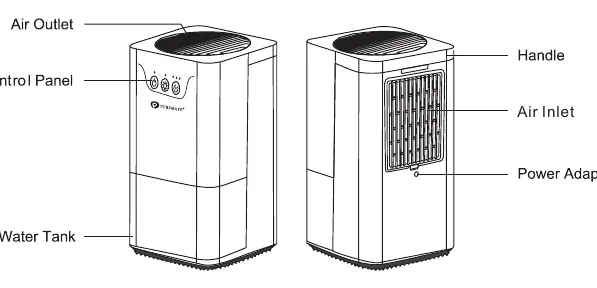
The device consists of an air outlet, control panel, water tank, air inlet, and a power adapter interface. The control panel features three main buttons:
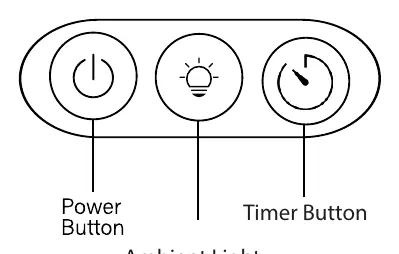
- Power Button: Turns the unit on and off.
- Ambient Light Button: Cycles through brightness settings or turns the light off.
- Timer Button: Sets the operating time for 8, 16, or 24 hours, after which the unit stops automatically.
Operating Instructions
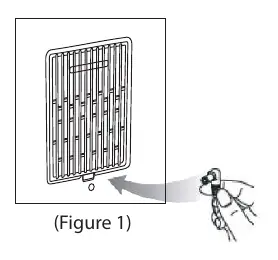
To start the dehumidifier, connect the power cord to the interface on the back of the machine and plug it into a power socket. Press the power button to begin operation; the power indicator will illuminate. To turn off the unit, press the power button again.
Water Tank Management
When the water tank reaches its maximum capacity, the unit will stop working, and the ambient light will turn red. To empty the tank:
- Switch off the dehumidifier.
- Remove the water tank by holding both sides.
- Pour the collected water into a sink or drain.
- Place the tank back into the unit and press the power button to resume operation.
Cleaning and Maintenance
Before performing any maintenance, turn off the unit and unplug the AC/DC adapter. Use a soft cloth to clean the surface of the device; do not immerse it in liquid. Use a soft-bristled brush to remove dust from the air inlet and outlet. It is recommended to clean the filter once a month using water, a vacuum cleaner, or a dry brush. The water tank cover is detachable for cleaning purposes.
Safety Information
- For indoor use only; do not use in laundry rooms.
- Do not use around heated surfaces, open flames, or flammable substances.
- Do not immerse the unit in water or other liquids.
- Use only the provided power supply unit.
- If the supply cord is damaged, contact the manufacturer for replacement.
Practical help
Common problems
Dehumidifier stops working
Check if the water tank is full (indicated by a red ambient light). Empty the water tank to resume operation.
Condensate freezing or frosting
The ambient temperature is likely below 15°C. Shut down the unit, as dehumidification is generally not required in low-temperature environments.
Unit does not turn on
Ensure the power adapter is securely connected to the back of the machine and the power socket.
Before use
- Ensure the unit is placed in an upright position.
- Verify that the air inlet and outlet grills are clear of obstructions.
- Confirm the ambient temperature is above 15°C.
- Ensure the water tank is correctly inserted into the unit.
- Use only the provided power adapter.
Specs in practice
- Moisture Removal
- 250-350mL per 24 hours (tested at 85% RH, 30°C).
- Water Tank Capacity
- 1400ml total capacity.
- Power Consumption
- 22.5W.
- Operating Environment
- 15°C to 40°C, humidity below 95%.
Images and diagrams
- The control panel includes a Power button, Ambient Light button, and Timer button.
- The rear of the unit houses the air inlet and the power adapter connection port.
Model compatibility
- For indoor use only.
- Not suitable for use in laundry rooms.
- Must be used with the provided power supply unit.

Manual page author
David Miller
Documentation analyst
Organizes user manual content into clear summaries, with attention to model details, product context, and everyday usability.