Power / Wireless Chargers
RAM 1500 Wireless Charging Pad Owner's Manual
Quick guide for the RAM 1500 wireless charging pad. Learn how to use the Qi charging system, understand LED indicator statuses, and troubleshoot common charging issues.
Quick answers from the manual
Quick answer
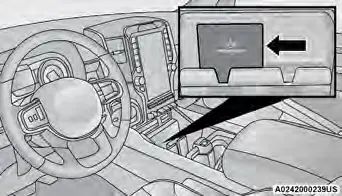
- The wireless charging pad is located below the center stack or inside the center console. To charge, place your Qi-enabled phone on the pad with the display facing up. The ignition must be in the ON/RUN or START position. p. 2
Key actions
- Place phone on pad p. 2, 3
- Check LED status p. 2
First start
- Ensure ignition is ON/RUN or START, then place the Qi-enabled device on the pad. p. 2
Show 3 more answers Show less
Problems and fixes
Red light flashing
Remove foreign objects or reposition the phone.
p. 2
Phone not charging
Check for Qi compatibility, remove case, or ensure proper alignment.
p. 2, 3Technical specifications
| Parameter | Value | Meaning | Pages |
|---|---|---|---|
| Frequency | 128 kHz | Wireless Charging frequency | p. 4 |
| Modulation | ASK | Signal modulation type | p. 4 |
Where to find it in the PDF
- Wireless Charging Pad Operation p. 2
- Important Notes p. 3
- Regulatory Compliance p. 4
Table of contents
Quick guide from the manual
The wireless charging pad is designed to charge Qi-enabled mobile phones. It is typically located below the center stack or inside the center console. To begin charging, ensure the vehicle ignition is in the ON/RUN or START position. Place your mobile device inside the prepared area delimited on the mat, with the display facing upward. Ensure the phone does not cover the LED indicator light.
LED Indicator Status
- No Light: The charging pad is idle or searching for a device. The device may not be compatible with the Qi standard.
- Blue Light: The device is detected and is charging.
- Red Light/Flashing: An internal error has occurred, or a foreign object is detected on the pad.
- Green Light: The device has completed battery charging (if the device is equipped to transmit this information).
Important Operating Notes
- Phone Placement: Phones must be placed within the outline shown on the pad. Movement during charging may slow or stop the process.
- Case Removal: Protective cases must be removed before placing the phone on the pad.
- Key Fob Interference: Do not place the key fob on the charging pad or within 6 inches (15 cm) of it. This can cause heat buildup, damage the fob, and prevent the vehicle from starting.
- Overheating Protection: Wireless chargers may slow down the charging rate or shut down temporarily if the device overheats. This is a protective measure, not a fault.
- NFC Interference: The presence of an active Near-Field Communication (NFC) function on a smartphone may cause charging anomalies.
- Multi-Function Usage: Using multiple wireless functions simultaneously (e.g., wireless charging, Apple CarPlay, Android Auto) may cause the device to overheat. If this occurs, connect the device via the USB port.
Regulatory Compliance
This device complies with part 15 of the FCC Rules and Industry Canada license-exempt RSS standards. Operation is subject to the condition that the device does not cause harmful interference and must accept any interference received. The device should be operated with a minimum distance of 8 cm between the radiator and the body.
Practical help
Common problems
Red light flashing on the charging pad
This indicates an internal error or a foreign object is detected. Remove any foreign objects and reposition the phone.
Phone is not charging
Ensure the phone is Qi-compatible, remove any protective case, and ensure the phone is placed correctly within the outline on the pad.
Key fob not detected or vehicle won't start
Ensure the key fob is not on or within 6 inches (15 cm) of the wireless charging pad.
Before use
- Verify the phone is Qi-enabled.
- Remove the phone's protective case.
- Ensure the vehicle ignition is in the ON/RUN or START position.
- Place the phone with the display facing upward.
- Ensure the phone does not cover the LED indicator.
Show more Show less
Specs in practice
- Max Target Power
- 41.9 dBuV/m.
Images and diagrams
- The diagram illustrates the location of the wireless charging pad below the center stack and the correct placement area for the mobile device.
Model compatibility
- Requires a Qi-enabled mobile phone.
- If the phone is not Qi-equipped, an aftermarket sleeve or special back plate is required.

Manual page author
Michael Turner
Technical manual editor