Power / Wireless Chargers
Valore 2-in-1 Wireless Charging Pad AC96 User Manual
Quick guide for the Valore 2-in-1 Wireless Charging Pad (AC96). Learn how to set up, use the charging stand and pad, understand LED indicators, and follow safety precautions.
Quick answers from the manual
Quick answer
- The Valore AC96 is a 2-in-1 wireless charging pad. Connect it to a power source via the USB-C cable and place your Qi-enabled device on the stand or mat to charge. LED indicators show status: Green for charging, Off/Green for fully charged, and blinking Green/Blue for errors. p. 1, 2
Key actions
- Connect the USB-C cable to the charging stand and power adapter. p. 2
- Place Qi-enabled device on the charger. p. 2
First start
- Plug in the power adapter and connect the USB-C cable to the charging stand. p. 2
Problems and fixes
FOD/Malfunction
LED blinks in Green & Blue; check for foreign objects or device placement.
p. 2Technical specifications
| Parameter | Value | Meaning | Pages |
|---|---|---|---|
| Power output | 10W+10W(max) | Maximum charging power | p. 1 |
| Power input | 5V/2A, 9V/1.8A (max) | Required input power | p. 1 |
Where to find it in the PDF
- Product Overview p. 1
- Setup and Operation p. 2
- Safety and Warranty p. 4
Table of contents
Manual images
Click an image to enlargeQuick guide from the manual
The Valore 2-in-1 Wireless Charging Pad (AC96) allows you to charge two devices simultaneously using a detachable charging stand and pad. To begin, connect the device to a power adapter using the provided USB-C cable. Place your Qi-enabled device on the charger to start the process. The LED indicator provides status updates, including charging, fully charged, and malfunction alerts.
Product overview
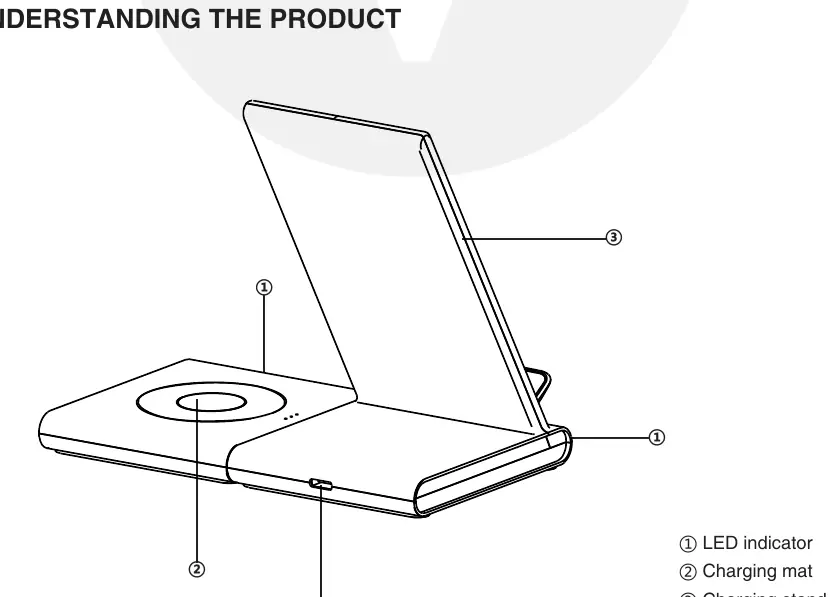
The device consists of a charging mat and a detachable charging stand. It features a USB-C port for power input and an LED indicator to show the current status of the charging process.
Setup and installation
1. Connect the USB-C cable to the charging stand and the wall adapter.
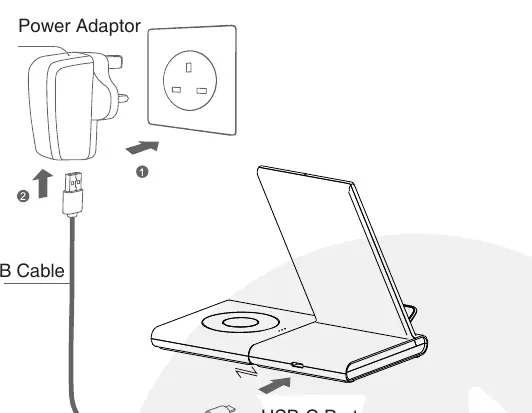
2. Ensure the charging mat is securely connected to the charger.
3. Plug the power adapter into a wall outlet.
4. Both the charging stand and the charging mat can operate simultaneously.
Operation and LED indicators
When powered on, the LED indicator will glow Blue for 5 seconds before turning off and entering standby mode. When a device is placed on the charger, the LED indicates the status:
- Charging: LED lights up constantly in Green.
- Fully charged (Samsung): LED turns off.
- Fully charged (iPhone): LED remains in continuous Green.
- FOD/Malfunction: LED blinks in Green and Blue.
Safety and maintenance
To ensure safe operation and longevity of the product, follow these guidelines:
- Do not store or use the product in high-temperature environments or near fire.
- Keep the product dry; do not expose it to moisture or submerge it in liquid.
- Use only the provided charging cable.
- Do not disassemble, repair, or modify the product.
- Supervise children when they are using the product.
- If the product shows signs of damage (dents, punctures, corrosion) or produces an abnormal smell, stop using it immediately and contact support.
For technical support, email [email protected]. For warranty registration, visit www.valore.sg.
Official resources from the manual
Practical help
Common problems
LED blinks in Green & Blue
This indicates a Foreign Object Detection (FOD) or malfunction. Ensure no metal objects are on the charger and try repositioning the device.
Device not charging
Ensure the wall adapter is properly connected and you are using the provided USB-C cable. Verify that your device is Qi-enabled.
Before use
- Ensure the wall adapter is connected to a power source.
- Use the provided USB-C cable for connection.
- Verify that your device supports Qi wireless charging.
- Ensure the charging stand and mat are properly assembled.
Specs in practice
- Power output
- 10W+10W (max) total output for simultaneous charging.
- Operating temperature
- 0-60°C; do not exceed this range.
Images and diagrams
- LED indicator: Shows charging status.
- Charging mat: Surface for wireless charging.
- Charging stand: Upright surface for wireless charging.
- USB-C port: Power input connection.
Model compatibility
- Supports Qi-enabled phones and Samsung Watch.
- Not compatible with Apple Watch.

Manual page author
David Miller
Documentation analyst
Organizes user manual content into clear summaries, with attention to model details, product context, and everyday usability.