Toys / RC Components
User Manual for Rc Factory VOLTA 20CL Electronic Speed Controller
Comprehensive user guide for the Rc Factory VOLTA 20CL electronic speed controller. Includes instructions for tethered mode operation, governor settings, telemetry configuration, and safety precautions.
PDF source: CS · summary: English
Quick answers from the manual
Quick answer
- The VOLTA 20CL is an electronic speed controller with full telemetry, featuring a dedicated 'Tethered Mode' for tethered flight, adjustable governor gains, and configurable flight warnings. p. 1, 2
Key actions
- Stop or start the tethered sequence p. 1
- Enter the main menu p. 1
First start
- Connect a 2-5s flight battery to automatically initiate the tethered mode sequence. p. 1
Show 3 more answers Show less
Problems and fixes
Motor oscillates or vibrates
Reduce Governor P or I gain values in small increments.
p. 2Maintenance and reset
- Reset capacity data via the 'Reset capacity' menu option. p. 2
Where to find it in the PDF
- Tethered mode setup and menu navigation p. 1
- Advanced settings and contact info p. 2
Table of contents
Quick guide from the manual
The VOLTA 20CL is an electronic speed controller designed for tethered flight applications. Safety Warning: Always remove the propeller and ensure the motor is firmly installed before performing any setup or configuration.
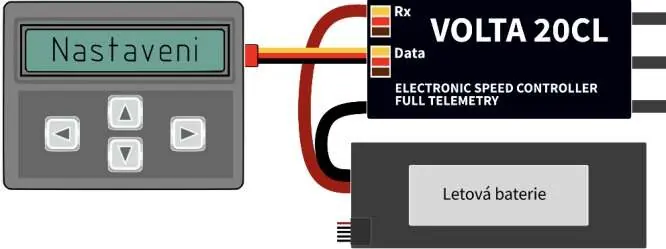
To operate in tethered mode, connect a 2-5s flight battery. The sequence starts automatically. You can stop or start the sequence at any time by pressing the 'Left' and 'Right' buttons simultaneously. When the sequence is active and the motor is running, the display shows real-time telemetry including RPM, battery voltage, current, and consumed capacity. If the ESC is controlled via a receiver throttle channel, the sequencer disconnects, and the unit functions as a standard ESC.
Menu Navigation
Access the main menu by pressing the 'Down' button. Use the 'Left' and 'Right' buttons to navigate and select options. To return to the initial display, press the 'Up' button.
General Settings
- Governor Mode: Set to 'Tethered seq.' for tethered operation.
- Min. RPM: Defines minimum working RPM before motor cutoff and oscillation behavior at flight end.
- Max. RPM: Defines maximum RPM at flight end. Note that this may be limited by drive capabilities and ESC protection settings.
- Acceleration: Time taken to ramp up from zero to working RPM.
- Working RPM: Motor speed during flight.
- Delay Start: Time between battery connection and motor start.
- Flight Time: Duration of working RPM, including warning time.
- Deceleration: Time from flight end to motor stop.
Governor Tuning
The governor settings allow for precise motor control. Changes should only be made by experienced modelers in small increments.
- Governor P Gain: Determines the linear relationship between actual RPM, set RPM, and throttle. If too high, the motor may vibrate and RPM will oscillate. Default is 5.
- Governor I Gain: Determines how quickly the system corrects the difference between desired and actual RPM. If too low, RPM correction is slow; if too high, RPM will fluctuate. Default is 10.
Capacity and Warnings
You can configure how the ESC handles capacity resets and flight warnings:
- Warning Type: Choose between 'Time-based' (RPM set to Max RPM for a duration) or 'Oscillation' (motor oscillates between Min and Max RPM).
- Reset Capacity: Options include 'After power-on' (resets each time), 'Voltage change' (accumulates until a new battery is connected), or 'Manual' (requires manual reset).
Practical help
Common problems
Motor vibrates or RPM oscillates rapidly
The Governor P or I gain is likely too high. Reduce these values in small increments.
Telemetry values seem inaccurate
Note that values measured on the ground at zero speed may differ significantly from actual flight values.
ESC functions as a standard controller instead of tethered mode
If the ESC is connected to a receiver throttle channel, the sequencer automatically disconnects.
Before use
- Remove the propeller for safety during setup.
- Ensure the motor is firmly installed.
- Connect a 2-5s flight battery.
- Verify the language setting in the menu if needed.
Show more Show less
Specs in practice
- Governor P Gain
- Controls the linear relationship between actual and set RPM; affects response to load changes.
- Governor I Gain
- Controls the speed of correcting the difference between desired and actual RPM.
- Tethered Mode
- A specialized mode for tethered flight that provides telemetry and automated sequence control.
Images and diagrams
- The connection diagram illustrates the ESC unit connected to the programming interface (buttons) and the flight battery.
Model compatibility
- Supports 2-5s flight batteries.
- Compatible with receiver throttle channel control (disables sequencer).

Manual page author
Michael Turner
Technical manual editor