Computers / Tablets
Jumper AION-RX-MINI-se Receiver User Manual
Quick guide for the Jumper AION-RX-MINI-se receiver. Learn how to bind the device, configure failsafe settings, and view technical specifications.
Quick answers from the manual
Quick answer
- The Jumper AION-RX-MINI-se is a 16-channel 2.4GHz ELRS receiver. To bind, power the receiver 3 times until the green light flashes double, then initiate binding on your transmitter. p. 1, 2
Key actions
- Binding the receiver p. 2
- Setting Failsafe p. 2
Problems and fixes
Receiver enters WiFi firmware update mode
Restart the binding process; this mode activates if binding is not completed within 20 seconds of power-on.
p. 2Technical specifications
| Parameter | Value | Meaning | Pages |
|---|---|---|---|
| Dimensions | 12.8 x 9.8 x 3.6 mm | Physical size of the unit | p. 1 |
| Weight | 0.8g | Total weight of the receiver | p. 1 |
| Operating Voltage | 3.5V - 6V | Input voltage range | p. 1 |
Where to find it in the PDF
- Introduction and Specifications p. 1
- Binding and Failsafe p. 2
Table of contents
Quick Guide
The Jumper AION-RX-MINI-se is a full duplex telemetry receiver designed for use with ELRS 2.4GHz systems. This guide covers the essential setup procedures, including binding the receiver to your transmitter and configuring failsafe settings.
Specifications
- Dimensions: 12.8 x 9.8 x 3.6 mm
- Weight: 0.8 g
- Channels: 16Ch
- Operating Voltage: 3.5V - 6V
- Operating Current: 60mA at 5V
- Operating Range: Full range, >5KM
- Compatibility: Radios in ELRS 2.4 mode
Binding Procedure
Binding uniquely associates the receiver with your transmitter or RF module. Follow these steps:
- Put the transmitter or transmitter RF module into binding mode.
- Power the receiver 3 times. The green light will flash double, indicating the receiver is in binding mode.
- Bind in the radio. Once the receiver's green light remains solid, the binding is completed.
Note: If the receiver is not bound within 20 seconds after power-on, it will enter WiFi firmware updating mode, indicated by the green light flashing.
Failsafe Configuration
Failsafe is a feature that sets a preset channel output position whenever the control signal is lost. To set Failsafe for necessary channels:
- Failsafe for receivers supporting ELRS RF mode can be set via the radio interface.
- Navigate to: MODEL SETUP / Internal RF / Failsafe.
- Supported modes include no pulse, hold, and custom for each channel.
Important: Failsafe settings via the transmitter have higher priority than settings via the receiver. Proper Failsafe configuration can decrease the risk of damage.
Practical help
Common problems
Receiver enters WiFi firmware update mode instead of binding.
This occurs if the receiver is not bound within 20 seconds of power-on. Restart the power cycle and ensure the transmitter is in binding mode immediately.
Failsafe not working as expected.
Ensure you are configuring Failsafe via the radio interface (MODEL SETUP/Internal RF/Failsafe). Transmitter settings take priority over receiver settings.
Before use
- Verify power supply is within 3.5V-6V range.
- Ensure your radio is set to ELRS 2.4 mode.
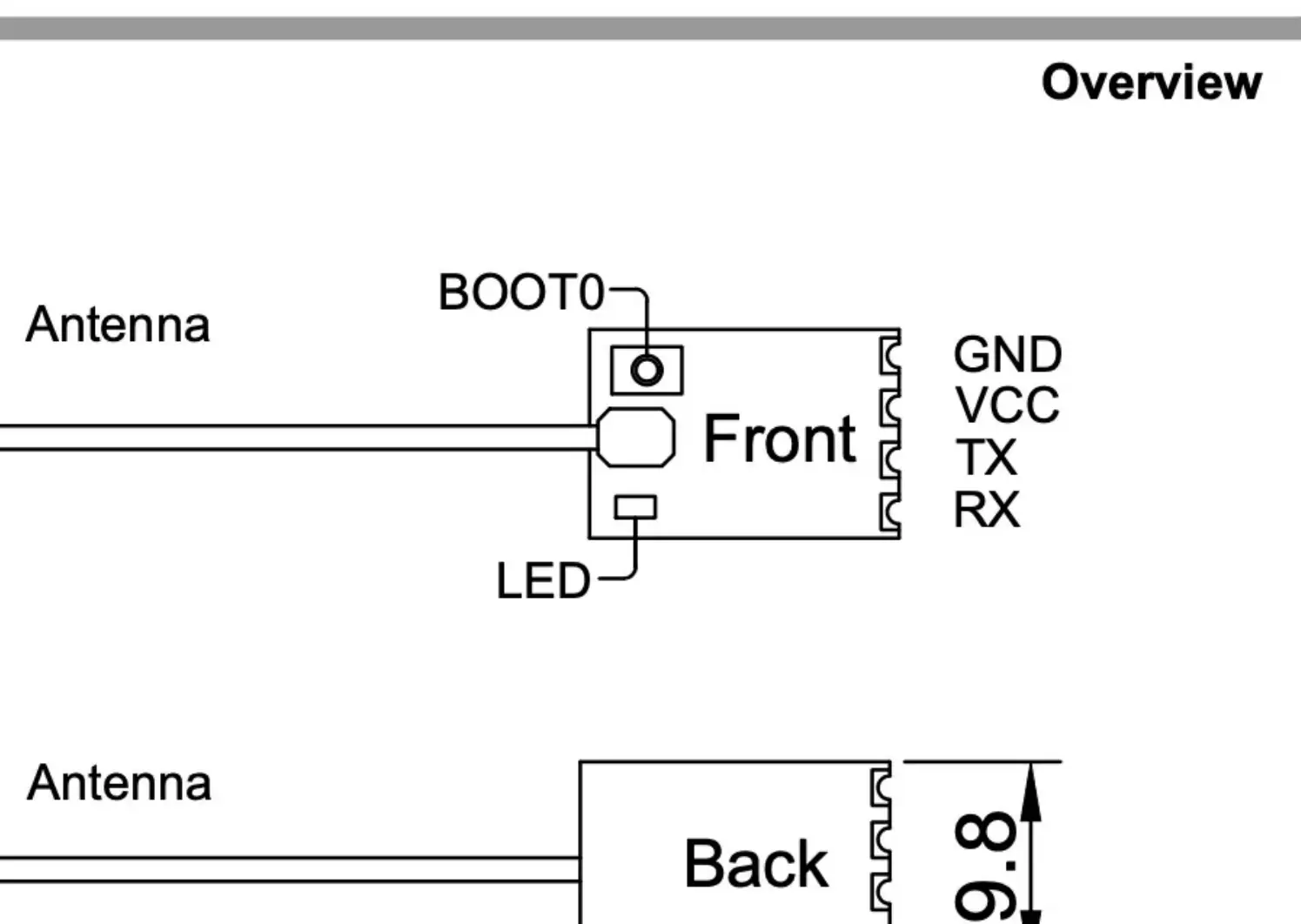
- Check wiring connections (GND, VCC, TX, RX) against the provided diagram.
- Ensure the antenna is unobstructed.
Specs in practice
- Operating Voltage
- The receiver requires a stable power source between 3.5V and 6V DC.
- Operating Range
- Full range capability, tested to exceed 5KM.
Images and diagrams
- The diagram illustrates the front and back of the receiver.
- The front side features the BOOT0 button, LED indicator, and antenna connection.
- The pinout on the side includes GND, VCC, TX, and RX connections.
Model compatibility
- Compatible with radios operating in ELRS 2.4 mode.

Manual page author
Emily Carter
User documentation editor
Prepares concise manual descriptions and highlights the most useful setup, operation, and maintenance information for readers.