Lighting / Controllers & Dimmers
User Manual for Rockville DMX-WTR and DMX-WRE Wireless DMX System
Quick guide for the Rockville DMX-WTR and DMX-WRE wireless DMX system. Learn how to pair transmitters and receivers, set ID channels, troubleshoot connection issues, and understand technical specifications.
Quick answers from the manual
Quick answer
- The Rockville DMX-WTR and DMX-WRE are wireless DMX modules. The transmitter (WTR) connects to the DMX source, and the receiver (WRE) connects to the lighting fixture. They sync via color-coded ID keys. p. 3, 4
Key actions
- Pairing the transmitter and receiver p. 3
First start
- Powering on and syncing p. 3
Problems and fixes
Units not responding to DMX
Check power, ensure ID keys match, and verify correct DMX port connections (OUT to transmitter, IN to receiver).
p. 6Technical specifications
| Parameter | Value | Meaning | Pages |
|---|---|---|---|
| Range | 1,968 feet (600 meters) | Maximum operating distance. | p. 5 |
| Battery (DMX-WRE) | 650mAh | Rechargeable battery capacity. | p. 5 |
Where to find it in the PDF
- Functions DMX-WTR p. 2
- Functions DMX-WRE p. 3
- Operation p. 3, 4
- Features and Specifications p. 5
- Troubleshooting p. 6
Table of contents
Manual images
Click an image to enlargeQuick Guide from the Manual
The Rockville DMX-WTR (Transmitter) and DMX-WRE (Receiver) system allows for wireless control of DMX lighting fixtures. The core operation involves powering on both units, connecting the transmitter to your DMX source, connecting the receiver to your lighting fixture, and matching the ID keys on both units to establish a secure connection.
Important Safety Instructions
- Indoor use only: Do not expose units to moisture.
- Power: Only use the included power adapters. Do not use if the cord is damaged.
- Temperature: Operating range is -4°F to 113°F (-20°C to 45°C) with 10% - 90% relative humidity.
- Maintenance: No user-serviceable parts inside. Do not open the units.
- Placement: Ensure there are no obstructions between the transmitter and the receiver(s).
Functions
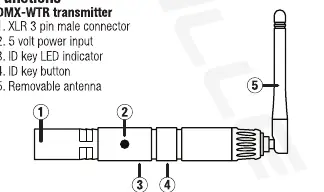
DMX-WTR Transmitter
- XLR 3-pin male connector
- 5V power input
- ID key LED indicator
- ID key button
- Removable antenna
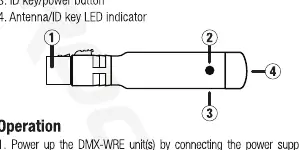
DMX-WRE Receiver
- XLR 3-pin female connector
- 5V power input
- ID key/power button
- Antenna/ID key LED indicator
Operation and Pairing
- Power up the DMX-WRE unit(s) by connecting the power supply and pressing the Power button once (press twice quickly to turn it off).
- Power up the DMX-WTR unit by connecting the power supply.
- Connect the DMX-WTR to the DMX source.
- Connect the DMX-WRE unit(s) to the desired fixture(s).
- Press the ID key on the DMX-WTR to indicate the ID setting. Press again to set the ID. Repeat this process for the DMX-WRE.
- The ID must match on both the DMX-WTR and DMX-WRE. The units will remember the previously used ID for future use.
Note: The DMX-WTR will automatically look for an interference-free channel. If there is over 10% interference, it will switch channels. The LED on the DMX-WTR will blink RED slowly until communication is established; the DMX-WRE status LED will flash GREEN slowly until communication is established.
ID Codes and Colors
The system uses a color-coded ID system:
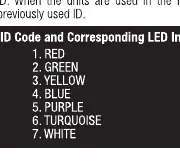
- 1: RED
- 2: GREEN
- 3: YELLOW
- 4: BLUE
- 5: PURPLE
- 6: TURQUOISE
- 7: WHITE
Features and Specifications
- Battery (DMX-WRE only): Built-in 650mAh rechargeable battery. Lasts 9 hours, charges in 2 hours.
- Range: Up to 1,968 feet (600 meters).
- Frequency: 2.4GHz band with GFSK modulation.
- Channel Hopping: 126 channels, hops 1100 times per second.
- Compatibility: Up to 25 receivers per transmitter.
- Dimensions: 4.7 inches long, antenna is 3.5 inches tall.
- Weight: 0.4 lbs.
Troubleshooting
- No power: Ensure the power adapter is plugged in correctly. Check that the DMX-WRE is charged. Ensure the power adapter is not damaged.
- Units not responding to DMX: Verify both units are powered on. Ensure the ID keys match on both transmitter and receiver. Check that the transmitter is connected to the DMX OUT port of the controller and the receiver is connected to the DMX IN port of the fixture.
Manufacturer information
Rockville
Practical help
Common problems
No power
Ensure the power adapter is properly plugged in. If using the DMX-WRE, ensure it is fully charged (2-hour charge time). Check for damaged power adapters.
Units not responding to DMX
Verify both units are powered on. Ensure the ID keys match on both the transmitter and receiver. Confirm the transmitter is connected to the DMX OUT port of the controller and the receiver is connected to the DMX IN port of the fixture.
Before use
- Ensure the environment is for indoor use only.
- Verify power adapters are not damaged.
- Charge the DMX-WRE battery fully (2 hours) before first use.
- Ensure there are no physical obstructions between the transmitter and receiver.
- Confirm the DMX controller is connected to the transmitter and the fixture to the receiver.
Specs in practice
- Battery (DMX-WRE)
- 650mAh rechargeable battery providing 9 hours of operation.
- Channel Hopping
- System hops 1100 times per second across 126 channels to avoid interference.
Images and diagrams
- DMX-WTR Transmitter: Features an XLR 3-pin male connector, 5V power input, ID key LED, ID key button, and removable antenna.
- DMX-WRE Receiver: Features an XLR 3-pin female connector, 5V power input, ID key/power button, and antenna/ID key LED indicator.
Model compatibility
- Up to 25 receivers can be connected to each transmitter.
- The DMX-WTR has 7 ID channels.
- If using with DMX-QR receivers, note that DMX-QR uses a number ID system (1-6) corresponding to the color codes.

Manual page author
Michael Turner
Technical manual editor
Reviews PDF manuals for structure, safety notes, and practical product details so readers can find the right information quickly.