Home / Electrical Timers
User Guide for Rogue 049X Home Timer
Comprehensive user guide for the Rogue 049X Home Timer. Includes instructions for remote control operation, setting custom interval timers, understanding display indicators, and device maintenance.
Table of contents
Manual images
Click an image to enlargeQuick guide from the manual
The Rogue 049X Home Timer is operated primarily via the included remote control. To power on the device, use the button located at the top of the timer housing. A short press powers the unit on, while holding the button for 3 seconds puts it into sleep mode or shuts it down completely. The device features 20 pre-programmed modes accessible via the number keys on the remote.
Device operation
Powering On/Off: Use the button on the top of the housing. Short press to power on. Hold for 3 seconds to enter sleep mode or shut down (screen will display OFF).
Volume and Brightness: Use the dedicated volume buttons (+/-) to adjust sound across 5 levels. Use the brightness button to cycle through 5 display intensity levels.
Remote control and modes
The remote control allows for quick access to various training modes. When the timer is free, press a number key (1-20) followed by the START/STOP button to initiate the corresponding mode.

- Modes 1-12: Standard interval workouts with varying work/rest ratios.
- Modes 13-16: Variable interval workouts with changing work periods.
- Modes 17-18: Countdown timers (5 min and 10 min).
- Mode 19: 24-second shot clock.
- Mode 20: Lap timer function.
Customizing timers
You can program custom settings for various modes:
Interval Timer:
- Press INT followed by SET.
- Enter the desired number of rounds.
- Press SET again to enter Work Time (minutes and seconds).
- Press SET again to enter Rest Time (minutes and seconds).
- Press SET a 4th time to save.
Count-Up/Count-Down Timers:
- Press the UP or DOWN arrow button.
- Press SET.
- Use number keys to enter the desired time.
- Press SET again to save.
Display indicators
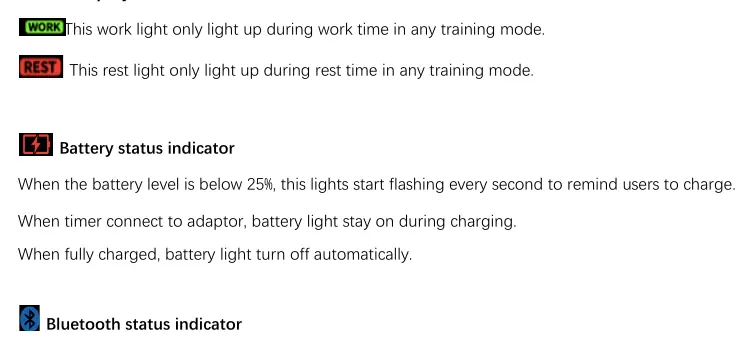
- Work/Rest Lights: Indicate the active phase of your training mode.
- Battery Status: Flashes every second when below 25%. Stays on during charging and turns off when fully charged.
- Bluetooth Status: Flashes when waiting for pairing. Stays solid when connected. Turns off after 5 minutes if pairing is unsuccessful.
Special modes
EMOM Mode: Press EMOM and START/STOP to begin a 1-minute work/0-second rest cycle repeated 99 times.
Warm-up Mode: Press WARM UP and START/STOP to begin a 10-minute countdown.
Fight Gone Bad (FGB) Timer: Press FGB to activate. Consists of three 5-minute rounds with 1-minute clock stoppages between rounds.
Tabata Timer: Press TBT to activate a 4-minute session (20s work/10s rest).
Practical help
Common problems
Bluetooth indicator turns off
The device automatically turns off the Bluetooth indicator after 5 minutes if pairing is not successful. The device remains available for pairing.
Battery light flashing
The battery level is below 25%. Connect the timer to an adaptor to charge.
Timer does not start
Ensure the device is not in sleep mode. Hold the power button for 3 seconds to wake the device.
Before use
- Charge the device until the battery light turns off.
- Ensure the power button on the housing is pressed to turn the unit on.
- Check if the device is in sleep mode (hold button 3s to wake).
- Verify the 12/24 hour format preference using the 12/24 HR button.
Specs in practice
- Work/Rest Lights
- Visual indicators showing the current phase of the training session.
- Battery Indicator
- Flashes every second when charge is below 25%; solid during charging.
- Bluetooth Indicator
- Flashes when ready to pair; solid when connected.
Images and diagrams
- The power button is located at the top of the timer housing.
- The remote control features 20 number keys for quick mode selection.
- The display includes dedicated indicators for Work, Rest, Battery, and Bluetooth status.

Manual page author
Emily Carter
User documentation editor
Prepares concise manual descriptions and highlights the most useful setup, operation, and maintenance information for readers.