Electronics / Camera Lenses
User Manual for Viltrox 30-300 T4.0 Zoom 10X Cinema Lens
Quick guide and user manual for the Viltrox 30-300 T4.0 Zoom 10X Cinema Lens. Includes safety instructions, lens component identification, and back focus adjustment procedures.
Table of contents
Quick guide from the manual
This manual provides essential operating instructions for the Viltrox 30-300 T4.0 Zoom 10X Cinema Lens. Users should familiarize themselves with the lens components and the back focus adjustment procedure to ensure optimal image quality. Always handle the lens with care and avoid direct sunlight exposure to the lens elements.
Safety Notes
- Do not look at the sun or bright light sources through the lens, as this may cause permanent eye damage.
- Keep the lens dry and avoid exposure to extreme temperatures or humidity.
- Clean the lens surface using a professional lens cleaning cloth or blower. Do not use organic solvents.
Lens Components
The lens features several key components for manual operation:
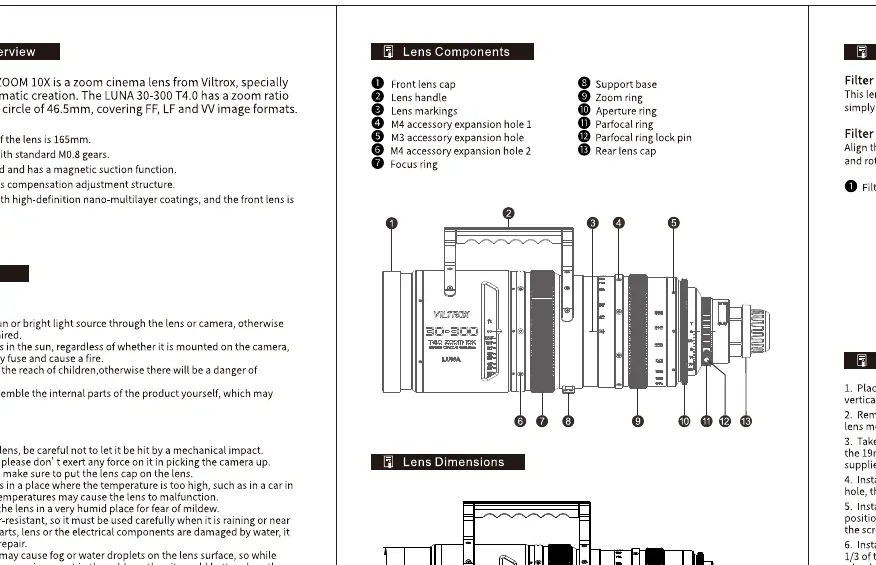
- Front lens cap
- Focus ring
- Zoom ring
- Iris ring
- Back focus adjustment ring
- Lens mount
Back Focus Adjustment
If the focus is not sharp across the zoom range, perform the back focus adjustment:
- Loosen the back focus adjustment screw.
- Rotate the back focus adjustment ring to adjust the back focus distance.
- Once the focus is sharp, tighten the back focus adjustment screw to lock the position.
Specifications
Key technical parameters for the 30-300 T4.0 Zoom 10X lens include:
- Focal Length: 30-300mm
- Aperture: T4.0
- Zoom Ratio: 10X
- Focusing: Manual
- Mount: PL
Manufacturer information
Viltrox
Practical help
Common problems
Image is not sharp throughout the zoom range
Perform the back focus adjustment procedure by loosening the adjustment screw and rotating the back focus ring until the image is sharp.
Before use
- Ensure the lens mount is clean and free of debris.
- Verify that the focus, zoom, and iris rings rotate smoothly.
- Check that the back focus adjustment screw is tightened after any adjustments.
- Ensure the lens is compatible with your camera's PL mount.
Images and diagrams
- The lens diagram identifies the physical rings for focus, zoom, and iris, as well as the back focus adjustment mechanism.
- The back focus adjustment diagram illustrates the specific screw and ring location required for calibration.
Model compatibility
- This lens is designed for cameras with a PL mount.

Manual page author
Emily Carter
User documentation editor
Prepares concise manual descriptions and highlights the most useful setup, operation, and maintenance information for readers.