Electronics / Networking
User Manual for Roline 21.13.1174 Media Converter
Quick guide for the Roline 21.13.1174 media converter. Learn about LED indicators, hardware ports, and technical specifications for this 10/100/1000Base-T to fiber converter.
Table of contents
Quick guide from the manual
The Roline 21.13.1174 is a media converter designed to bridge 10/100/1000Mbps copper networks with 1G/100Mbps fiber networks. This device supports auto-negotiation, auto-MDI/MDI-X detection, and jumbo frames up to 9.2K bytes. Ensure the device is powered using the provided external power adapter and operated within the specified temperature range of 0°C to 40°C.
Hardware Overview
The device features a compact design with ports and indicators on the front and rear panels:
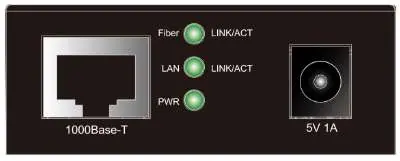
- Front View: Contains the 1000Base-T RJ45 port, LED status indicators (Fiber, LAN, PWR), and the 5V 1A power input jack.
- Rear View: Contains the SFP slot for fiber transceiver installation.
LED Indicators
The LED indicators provide real-time status of the device operation:
- PWR (Power): Green light indicates the device is powered on. If off, the device is powered off.
- LAN / Fiber (Link/Act) - Green: Solid on indicates the port is operating at 1000Mbps. Blinking indicates TX/RX activity at 1000Mbps. Off indicates the link is disconnected.
- LAN / Fiber (Link/Act) - Orange: Solid on indicates the copper port is operating at 10/100Mbps and the fiber port is operating at 100Mbps. Blinking indicates TX/RX activity at these speeds. Off indicates the link is disconnected.
Technical Specifications
The device complies with IEEE 802.3, 802.3u, 802.3ab, 802.3z, and 802.3x standards. Key specifications include:
- Network Ports: 1x 10/100/1000Mbps Gigabit copper port and 1x 100/1000Mbps dual-speed fiber SFP port.
- Power Input: +5VDC via external power adapter.
- Power Consumption: 2W maximum.
- Dimensions: 60 x 75 x 23 mm.
- Operating Environment: Temperature 0°C to 40°C; Humidity 10% to 90% (non-condensing).
Manufacturer information
ROLINE
Practical help
Common problems
Link disconnected (LED off)
Check that the Ethernet cable is securely connected to the copper port and the SFP module is properly seated in the fiber port.
Unexpected link speed
Ensure the connected devices support auto-negotiation and that the fiber transceiver matches the required speed (100Mbps or 1000Mbps).
Before use
- Verify the power adapter provides +5VDC.
- Ensure the SFP module is compatible with your fiber network infrastructure.
- Check that the copper cable is Cat5e or better for Gigabit speeds.
- Confirm the operating environment is between 0°C and 40°C.
Specs in practice
- Jumbo Frame Size
- Supports up to 9.2K bytes, allowing for larger data packets to improve network efficiency.
- Auto-MDI/MDI-X
- Automatically detects and adjusts for straight-through or crossover Ethernet cables.
- Power Consumption
- The device consumes a maximum of 2W, ensuring energy efficiency.
Images and diagrams
- The front panel diagram identifies the RJ45 port, the three LED status lights (Fiber, LAN, PWR), and the power input port.
- The rear panel diagram identifies the SFP transceiver slot.
Model compatibility
- Complies with IEEE 802.3, 802.3u, 802.3ab, 802.3z standards.
- Supports 802.3x flow control.

Manual page author
David Miller
Documentation analyst
Organizes user manual content into clear summaries, with attention to model details, product context, and everyday usability.