Tools / Drills
User Manual for Ronix 2121 Impact Drill
Quick guide for the Ronix 2121 Impact Drill. Learn how to operate, change drill bits, use the hammer function, and maintain your tool safely.
Table of contents
Manual images
Click an image to enlargeQuick guide from the manual
The Ronix 2121 is a 450W impact drill designed for drilling into wood, steel, and concrete. Before using the tool, ensure the mains voltage matches the specification (220V). Always wear appropriate personal protective equipment, such as eye protection and a dust mask. Never force the tool; if it overheats, run it without load for two minutes to cool down.
Product Overview
The drill features several key controls:
- Drill chuck: Holds the drill bit.
- Operating switch with speed regulator: Controls the start/stop function and speed.
- Locking button: Allows for continuous operation.
- Switch for hammer drilling/drilling: Toggles between standard drilling and hammer action.
- Direction switch: Controls the direction of rotation.
Safety Instructions
General Power Tool Safety: Keep your work area clean and well-lit. Do not operate in explosive atmospheres. Keep children and bystanders away.
Electric Safety: Ensure the plug matches the outlet. Avoid body contact with earthed surfaces. Do not expose the tool to rain or wet conditions. Use an RCD-protected supply if working in damp locations.
Personal Safety: Stay alert and use common sense. Remove adjusting keys before turning the tool on. Do not overreach. Wear appropriate clothing and protective gear.
Operating Instructions
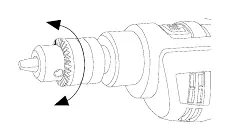
Inserting the Drill: Ensure the tool is disconnected from the power supply. Turn the ring of the drill chuck until the clamping jaws are open wide enough to insert the drill bit.
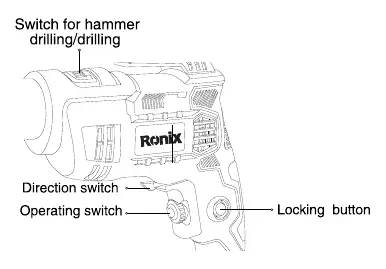
Operating the Drill: Press the operating switch to start the machine; release it to stop. For continuous operation, press the locking button while the operating switch is pressed. To stop continuous operation, press the operating switch again and release it.
Hammer Drilling: Use the hammer drilling/drilling switch to select the desired mode. Use the hammer setting for masonry and the drilling setting for wood and metal.
Drilling Tips
- Always use the correct size and type of drill bit for the job.
- Hold the machine firmly by the handle.
- Set the direction switch to the correct rotation before starting.
- Never change the direction of motion while the machine is switched on.
Maintenance and Care
Overload: Do not use excessive force. If the motor becomes too hot, allow it to run without load for two minutes. Clean the ventilation slits regularly with a clean cloth and brush to prevent overheating.
Technical Specifications
- Model: 2121
- Voltage: 220V
- Frequency: 50Hz
- Power input: 450W
- No load speed: 0-3200 RPM
- Max drilling capacity (Wood): 20mm
- Max drilling capacity (Steel/Concrete): 10mm
- Net Weight: 1.4 Kg
Manufacturer information
Ronix Tools
Practical help
Common problems
Drill bit slipping or loose
Ensure the drill chuck is tightened properly after inserting the bit.
Overheating during use
Do not use excessive force. If the tool gets hot, run it without load for two minutes to cool down.
Machine not starting
Check the power supply and ensure the operating switch is pressed correctly.
Before use
- Ensure the mains voltage matches the tool's rating (220V).
- Check that the drill bit is the correct size and type for the material.
- Verify the hammer/drilling switch is set to the correct mode.
- Ensure the direction switch is set to the desired rotation.
- Wear appropriate personal protective equipment (eye protection, dust mask).
Specs in practice
- Power input: 450W
- Indicates the power consumption of the motor.
- No load speed: 0-3200 RPM
- The rotational speed range of the chuck without resistance.
- Max drilling capacity
- The maximum diameter hole the drill can safely create in specific materials (Wood: 20mm, Steel/Concrete: 10mm).
Images and diagrams
- Drill chuck: Holds the drill bit.
- Operating switch with speed regulator: Controls start/stop and speed.
- Locking button: Enables continuous operation.
- Switch for hammer drilling/drilling: Toggles between standard drilling and hammer action.
- Direction switch: Changes rotation direction.
Model compatibility
- Suitable for wood, steel, and concrete drilling.
- Requires 220V power supply.

Manual page author
Michael Turner
Technical manual editor
Reviews PDF manuals for structure, safety notes, and practical product details so readers can find the right information quickly.