Tools / Measuring Tools
Operating Manual for RS PRO RS 1107 and RS 1113 Differential Manometer
Quick guide for the RS PRO RS 1107 and RS 1113 differential manometers. Learn how to configure settings, use special measurement functions, perform adjustments, and replace batteries.
Table of contents
Manual images
Click an image to enlargeQuick guide from the manual
The RS PRO RS 1107 and RS 1113 are professional differential manometers designed for precise pressure measurements. This manual provides instructions for configuration, special measurement modes, and maintenance. Always ensure the device is handled with care and protected from dirt and moisture.
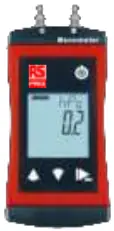
Product overview
The device features a 3-line segment LCD display and three main control buttons:
- On/Off button: Press briefly to switch on or toggle lighting. Long press to switch off or reject menu changes.
- Up/Down buttons: Press briefly to view min/max values or change parameters. Long press to reset min/max values. Press both simultaneously to rotate the display.
- Function key: Press briefly to freeze measurement (Hold) or return to display. Long press (2s) to enter configuration. Long press (4s) to activate special functions.
Operation and configuration
To enter the configuration menu, press and hold the Function key for 2 seconds until ConF appears. Use the Up/Down buttons to navigate and change parameters, and the Function key to confirm or move to the next parameter.
Available settings include:
- Display unit: Select between Pa, hPa, mbar, bar, PSI, or mmHg (availability depends on model).
- Special functions: Enable Tare (null), High-resolution measurement (F,nE), or Averaging (AVR).
- Measuring rate: Choose between Slow (SLO) or Fast (FAST).
- Resolution: Set to Auto, High, or Low.
- Shut-off time: Configure automatic power-off duration.
- Backlight: Adjust backlight settings.
- Factory settings: Reset the device to default configurations.
Measurement basics and special functions
The device offers several specialized modes accessible via the Function key (long press 4s):
- Tare function (null): Zero the display for relative measurements.
- High-resolution measurement (F,nE): Optimized for fine adjustment work (0.1 Pa for RS 1107, 1 Pa for RS 1113). Note that this increases power consumption.
- Averaging (AVR): Useful for heavily fluctuating pressures. Select 2s, 5s, or 10s averaging times.
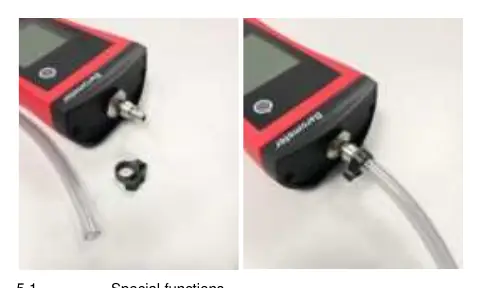
Caution: For pressures greater than 1 bar, ensure hoses are secured with suitable clamps to prevent loosening.
Maintenance and battery replacement
The device uses 2x AA batteries. When the battery indicator blinks or BAT appears, replace the batteries immediately.
- Unscrew the Phillips screws on the rear cover.
- Remove the cover and replace the two AA batteries, ensuring correct polarity.
- Check that the O-ring is clean and undamaged.
- Fit the cover evenly and tighten the screws.
Troubleshooting
- No display/unclear characters: Battery depleted or product defective. Replace batteries or contact service.
- Err.1 / Err.2: Measurement range exceeded or undercut. Ensure the pressure is within the allowable range.
- Err.3 / Err.4: Display range exceeded or undercut. Check display unit settings or deactivate special functions.
- SYS Err: System error. Try switching the product off and on, or replace batteries.
Technical data
- RS 1107: ±200 hPa range, 0.1 Pa resolution.
- RS 1113: ±2000 hPa range, 1 Pa resolution.
- Protection: IP67 (ensure connections are protected).
- Operating conditions: -20 to +50 °C, 0 to 95% r.h.
Manufacturer information
RS PRO
Practical help
Common problems
No display or unclear characters
Batteries are depleted or the product is defective. Replace batteries or send for repair.
Err.1 or Err.2 displayed
Measurement range exceeded or undercut. Ensure the pressure is within the device's allowable range.
Err.3 or Err.4 displayed
Display range exceeded or undercut. Check your display unit settings or deactivate the high-resolution function.
SYS Err displayed
System error. Try power cycling the device or replacing the batteries.
Before use
- Check battery status.
- Ensure hoses are securely connected.
- Verify the correct pressure range for your model (RS 1107 vs RS 1113).
- Ensure no pressure is applied to the connections when starting special functions.
- Check that the O-ring is properly seated if the battery cover was recently opened.
Images and diagrams
- Buttons: On/Off button for power and lighting; Up/Down for min/max and parameter changes; Function key for menu and special functions.
- Battery replacement: Unscrew Phillips screws, replace 2x AA batteries, ensure correct polarity and O-ring placement.
Model compatibility
- Use only high-quality alkaline batteries.
- Hoses must be secured with clamps for pressures > 1 bar.
- The device is intended for air or non-corrosive/non-ionising gases.

Manual page author
David Miller
Documentation analyst
Organizes user manual content into clear summaries, with attention to model details, product context, and everyday usability.