Garden / Lawn Mowers
User Manual for Ryobi RLM15E36H and RLM18E40H Electric Lawn Mower
Quick guide for the Ryobi RLM15E36H and RLM18E40H electric lawn mowers. Includes safety instructions, assembly, operation, maintenance, and troubleshooting tips.
Table of contents
Manual images
Click an image to enlargeQuick guide from the manual
This manual provides essential safety and operating instructions for the Ryobi RLM15E36H and RLM18E40H electric lawn mowers. Always read the full safety warnings before operating the product.
General safety warnings
Personal Safety: The mower is capable of amputating hands and feet and throwing objects. Never allow children or people with reduced capabilities to operate the product. Always wear heavy, long trousers, long sleeves, and sturdy anti-slip footwear. Never operate the mower while tired or under the influence of drugs, alcohol, or medication.
Work Area Safety: Keep children, bystanders, and pets at least 15m away from the operating area. Inspect the area thoroughly and remove all rocks, sticks, metal, wire, bones, toys, or other foreign objects before mowing.
Electrical Safety: Ensure the power plug matches the outlet. Use a residual current device (RCD) with a tripping current of not more than 30 mA. Check the supply and extension cord for damage before every use. If the cord is damaged, disconnect it immediately and do not use the product.
Operation
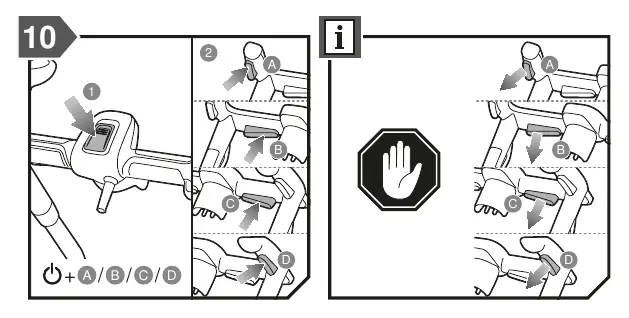
Starting the mower: Ensure all four wheels are on the ground. Press the Start button and then the On-off button to start the product. Release the Start button and keep pressing the On-off button to run the product. Release the On-off button to stop the product.
Mowing Tips: For long grass, reduce walking speed for more effective cutting. Do not cut wet grass as it will stick to the underside of the deck. New or thick grass may require a higher cutting height. The mower is designed to operate most effectively when moving forwards.
Overload protection
The product has an overload protection device. If triggered, the motor will automatically switch off. Allow the motor to cool down for 5 to 10 minutes before restarting. Ensure the blade can rotate freely and is not jammed.
Maintenance
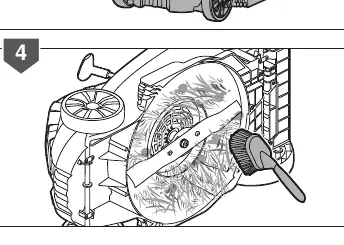
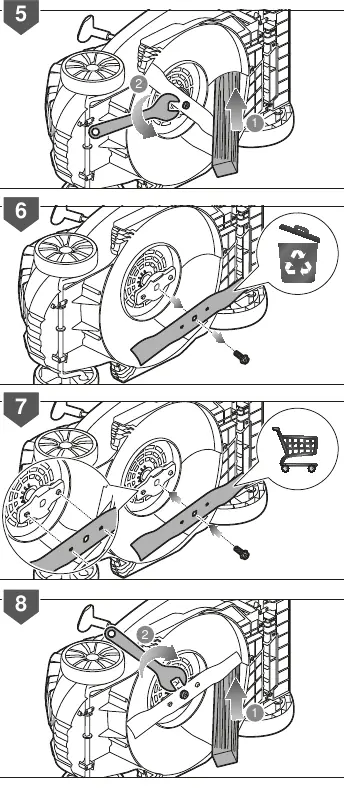
Always stop the motor and disconnect from the power supply before cleaning or maintenance. The blade is very sharp; use extreme caution and wear heavy-duty gloves when handling, cleaning, or checking bolt security. Replace worn or damaged blades and bolts in sets to preserve balance.
Transportation and storage
Stop the product, disconnect from the power supply, and allow it to cool before storing or transporting. Clean all foreign material from the product and store it in a cool, dry, and well-ventilated place inaccessible to children.
Manufacturer information
Ryobi
Practical help
Common problems
Motor will not start
Check power supply, ensure the switch is in the OFF position before plugging in, and check if the overload protector has been actuated (let the motor cool for 5-10 minutes).
Abnormal vibration
Inspect blades for damage, replace if worn or damaged, and check for and tighten any loose parts.
Before use
- Inspect blades, blade bolts, and cutter assembly for wear or damage.
- Check the grass box for holes or deterioration.
- Ensure all four wheels are on the ground.
- Check the power cord for signs of damage or aging.
- Ensure the switch is in the OFF position before plugging in.
Specs in practice
- Rated voltage
- 220-240V ~50Hz
- Width of cut
- 36cm (RLM15E36H) / 40cm (RLM18E40H)
Images and diagrams
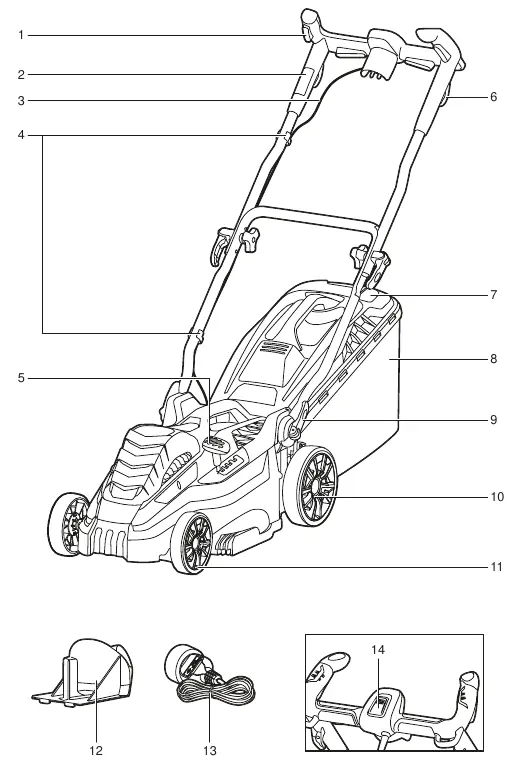
- Page 121: Parts identification diagram.
- Page 123: Starting procedure (Step 10).
- Page 131: Blade maintenance and cleaning.
- Page 132: Blade replacement procedure.
Model compatibility
- Use only original manufacturer's replacement parts.
- Extension cords must be suitable for outdoor use and marked 'H05 RN-F' or 'H05 VV-F'.

Manual page author
Emily Carter
User documentation editor
Prepares concise manual descriptions and highlights the most useful setup, operation, and maintenance information for readers.