Power / Power Inverters
Ryobi ONE+ 18V 200W Power Source & Battery Charger User Manual
Comprehensive user guide for the Ryobi PCLBG06 18V 200W Power Source and Battery Charger. Includes setup, operation, LED indicator meanings, maintenance, and safety instructions.
Quick answers from the manual
Quick answer
- The Ryobi PCLBG06 is a 200W power source and battery charger that converts 18V DC battery power into 120V AC and USB power for charging and operating small electronics. p. 1, 5, 7
Key actions
- Turn on AC output p. 5, 7
- Turn on USB output p. 5, 7
- Charge the battery p. 7
First start
- Insert a charged Ryobi 18V battery pack into the unit. p. 6, 7
- Press the power button for 1 second to turn the unit ON. p. 7
Problems and fixes
Unit overloaded
Disconnect device, check battery charge, press power button to reset.
p. 7, 8
Unit overheated
Allow unit to cool, then press power button.
p. 7, 8Maintenance and reset
- Reset after overload p. 8
Technical specifications
| Parameter | Value | Meaning | Pages |
|---|---|---|---|
| Watts | 200W | Continuous power output | p. 5 |
| AC Output | 120V, 1.67A, 60Hz | AC power output | p. 5 |
Where to find it in the PDF
- Safety Instructions p. 2, 3
- Features & Specs p. 5
- Operation p. 6, 7, 8
- Maintenance p. 9
Table of contents
Important Safety Information
Before using the Ryobi PCLBG06, read and understand all instructions. Failure to follow safety rules may result in electric shock, fire, or serious injury. Always remove the battery pack when the unit is not in use. Do not expose the power source to rain or wet conditions. Do not use the power source to power life support devices or other critical medical equipment.
Product Overview
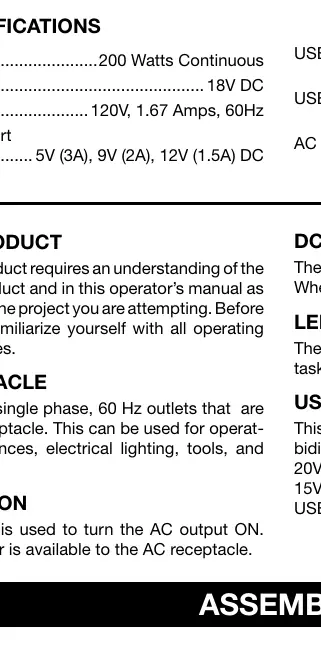
The Ryobi PCLBG06 is a 200W continuous power source and battery charger designed for use with Ryobi 18V battery packs. It features a 120V AC receptacle, a USB-A fast charge port, and two USB-C ports (one bidirectional 60W, one 30W). It also includes an integrated LED task light with adjustable brightness.
Operation
Powering Devices: Insert a charged Ryobi 18V battery pack. Press the power button for 1 second to turn the unit ON. The LED will light up green when ready. Plug your devices into the USB ports or the 120V AC receptacle.
Charging the Battery: The unit can charge an 18V battery using the 60W USB-C port when connected to a USB-C power source (wall adapter, solar panel, or vehicle port). For best results, use a 30W or higher USB-C power source.
Hibernation Mode: The unit features an automatic shutdown timer to conserve battery. By default, it turns off after 3 hours of no significant power draw. You can toggle this mode by holding the Task Light button and the USB Power button (for ON) or AC Power button (for OFF) for 5 seconds.
LED Indicators
The unit features LED indicators to communicate status:
- AC Power ON: Solid Green.
- USB Power ON: Solid Green.
- AC/USB Overload: Flashing Red (Reduce load and press power button to reset).
- High Temperature: Flashing Yellow (Allow unit to cool and press power button to reset).
- Low Battery Alert: Flashing Green (Charge battery).
Maintenance and Storage
Periodically inspect the product for damaged, missing, or loose parts. Avoid using solvents when cleaning plastic parts; use a clean cloth to remove dirt, dust, oil, or grease. Store the unit indoors in a dry, locked place, out of the reach of children, without the battery pack installed.
Manufacturer information
Ryobi
Practical help
Common problems
Power button LED blinks red and turns off
The unit is overloaded. Disconnect the device, ensure the battery is sufficiently charged, and press the power button to restart.
Power button LED flashes yellow
The unit is overheated. Allow it to cool down, then press the power button to try again.
Power button LED flashes green
The battery pack needs to be recharged.
Charging disabled (Solid White LED)
Input power is less than 5 watts. Increase input power or adjust solar panel for better sunlight.
Before use
- Inspect the product for any damage or loose parts.
- Ensure the battery pack is fully charged.
- Verify that the device being powered does not exceed the 200W rating.
- Ensure the unit is in a dry, well-ventilated area.
- Check that all vents are clear and not blocked.
Images and diagrams
- Fig 1: Overview of buttons, ports, and lanyard loop.
- Fig 2: How to install/remove the battery pack.
- Fig 3: Setup for solar panel charging and USB passthrough.
Model compatibility
- Compatible with Ryobi 18V battery packs.
- Not compatible with appliances, power tools, air conditioners, sump pumps, or compressors.
- USB-C input must be 5W or higher to charge the battery.

Manual page author
Emily Carter
User documentation editor
Prepares concise manual descriptions and highlights the most useful setup, operation, and maintenance information for readers.