Electronics / Monitors
Samsung Dryer User Manual DVG(E)24DG8000*/DV24DG8000P*
Comprehensive user guide for the Samsung DVG(E)24DG8000*/DV24DG8000P* dryer. Includes detailed instructions for installation, operation, maintenance, SmartThings connectivity, and troubleshooting.
PDF source: español · summary: English
Quick answers from the manual
Quick answer
- This manual covers the installation, operation, and maintenance of the Samsung DVG(E)24DG8000*/DV24DG8000P* dryer. p. 1
Key actions
- Installation p. 16, 18
- Operation p. 31, 34
- Maintenance p. 43
First start
- Ensure proper venting, level the unit, and perform the vent blockage test. p. 21, 22
Show 5 more answers Show less
Problems and fixes
General issues
Consult the verification table for common issues like not heating or not drying.
p. 44, 45Error codes
| Code | Meaning | Action | Pages |
|---|---|---|---|
| dC | Door open | Close door properly | p. 47 |
| HC | High temperature detection | Clean lint filter | p. 47 |
| 9C1 | Abnormal voltage | Check electrical connection | p. 47 |
Maintenance and reset
- Clean lint filter before or after every load. p. 28
Technical specifications
| Parameter | Value | Meaning | Pages |
|---|---|---|---|
| Dry Capacity | 12 kg | Dry clothes capacity | p. 49 |
| Electric Heater Power | 5300 W | Power consumption | p. 49 |
| Gas Heater Power | 20000 BTU/h | Power consumption | p. 49 |
Where to find it in the PDF
- Installation p. 16, 27
- Operation p. 31, 42
- Troubleshooting p. 44, 47
Table of contents
Manual images
Click an image to enlargeQuick Guide
This manual provides essential information for the safe installation, operation, and maintenance of your Samsung dryer. Always read the safety instructions before use. Ensure the dryer is installed by a qualified technician, especially for gas models.
Installation
Proper installation is critical for safety and performance:
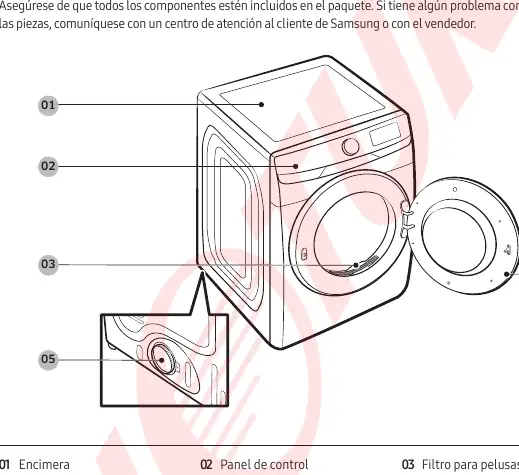
- Clearances: Maintain at least 25 mm on sides/front/top and 150 mm at the back.
- Venting: Use rigid metal ducting. Do not use plastic or thin-walled flexible ducts.
- Gas Models: Must be installed by a qualified professional. Ensure proper gas supply and ventilation.
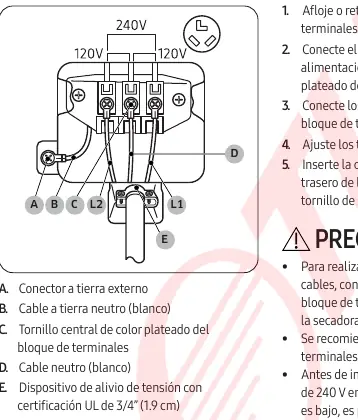
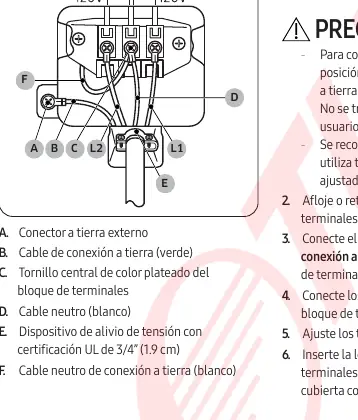
- Electrical: Follow the 3-wire or 4-wire connection instructions carefully. Ensure the unit is properly grounded.
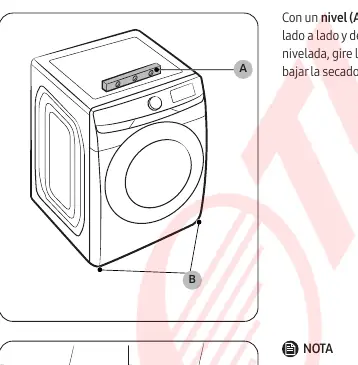
- Leveling: Use the leveling legs to ensure the dryer is stable to prevent vibration.
Operation
The control panel allows you to select cycles and customize settings:
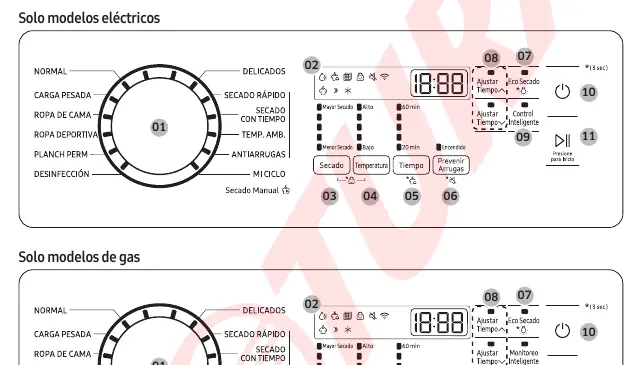
- Cycle Selection: Use the cycle selector to choose the appropriate program (Normal, Heavy Duty, Bedding, etc.).
- Customization: Adjust drying level, temperature, and time based on the load.
- SmartThings: Connect your dryer to the SmartThings app for remote monitoring and control.
- Vent Blockage Test: Perform this test after installation to ensure the venting system is clear.
Maintenance
Regular maintenance ensures longevity:
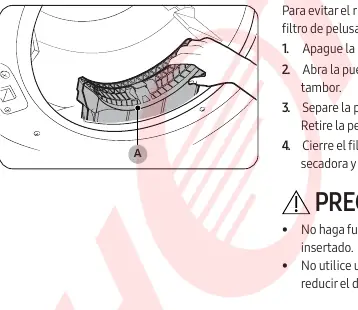
- Lint Filter: Clean the lint filter before or after every load.
- Drum: Clean with a non-abrasive multi-purpose cleaner.
- Venting System: Inspect and clean the venting system regularly to prevent fire hazards.
Troubleshooting
If the dryer behaves abnormally, check the following:
- No Heat: Check circuit breakers, ensure gas supply is open, and clean the lint filter/vent.
- Not Drying: Do not overload the dryer. Separate heavy and light items.
- Error Codes: Refer to the error code section for specific issues like dC (door open), HC (high temp), or 9C1 (voltage).
Manufacturer information
Samsung Electronics
Practical help
Common problems
Dryer does not heat
Check circuit breakers, ensure gas supply is open (if gas model), clean lint filter/vent, and disable Eco Dry if active.
Dryer does not run
Ensure the door is closed, the power cord is connected, and check circuit breakers.
Clothes not drying evenly
Separate heavy and light items, do not overload, and ensure proper ventilation.
Before use
- Ensure dryer is level
- Clean lint filter
- Check ventilation ducting
- Verify gas/electric connection
Show more Show less
Specs in practice
- Clearance (Sides/Front/Top)
- 25 mm
- Clearance (Back)
- 150 mm
Images and diagrams
- Control panel layout
- 3-wire and 4-wire electrical connection diagrams
- Door reversal steps
Model compatibility
- Requires 2.4 GHz Wi-Fi for SmartThings
- Gas models require professional installation

Manual page author
Michael Turner
Technical manual editor