Home Appliances / Refrigerators
User Manual for Samsung Refrigerator BRB6000G
Quick guide and user manual for the Samsung BRB6000G built-in refrigerator. Includes installation requirements, ventilation, safety warnings, temperature settings, and food storage tips.
PDF source: LV · summary: English
Quick answers from the manual
Quick answer
- This manual provides installation, safety, and usage instructions for the Samsung BRB6000G refrigerator, including dimensions, ventilation requirements, and food storage guidelines. p. 1, 7, 8, 11
Key actions
- Cleaning the refrigerator p. 10
- Using Quick Cooling p. 11
- Using Intensive Freezing p. 11
First start
- Installation requirements p. 5, 7, 8, 9
Show 2 more answers Show less
Technical specifications
| Parameter | Value | Meaning | Pages |
|---|---|---|---|
| Refrigerant | R-600a or R-134a | Cooling agent used in the appliance | p. 2 |
| Water Pressure | 206-861 kPa (30-125 psi) | Required pressure for proper operation | p. 4 |
Where to find it in the PDF
- Safety Information p. 1, 2, 3, 4
- Refrigerator Overview p. 6
- Installation and Dimensions p. 7, 8, 9
- Maintenance and Cleaning p. 10
- Usage and Temperature p. 11, 12
- Disposal p. 13
Table of contents
Manual images
Click an image to enlargeImportant Information
This guide provides essential information for the installation, operation, and maintenance of your Samsung BRB6000G built-in refrigerator. Always refer to the official Samsung website for the most detailed support and documentation.
Safety Information
- Refrigerant: This appliance contains R-600a, a flammable refrigerant. Handle with care to avoid damaging the cooling circuit.
- Ventilation: Do not block ventilation openings in the appliance or the built-in structure.
- Electrical Safety: Ensure the power outlet is easily accessible for emergency disconnection. Do not use damaged power cords.
- Usage: This appliance is intended for household use only. Do not store explosive substances like aerosol cans with flammable propellants inside.
Installation
Proper installation is critical for the performance and energy efficiency of this built-in model.
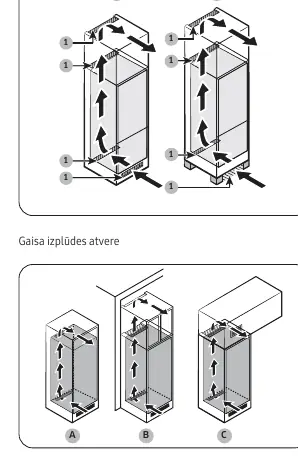
- Ventilation System: The cabinet must have an air intake and exhaust opening of at least 200 cm² (500 mm x 40 mm).
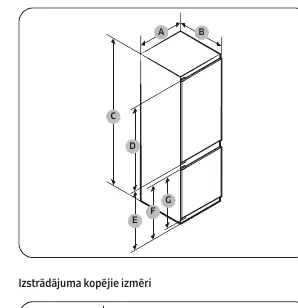
- Clearance: Ensure adequate space around the unit as specified in the dimensions section.
- Cabinet Requirements: The cabinet must be stable and level. If the cabinet has doors, ensure they are not too heavy to prevent sagging.
- Power Connection: Ensure the power cord is routed to the side of the refrigerator if the cabinet depth is 560 mm to maintain energy efficiency.
Refrigerator Overview
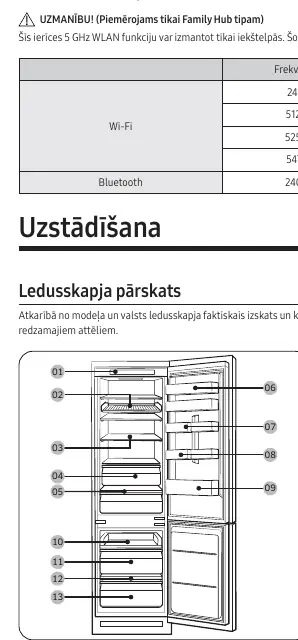
The unit features a control panel, various shelves (wine rack, sliding shelf, vegetable shelf), and freezer drawers. Note that specific features and parts may vary depending on the exact model configuration.
Usage
- Temperature Settings: The recommended optimal temperatures are 3°C for the refrigerator and -19°C for the freezer.
- Fast Cooling: Accelerates the cooling process to maximum fan speed for 2.5 hours.
- Fast Freezing: Accelerates the freezing process to maximum fan speed for 50 hours. Activate this at least 20 hours before adding a large amount of food.
Maintenance and Cleaning
- Cleaning: Use a soft, damp cloth. Do not use benzene, thinners, bleach, or abrasive cleaners as they can damage surfaces and cause fire hazards.
- LED Lights: Do not attempt to replace LED lights yourself. Contact a Samsung service center for assistance.
- Defrosting: Contact Samsung service if the unit requires defrosting.
Food Storage
To maintain food quality and safety:
- Store raw meat and fish in suitable containers to prevent contact with other foods.
- Cover food to retain moisture and prevent odor transfer.
- Do not store perishable items in the door bins as temperatures fluctuate more than in the main compartment.
Manufacturer information
Samsung Electronics
Practical help
Common problems
Refrigerator not cooling properly
Check that ventilation gaps (min 200cm²) are not blocked, ensure doors are closed properly, and verify temperature settings.
Strange noises or smells
Ensure food is stored in sealed containers and clean the interior with a soft, damp cloth.
LED light failure
Do not attempt to replace the light yourself; contact a Samsung service center.
Before use
- Ensure the floor is stable and level.
- Verify the cabinet dimensions match the installation requirements.
- Ensure proper ventilation gaps (min 200cm²) are provided.
- Check that the power outlet is easily accessible.
- Clean the interior with a soft, damp cloth before first use.
Show more Show less
Specs in practice
- Fast Cooling
- Accelerates cooling to maximum fan speed for 2.5 hours.
- Fast Freezing
- Accelerates freezing to maximum fan speed for 50 hours.
Images and diagrams
- Ventilation system: Shows air intake and exhaust paths required for built-in installation.
- Product dimensions: Illustrates height, width, and depth measurements for cabinet fitting.
Model compatibility
- Designed for built-in installation.
- Requires specific cabinet dimensions (see manual for details).

Manual page author
Michael Turner
Technical manual editor