Accessories / Mounts & Stands
Wall Mount Adapter User Manual for Samsung SADT-104WM
Quick guide for installing the Samsung SADT-104WM wall mount adapter. Includes step-by-step mounting instructions, cable routing, camera attachment, and technical specifications.
Table of contents
Manual images
Click an image to enlargeImportant Information
The Samsung SADT-104WM is a wall mount adapter designed for installing SmartDome cameras (specifically models SCC-C6433 and SCC-C6435) on interior walls. Ensure the installation surface can support at least four times the total weight of the product and camera. Use M10 anchor bolts for concrete walls.
Installation Requirements
- Weight Support: The mounting surface must support more than 4 times the weight of the product.
- Hardware: Use M10 anchor bolts and nuts.
- Cabling: Prepare power, BNC, and communication cables as required by the camera manual.
- Compatibility: Designed for use with Samsung SmartDome cameras (SCC-C6433/C6435).
Installation Steps
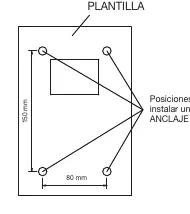
- Prepare Mounting Surface: Use the provided template to mark and drill 4 holes for M10 anchor bolts.
- Prepare Camera Adapter: Remove the seal from the camera adapter support.
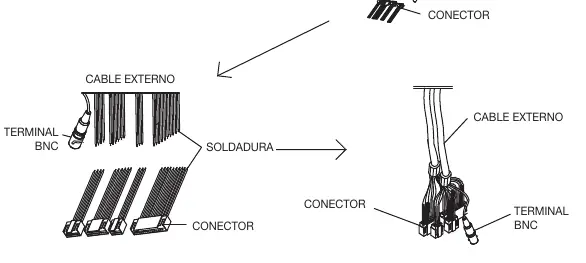
- Cable Connection: Strip and solder the camera cables to the external cables. Use insulation tape to cover all soldered joints.
- Attach Camera Adapter: Insert the camera adapter into the wall mount adapter. Ensure the "A" part of the camera adapter aligns with the arrow direction shown in the manual.
- Secure Adapter: Insert and tighten the 4 screws to fix the camera adapter to the wall mount adapter.
- Route Cables: Pass the cables through the back of the wall mount adapter. It is recommended to leave 100mm of extra cable length.
- Mount to Wall: Use the M10 anchor bolts and nuts to secure the wall mount adapter to the wall.
- Final Connections: Connect the cables and insert them into the cover fixing part. Ensure cables are not bent or peeled.
- Attach Cover: Insert the cover tab into the fixing part and snap the pressure closure into place.
- Safety Cable: Attach the safety cable from the camera to the safety hook on the mount to prevent accidental falls.
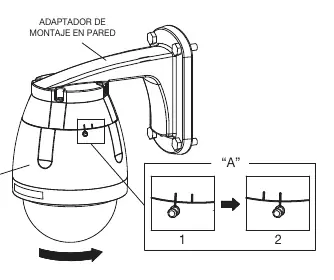
- Lock Camera: Align the camera guides with the adapter holes. Insert the camera and rotate it 10 degrees clockwise to lock it.
- Final Security: Tighten the screws on the camera housing to firmly secure it to the adapter.
Technical Specifications
- Usage: Indoor
- Installation Point: Wall or vertical structure
- Weight: 241g
- Material: Plastic
- Operating Temperature: -10°C to 50°C
Manufacturer information
Samsung Electronics
Practical help
Common problems
Camera housing separation
Ensure all screws are tightened securely after locking the camera into the adapter.
Cable damage during installation
Ensure cables are not bent or peeled when inserting them into the cover fixing part.
Before use
- Verify the wall can support 4x the weight of the product.
- Ensure M10 anchor bolts are available for installation.
- Prepare power, BNC, and communication cables.
- Check that the camera model is compatible (SCC-C6433/C6435).
- Ensure you have the installation template.
Specs in practice
- Operating Temperature
- -10°C to 50°C; ensure the environment is within this range.
Images and diagrams
- Template: Shows 80mm x 150mm hole spacing for M10 bolts.
- Cable Routing: Shows how to route cables through the back of the mount.
- Camera Locking: Shows the 10-degree rotation to lock the camera into the adapter.
Model compatibility
- Compatible with Samsung SmartDome cameras (SCC-C6433/C6435).
- Can be used with SADT-110CM (Corner Mount) or SADT-100PM (Pole Mount) adapters.

Manual page author
Michael Turner
Technical manual editor
Reviews PDF manuals for structure, safety notes, and practical product details so readers can find the right information quickly.